Start with one app that solves a problem you already have, get its backup working, and only then add a second. For most beginners Pi-hole, Jellyfin, Immich, Vaultwarden and Home Assistant are the useful first projects — but they carry very different risk if they break, and that should decide your order more than interest does.
The failure mode for new self-hosters is not technical. It is installing eight things in a weekend, having no idea where any of their data lives, and abandoning the lot three months later when something breaks and nobody remembers how it was configured.
Pick by the problem you want to solve
| Goal | Good first app | Typical resources | Main risk |
|---|---|---|---|
| Block network trackers | Pi-hole | 1 GB RAM, any always-on host | DNS outage stops the whole household |
| Stream your own media | Jellyfin | 4–8 GB RAM; Intel iGPU if transcoding | Codec and client compatibility |
| Replace Google Photos | Immich | 8 GB RAM; SSD for the database | Your photo library needs tested backups |
| Host passwords | Vaultwarden | Under 1 GB RAM | Security, HTTPS and backup discipline |
| Automate a smart home | Home Assistant | 2–4 GB RAM | USB radio access, monthly breaking changes |
| Find any document | Paperless-ngx | 2–4 GB RAM | OCR is CPU-heavy on import |
| Private file collaboration | Nextcloud | 4–8 GB RAM; database + cache | More maintenance than a file share |
Resource figures are practical starting points. Library size, user count and background indexing matter far more than the container itself.
Order them by consequence, not by interest
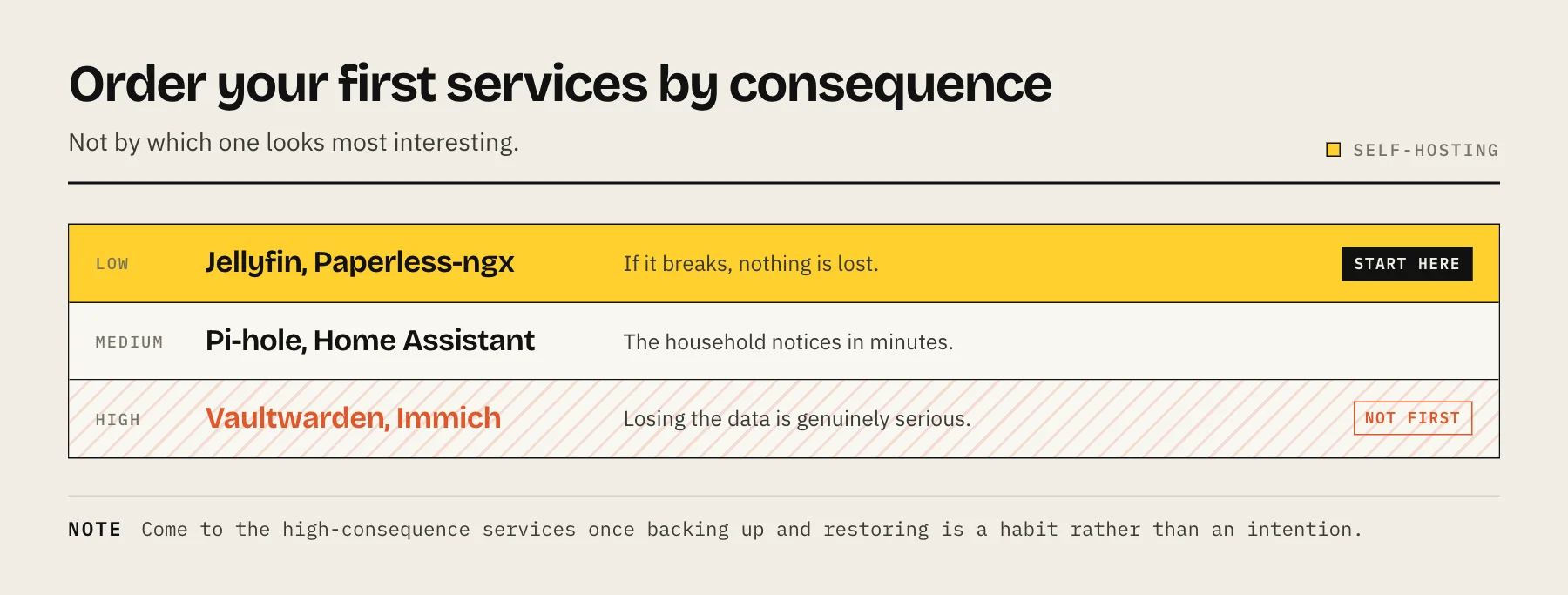
This is the part most guides leave out. Rank your candidates by what happens when it breaks, and start at the low end.
Low consequence — good first projects. Jellyfin and Paperless-ngx. If they stop, you watch something else or find the paper copy. You learn volumes, permissions and updates with nothing at stake.
Medium consequence. Pi-hole and Home Assistant. When these are down, other people in the house notice within minutes — Pi-hole because the internet appears broken, Home Assistant because the lights stop working. Both need a fallback plan you have told someone else about.
High consequence. Vaultwarden and Immich. These hold data whose loss is genuinely serious. Do not make either your first project. Come to them once backing up and restoring is a habit rather than an intention.
A sensible first month
Week 1 — learn persistent storage. Install one low-consequence service. Know exactly which host folders hold its configuration and data. Delete the container and recreate it from your Compose file. If your settings survive, you have understood the most important concept in self-hosting. See Docker on a NAS.
Week 2 — add backups and prove them. Copy the data folder somewhere else, then restore it into a fresh container and confirm the service comes up with your settings. Not "set up a backup job" — actually restore.
Week 3 — add a second service. Notice what breaks: port conflicts, permission mismatches, DNS. These are the real skills.
Week 4 — tidy up. A reverse proxy so you stop remembering port numbers, and remote access via a mesh VPN rather than forwarded ports. See reverse proxy explained and Tailscale for NAS.
Resist adding anything in weeks 2 and 4. The pause is the point.
The three habits that make it sustainable
Every application's data under one parent folder. /volume1/docker/<app>/. One backup job covers everything, and rebuilding the host is restoring one tree.
Compose files, kept together and backed up. Your entire stack becomes reproducible. Six months later you can see exactly what you configured, because you wrote it down without meaning to.
Pinned image tags. latest turns every restart into an unplanned upgrade. Pin the version, read release notes, update deliberately.
What to skip at the start
A reverse proxy before you have three services. Solve a problem you actually have.
Exposing anything to the internet. Use a mesh VPN. Add public access later, for the one service that genuinely needs it, once you understand what you are exposing.
Kubernetes. For a home server it is a large amount of machinery for no benefit. Compose is the right tool.
A monitoring stack. Prometheus and Grafana are interesting and they are not a first project. You will spend the weekend on dashboards rather than on the thing you wanted.
Buying hardware first. An old laptop or an existing NAS runs several containers comfortably. Buy once you know what is actually constrained — see how much RAM a NAS needs.
Where the hardware limits actually bite
Media transcoding is the one thing that genuinely needs specific hardware — an Intel CPU with Quick Sync, or an equivalent GPU. Everything else on this list runs on modest kit.
Databases on spinning disks are the most common cause of "self-hosting feels slow". Immich, Nextcloud and Paperless-ngx all keep metadata in a database, and that workload is random I/O. A small SSD for application data transforms the experience — see HDD vs SSD for NAS.
RAM limits how much you can run at once, and it is usually the first genuine constraint.
The rule that matters most
Self-hosted means self-supported. No vendor is backing up your data, patching your containers, or restoring your photos. Every service you add is a small ongoing commitment.
That is not a warning against doing it — it is the reason to add things slowly. Five services you maintain well are worth far more than fifteen you have stopped updating.
Whatever you run, keep the 3-2-1 backup rule intact underneath it.
FAQ
How many services can a typical NAS run? A modern four-bay unit with 8 GB comfortably runs five to ten light containers. Immich and Nextcloud each count as several.
Should I use my NAS or a separate machine? A NAS is convenient and shares one failure domain — a reboot for a container takes file access down too. A separate mini PC for apps plus a NAS for storage is more flexible. See what is a homelab.
What if I break something? With data in mounted folders and a Compose file, recreating a container costs a minute. That is precisely why those two habits matter.
Do I need to learn Linux? Not to start. You will absorb it gradually, which is a better way to learn than a course.
Sources
- Prerequisites — Pi-hole
- Requirements — Immich
- Hardware Selection — Jellyfin
- System requirements — Nextcloud
- Installation — Home Assistant