Planning a NAS build? This page shows exactly how much usable storage you get from a set of equal-size drives at each RAID or ZFS level, how many failures each survives, and what you actually see after formatting. Pair it with our best hard drives for NAS guide.
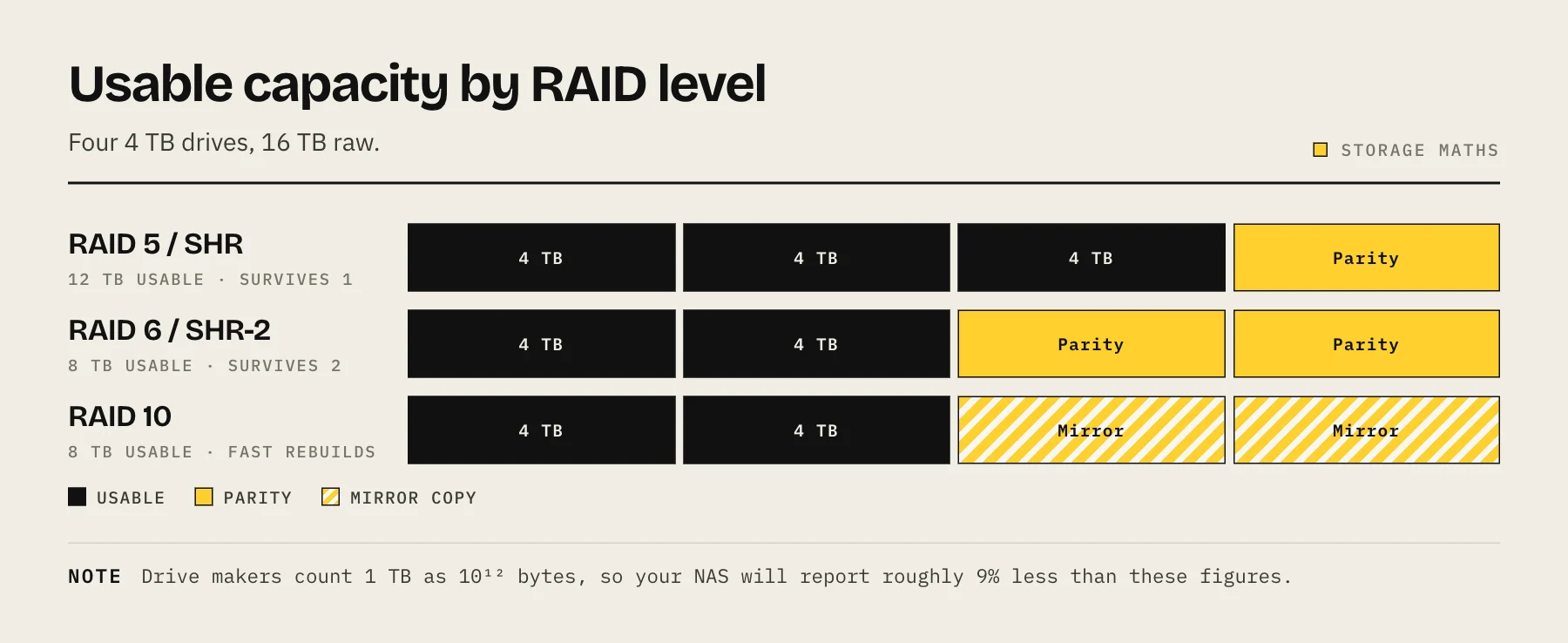
The formula
Usable capacity = multiplier × your drive size (with equal-size drives).
| Drives | RAID 0 | RAID 1 | RAID 5 / Z1 | RAID 6 / Z2 | RAID 10 |
|---|---|---|---|---|---|
| 2 | ×2 | ×1 | — | — | — |
| 3 | ×3 | ×1 | ×2 | — | — |
| 4 | ×4 | ×1 | ×3 | ×2 | ×2 |
| 5 | ×5 | ×1 | ×4 | ×3 | — |
| 6 | ×6 | ×1 | ×5 | ×4 | ×3 |
| 8 | ×8 | ×1 | ×7 | ×6 | ×4 |
| 10 | ×10 | ×1 | ×9 | ×8 | ×5 |
| 12 | ×12 | ×1 | ×11 | ×10 | ×6 |
Example: 6 × 8 TB drives in RAID 6 (Z2) → ×4 → 32 TB usable ≈ 29 TiB as your NAS will report it.
Fault tolerance and minimums
| RAID level | Failures survived | Min drives | Efficiency |
|---|---|---|---|
| RAID 0 | 0 | 2 | 100% |
| RAID 1 (mirror) | drives − 1 | 2 | 1 ÷ drives |
| RAID 5 / Z1 | 1 | 3 | (n−1) ÷ n |
| RAID 6 / Z2 | 2 | 4 | (n−2) ÷ n |
| RAID 10 | ≥1 (one per mirror pair) | 4 (even) | 50% |
RAID 10 is worth a note: it survives at least one failure, and can survive more if the failures land in different mirror pairs. It cannot survive two failures in the same pair. Treat it as single-failure protection and be pleasantly surprised.
Why usable is less than the number on the box
Two separate reductions stack, and people often blame the NAS for the second one.
Parity. Covered above — this is the multiplier.
Units. Drive makers count 1 TB as 1,000,000,000,000 bytes. Operating systems generally report in TiB, where 1 TiB = 1,099,511,627,776 bytes. That is a roughly 9% difference at terabyte scale, and it is arithmetic, not a defect. An "8 TB" drive shows up as about 7.28 TiB.
Filesystem overhead takes a further small slice for metadata and reserved space.
So four 8 TB drives in RAID 5 give 24 TB by the multiplier, which lands near 21.8 TiB as reported, before any overhead. Plan against the smaller figure.
Mixed drive sizes
The tables above assume equal drives. If your drives differ:
Classic RAID 5/6 treats every drive as if it were the size of the smallest one. Putting a 12 TB drive in an array of 4 TB drives wastes 8 TB of it.
Synology SHR and SHR-2 are designed for this. SHR splits drives into regions and protects each region across whatever disks can participate, so larger drives contribute more of their capacity. It is the main practical reason to choose SHR over classic RAID on a Synology.
ZFS builds vdevs from equal-size members; a mismatched disk is used at the smallest member's size. You can, however, build a pool from several vdevs of different sizes.
Unraid works differently again — the parity drive must be at least as large as the largest data drive, and data drives can be any size, each holding whole files.
Do not plan to fill it
Two reasons to leave headroom:
Performance. Copy-on-write filesystems like ZFS and Btrfs slow down noticeably as a pool approaches full, because free space becomes fragmented. Keeping usage under about 80% avoids the worst of it.
Snapshots need room. Snapshots consume space as data changes. A pool with no free space cannot take snapshots, which removes your fastest recovery option at the moment you are most likely to want it.
Budget your real capacity as roughly 80% of the usable figure.
Which level should you pick?
RAID 0 — maximum capacity, zero redundancy. One dead drive loses everything, and the risk multiplies with each disk added. Only for scratch data you can lose.
RAID 1 / mirror — simple, fast to rebuild, survives one failure per pair. Half your capacity. The right answer for two-bay units.
RAID 5 / RAIDZ1 — good efficiency, survives one failure. The concern is the rebuild window: reconstructing a large array reads every remaining disk end to end for hours or days, and that is exactly when a second marginal drive tends to give up. Reasonable for four smaller drives; increasingly uncomfortable as drive sizes grow.
RAID 6 / RAIDZ2 — survives two failures, including one during a rebuild. For arrays of four or more large drives this is the sensible default, and the extra disk it costs is cheaper than the alternative.
RAID 10 — fast rebuilds and good random performance, at 50% efficiency. Worth it for VM storage and databases; overkill for a media library.
SHR / SHR-2 — Synology's flexible layer over the above. SHR behaves like RAID 5, SHR-2 like RAID 6, both with much better handling of mixed drive sizes. See RAID 5 vs RAID 6 vs SHR.
The reminder that matters most
None of this is a backup. Every level here protects against a disk failing. None of them protect against accidental deletion, ransomware, a failed controller, a power event, fire or theft — all of which are faithfully applied to every disk at once.
An array with parity and no offsite copy is one copy of your data. Keep the 3-2-1 backup rule in place regardless of what the calculator says.
FAQ
Can I change RAID level later? Some platforms support limited migrations (RAID 1 to RAID 5, adding a disk to an SHR pool). Many changes require destroying and recreating the pool, which means a full data copy out and back. Decide deliberately at build time.
Is RAID 5 dead? Overstated, but the concern is real: rebuild times on very large drives leave a long window with no redundancy. On four or more large disks, double parity is the better default.
Does more drives mean faster? Sequential throughput improves with more spindles, but a 1GbE network caps you around 110 MB/s regardless — see 2.5GbE vs 10GbE.
What about hot spares? A hot spare shortens the window before a rebuild starts, at the cost of one drive's capacity. On a home NAS, double parity is usually a better use of that same disk.
Sources
- zpoolconcepts(7) — vdev types and capacity — OpenZFS
- What is Synology Hybrid RAID (SHR)? — Synology Knowledge Center
- Adding disks to array — Unraid Docs
- Prefixes for binary multiples — NIST
- RAID Calculator — Synology