Immich gives you Google Photos' core experience — automatic phone backup, timeline, albums, face and object search — on hardware you own, with no storage bill and no scanning of your library. You give up Google's reliability guarantee, its polish on edge cases, and the assumption that someone else handles disaster recovery. Run both in parallel for a month before you switch off the paid one.
Immich has become the default answer for "self-hosted Google Photos alternative", and for good reason: it is the first project to get the phone app right, which is where every previous attempt fell down. But the honest comparison is not feature-for-feature. It is about which failure modes you would rather own.
Where Immich genuinely matches Google Photos
Automatic background upload. The iOS and Android apps back up new photos and videos without you opening them, which is the entire reason phone-based photo backup works at all.
A real timeline. Scroll-by-date with a fast scrubber, not a folder tree. This sounds trivial and is the difference between a photo app and a file server.
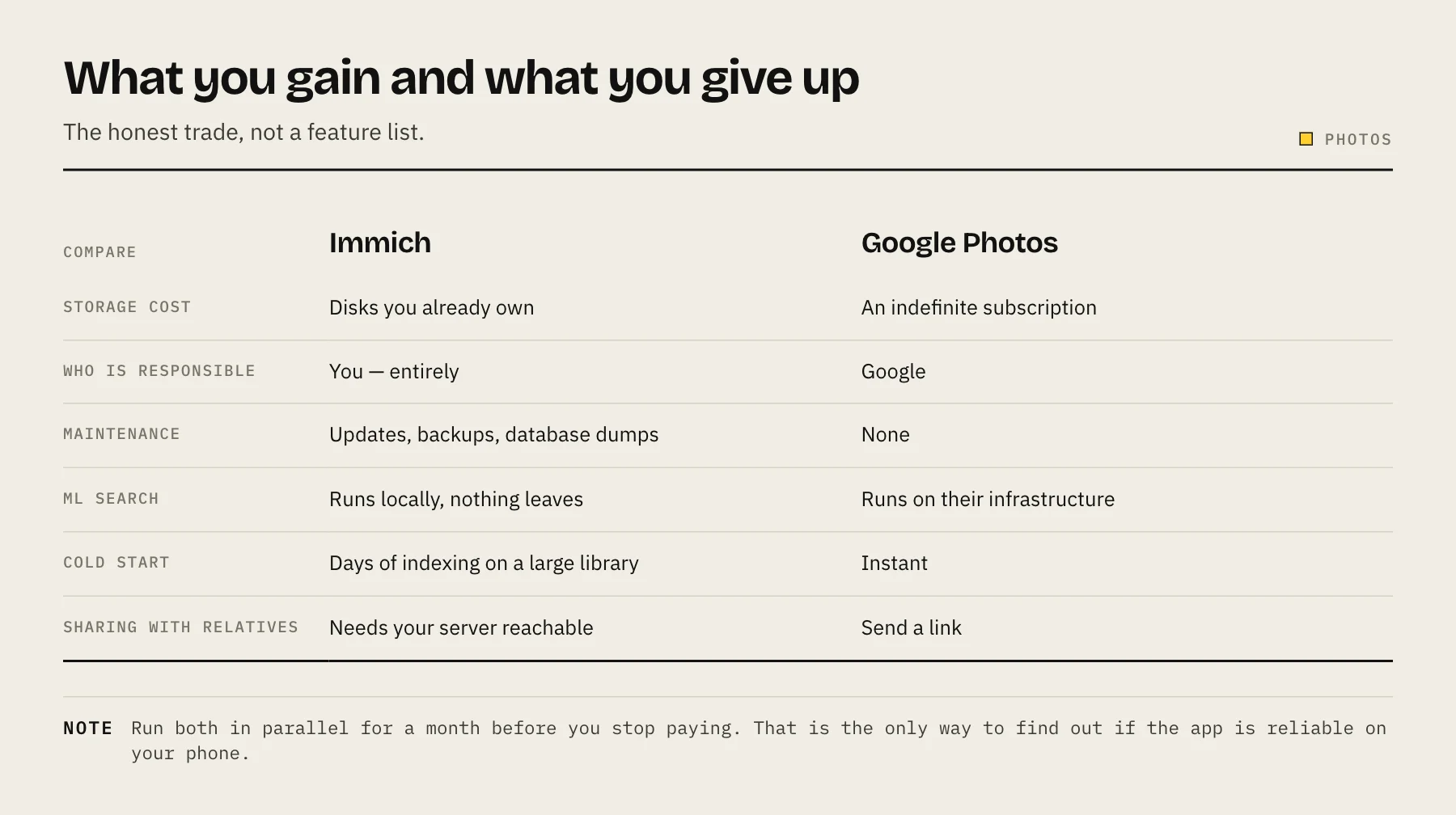
Machine-learning search. Immich runs its own models locally for face recognition (grouping people), object and scene detection ("beach", "dog", "receipt"), and CLIP-based semantic search. Searching "red car in snow" works. The models run on your hardware, so the first indexing pass of a large library is slow and CPU-heavy, but nothing leaves the machine.
Sharing. Shared albums and shareable links, including with a password and expiry.
Multi-user. Each family member gets their own library with optional shared albums, from one server.
No storage tier. Your cost is disks. For a household with a large video habit this is where the money argument becomes decisive.
Where Google Photos still wins
Someone else is responsible. Google's durability is the product. If your NAS dies and your backup was stale, that is entirely your problem — and this is the trade people underestimate.
Zero maintenance. No updates, no container restarts, no schema migrations, no reverse proxy certificate expiring on a Sunday.
Polish at the edges. Editing tools, motion photos, format handling, cross-platform consistency and the long tail of "it just works" behaviours are more mature.
Free-tier convenience for sharing with non-technical people. Sending a Google Photos link to a relative requires nothing of them. An Immich link requires your server to be reachable and up.
No cold-start cost. Immich's initial import and ML indexing of a 100,000-image library is a multi-day affair on modest NAS hardware.
The thing to know before you commit
Until its first stable release (v2.0.0, October 2025), Immich carried a prominent warning that the project was under very active development and that users should not rely on it as the only copy of their photos. That banner has since been removed, but breaking changes did happen between earlier releases, and the upgrade path can still require reading release notes carefully rather than pulling latest blindly.
This is not a reason to avoid it. It is a reason to:
- Pin a specific image tag rather than
latest, and update deliberately after reading the release notes. - Back up the database as well as the files. The photos on disk are only half the system; albums, faces, and metadata live in Postgres. A file-level backup without the database means rebuilding your entire organisational work.
- Keep a second copy elsewhere. Which you should be doing anyway — see the 3-2-1 backup rule.
Check the project's current documentation and release notes before you plan a migration; the project moves fast.
Hardware you will actually need
Immich is heavier than a typical NAS app because of the ML workloads.
| Component | Practical guidance |
|---|---|
| RAM | Immich documents a 6 GB minimum and recommends 8 GB, especially during indexing |
| CPU | Immich documents a 2-core minimum and recommends 4 cores. Indexing is the load, not day-to-day browsing |
| Storage | Your library size plus room for thumbnails and transcoded video — budget noticeably more than the raw photo total |
| GPU | Optional. Hardware acceleration for ML and video transcoding cuts indexing time substantially |
An entry-level two-bay NAS with 2 GB of soldered RAM will struggle. See how much RAM a NAS needs if you are sizing a machine around this.
A migration that does not lose anything
1. Export from Google Photos with Takeout. Request the export in Google Photos format. Large libraries arrive as many archive files.
2. Deal with the metadata problem. Takeout separates each photo's metadata into sidecar JSON files rather than writing it back into the image EXIF. Import the archives without handling this and you get a library where every photo is dated by file creation time — which is the day you downloaded it. Use a Takeout-aware importer such as the community tool immich-go, which pairs each photo with its JSON sidecar, rather than dragging folders in.
3. Run both in parallel for at least a month. Keep Google Photos backing up your phone while Immich does too. This is the only way to find out whether Immich's app is reliable on your phone, on your network before it is the only copy.
4. Verify a hard case. Pick a specific memory — a particular day three years ago — and confirm it is present, correctly dated, and findable by search in Immich.
5. Only then stop paying. And keep the offsite backup running regardless.
The realistic verdict
Choose Immich if you have a NAS with capable hardware, you are comfortable maintaining a Docker stack, you already have a backup routine you actually follow, and the storage bill or the privacy question bothers you enough to spend a weekend on it.
Stay on Google Photos if your photos are irreplaceable and your backup discipline is aspirational rather than actual. Self-hosting moves the responsibility to you; that is the whole point and also the whole risk.
For many people the answer is not either/or: Immich as the primary library you own and browse, with an encrypted offsite copy of the underlying files, is a stronger position than either service alone.
FAQ
Does Immich support RAW files? Yes, with thumbnail generation for common RAW formats. Check the current supported-formats list for your specific camera.
Can I keep my existing folder structure? Immich has an external library feature for read-only import of existing folders, alongside its own managed storage for app uploads.
How is this different from Nextcloud Photos? Nextcloud is a general file platform with a photos view. Immich is a photo application first, with a much stronger mobile app and ML search. See how to self-host Nextcloud with Docker if you want the broader platform instead.
Do I need to expose it to the internet? Only if you want to upload while away from home. Tailscale handles this without opening ports.
Sources
- Requirements — Immich documentation
- Quick start — Immich documentation
- v2.0.0 release — Immich blog
- immich-go (Google Photos Takeout importer) — GitHub