For a NAS in 2026, buy CMR drives only. The safe lines are WD Red Plus and Seagate IronWolf for home NAS, WD Red Pro and Seagate IronWolf Pro for busier or larger arrays, and Toshiba N300 for value. Avoid the plain WD Red in 2–6 TB — those are SMR. The best value per terabyte right now sits in the 16–22 TB range.
How we sourced this: this guide is built from manufacturer specifications, Western Digital's own CMR/SMR documentation, Backblaze's large-scale reliability data and independent reviews — not paid placement. Where our guidance is based on published data rather than our own bench testing, we say so. See How we test. Some links may be affiliate links — see our disclosure.
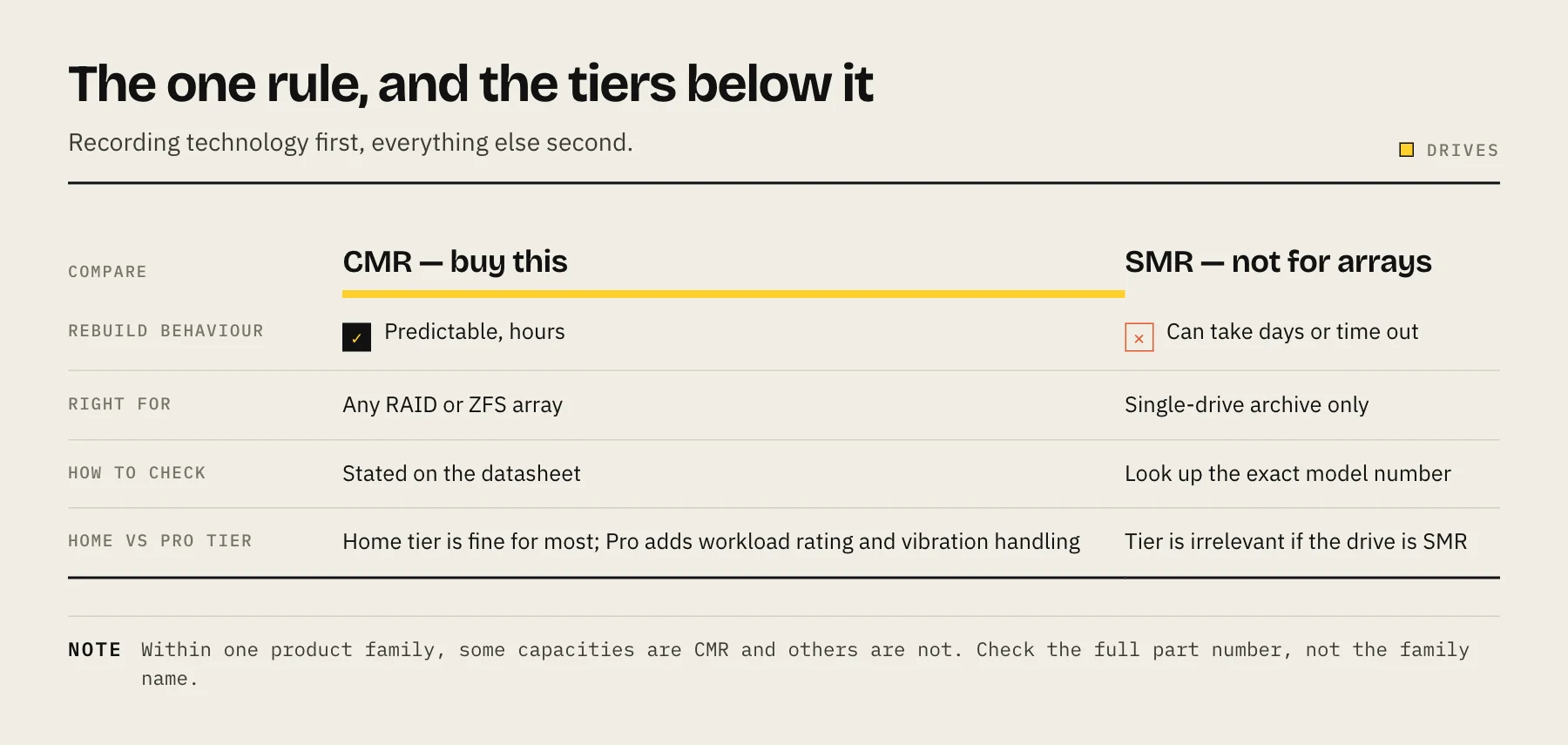
The one rule that matters most: CMR, not SMR
We cover the details in CMR vs SMR explained, but the short version:
- CMR drives are safe for NAS and RAID.
- SMR drives can stall or even fail during a RAID rebuild — the exact moment your data is most exposed. Avoid them in an array.
The classic trap is the plain WD Red line. Per Western Digital's own documentation, WD Red 2 TB, 3 TB, 4 TB and 6 TB use drive-managed SMR, while 8–14 TB WD Red are CMR. To skip the confusion entirely, buy WD Red Plus or WD Red Pro — both are CMR across the range. (WD renamed its CMR NAS drives "Red Plus" after a 2020 lawsuit over undisclosed SMR.)
The drives worth buying
| Drive | Tier | Recording | Best for |
|---|---|---|---|
| WD Red Plus | Home | CMR | 2–4 bay home NAS — quiet, cool, low power |
| Seagate IronWolf | Home | CMR | Home NAS, Plex, backups (IronWolf Health Mgmt) |
| WD Red Pro | Pro (7200 RPM) | CMR | Busy/larger arrays — 300 TB/yr workload, 5-yr warranty |
| Seagate IronWolf Pro | Pro (7200 RPM) | CMR | Heavy workloads and big capacity — up to 32 TB |
| Toshiba N300 | Value | CMR | Best price/TB — especially strong around 18 TB |
For most home buyers, the choice between IronWolf and WD Red comes down to noise, power, price and warranty as much as raw speed. Tom's Hardware names the Seagate IronWolf Pro its best NAS hard drive, noting it posts faster speeds than the WD Red Pro in many of its tests, with the WD Red Pro as the alternative pick. IronWolf Pro also leads on headline capacity (up to 32 TB).
Home tier or Pro tier?
- Home tier (WD Red Plus / IronWolf): lower workload ratings and, on many capacities, lower RPM mean quieter, cooler and lower power — the right call for a 2–4 bay home NAS running Plex, backups or a personal cloud.
- Pro tier (WD Red Pro / IronWolf Pro): 7200 RPM, higher workload ratings (e.g. 300 TB/year on Red Pro) and 5-year warranties — worth it for larger arrays, many drives, or heavier use.
For a home NAS, the extra cost of Pro drives usually isn't necessary; for 6+ bays or a busy system, it is.
Capacity and value: where the sweet spot is
Buy bigger than you think — data grows, and adding a drive later often means a rebuild. But the cheapest capacity per terabyte isn't the biggest drive.
According to disk-price trackers, in early 2026 the lowest $/TB sits in the ~16–22 TB range (16 TB is especially competitive), with new drives around $11–14/TB. Below 12 TB you actually pay more per terabyte for older technology. Prices move constantly, so check a live tracker like diskprices.com before buying, and plan your array with our RAID capacity calculator.
What about recertified/enterprise drives? Refurbished enterprise drives can drop to roughly $7–10/TB — big savings, at the cost of shorter (often seller-backed) warranties and used hours. Many homelabbers run them happily behind solid backups. Know the warranty trade-off before you commit.
What reliability data can (and can't) tell you
The best public reliability dataset is Backblaze's Drive Stats. Across 344,000+ drives in 2025, the overall annualized failure rate fell to 1.36% — the lowest since 2022 — and a 16 TB Seagate model and a 26 TB WD model each recorded just one failure over the year.
An honest caveat: Backblaze runs enterprise drives in data-center conditions, not the consumer NAS drives most home users buy. So use it as a read on manufacturer/model-family trends and the overall health of the drive market, not a head-to-head ranking of WD Red vs IronWolf on your desk. For consumer NAS drives specifically, weigh warranty length and workload rating (above) alongside it — and remember that with a proper backup, any single drive failure is a non-event.
Don't forget SSDs
For cache, app/VM storage or an all-flash build, see best SSD for NAS and hard drive vs SSD for NAS. For bulk capacity, HDDs still win decisively on price per terabyte.
FAQ
Are WD Red drives SMR? The plain WD Red 2–6 TB are SMR (drive-managed). WD Red Plus and WD Red Pro are CMR across the range — buy those for a NAS.
IronWolf or WD Red — which is better? In 2026 they're close. Decide on noise, power, price and warranty. IronWolf Pro leads on max capacity; WD Red Pro is the safe all-rounder.
What capacity is best value? The 16–22 TB range has the lowest price per terabyte in 2026; 16 TB is especially competitive. Below 12 TB is poor value.
Do I need "NAS" drives specifically? For anything beyond 1–2 bays, yes — they're rated for 24/7 operation and vibration in multi-bay enclosures.
How many should I buy? Enough to build your array at your target redundancy (e.g. RAID 6 / Z2), ideally plus a cold spare. And remember: a NAS is not a backup — keep an offsite copy.
Pre-purchase checklist
Verify the exact SKU is CMR, confirm it appears on the enclosure compatibility list, compare warranty and workload rating, and calculate usable capacity after redundancy. Buy from a seller with a clear shipping/return process, inspect SMART data on arrival, and complete an extended test before migrating the only copy of any data.
Sources
- Backblaze Drive Stats for 2025 — Backblaze
- WD Red Internal HDD SMR and CMR Network Attached Storage (NAS) Drive Information — Western Digital
- IronWolf Pro 32TB data sheet — Seagate
- IronWolf 12TB data sheet — Seagate
- Best Hard Drives 2026 — Tom's Hardware