Install Tailscale on the NAS and on the devices you want to reach it from, sign both into the same account, and you have an encrypted private network with no open ports and no router changes. It works behind carrier-grade NAT, takes about ten minutes, and it is the right default for remote NAS access.
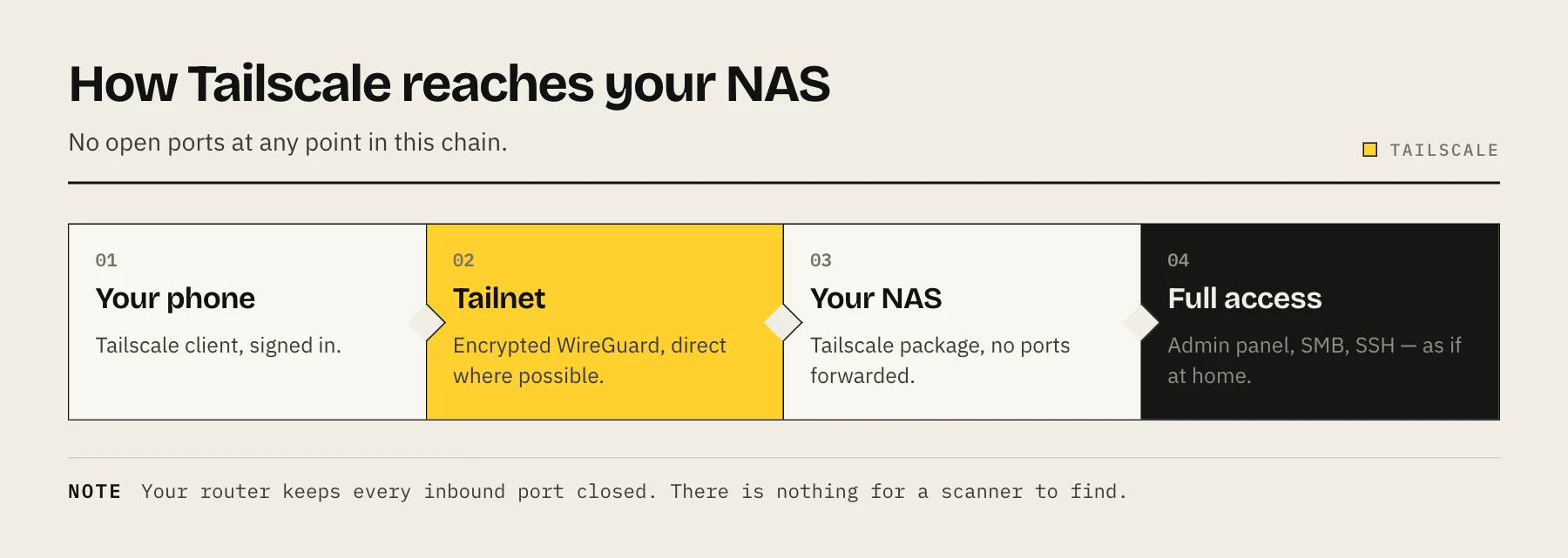
Tailscale builds a WireGuard mesh between machines you own. Each device authenticates against an identity provider, receives a stable private address, and connects directly to its peers wherever the network allows. Nothing listens on the public internet at any point.
Why not just forward a port?
Exposing a NAS admin panel to the internet puts it in front of continuous automated scanning. NAS ransomware campaigns have repeatedly targeted exactly this — internet-reachable management interfaces on unpatched appliances.
Port obscurity does not help; scanners sweep the full range. And once a port is open, your security depends on the appliance's login page being flawless forever.
Tailscale removes the exposure entirely. There is nothing to find.
Step 1 — Create an account
Sign up at tailscale.com. The free personal tier covers a generous number of devices and users, which is more than a household needs.
You authenticate with an existing identity provider rather than creating a new password. Use an account with MFA enabled — this account now controls access to your network, so it deserves the same protection as your email.
Step 2 — Install it on the NAS
- Synology: Tailscale is in Package Center. Install it, open it, and follow the authentication link.
- QNAP: available through the App Center.
- TrueNAS / Unraid: use the official container or the community plugin.
- Generic Linux / Docker: the official container image, or the package from Tailscale's repository.
After signing in, the NAS appears in your Tailscale admin console with an address in the 100.x.y.z range.
Step 3 — Install it on your devices
Install the client on your phone, tablet and laptop and sign into the same account. Each device joins the tailnet and can reach every other device on it.
Step 4 — Enable MagicDNS and connect
Turn on MagicDNS in the admin console. Instead of remembering 100.x.y.z, you reach the NAS at a name like http://mynas:5000.
From there everything behaves as if you were on the home network: the admin panel, SMB shares, SSH, container dashboards.
Step 5 — Lock down what each device can reach
This is the step most guides omit, and it is what turns a working setup into a safe one.
By default every device on your tailnet can reach every other device on every port. That is fine when it is only your own laptop and phone. It stops being fine the moment you add a family member's device, a VPS, or a machine you do not fully control.
Tailscale ACLs let you say "these devices may reach the NAS on port 8096 only". Tag devices by role and grant narrowly — a media client has no business reaching the NAS admin panel. Our Tailscale ACLs for NAS guide covers the least-privilege patterns.
Also worth doing in the admin console:
- Disable key expiry on the NAS, so it does not silently drop off the tailnet after a few months while you are away.
- Review the device list occasionally and remove anything you no longer use.
Optional — exit nodes and subnet routers
An exit node routes a device's entire internet traffic through your home connection. Useful on untrusted public Wi-Fi, and it makes you appear to be at home. Enable it on a device that is always on, then select it from the client.
A subnet router advertises your whole home network over the tailnet, so you can reach devices that cannot run Tailscale themselves — a printer, a smart TV, a router admin page. Convenient, but it widens what a compromised tailnet device can reach, so pair it with ACLs.
Performance notes
Tailscale prefers direct peer-to-peer connections. When NAT traversal fails it falls back to a DERP relay, which still carries end-to-end encrypted traffic but with noticeably lower throughput and higher latency.
If remote transfers feel slow, check the connection type in the admin console or with tailscale status. A relayed connection is the usual explanation.
Either way, your upload speed at home is the ceiling for anything you pull from the NAS remotely. Tailscale does not change physics.
What this does not solve
It is not a backup. Remote access to your data is not a second copy of it — see the 3-2-1 backup rule.
It does not patch anything. A NAS with an unpatched vulnerability is still vulnerable to anyone who reaches it, including devices on your own tailnet.
It does not help non-VPN devices. A smart TV or a relative's browser cannot join. For those, you need a public path — see Cloudflare Tunnel vs Tailscale vs reverse proxy.
After it works, clean up
Once Tailscale is running, remove what it replaced:
- Delete port-forwarding rules for the NAS on your router.
- Disable UPnP, then re-check the forwarding table — applications may have opened ports without telling you.
- Turn off vendor remote-access relay services you no longer need.
- Confirm from outside your network that the NAS is no longer reachable directly.
That last step is the one that proves the work was worth doing.
FAQ
Is Tailscale secure? It uses WireGuard for transport, with keys negotiated per peer. The coordination server handles authentication and key distribution; direct traffic between your devices is end-to-end encrypted, and relayed traffic is forwarded as ciphertext.
Is it free? The personal tier covers a household comfortably.
Tailscale vs a VPN server on the NAS? Self-hosted WireGuard is fine and fully under your control, but it needs an open UDP port and manual key management, and it does not work behind CGNAT.
Can I use SMB shares over it? Yes. Speed depends on your home upload rate, so treat it as remote access rather than a fast working drive.
What if Tailscale's service is down? Existing direct connections generally keep working, but new connections and authentication depend on the coordination service. If that concerns you, Headscale is an open-source control server you can self-host.
Sources
- Tailscale on Synology — Tailscale
- Tailscale on QNAP — Tailscale
- Key expiry — Tailscale
- MagicDNS — Tailscale
- DERP servers — Tailscale
- Pricing — Tailscale