Choose Jellyfin for a fully self-hosted, open-source server with hardware acceleration included and no subscription. Choose Plex for its more mature client ecosystem and easier account-based remote sharing. Before deciding, test direct play on the actual TVs and phones in your house — the best server is the one that avoids transcoding on your hardware.
Most comparisons list features. The thing that will actually determine your experience is narrower than that: whether your clients can play your files without the server re-encoding them.
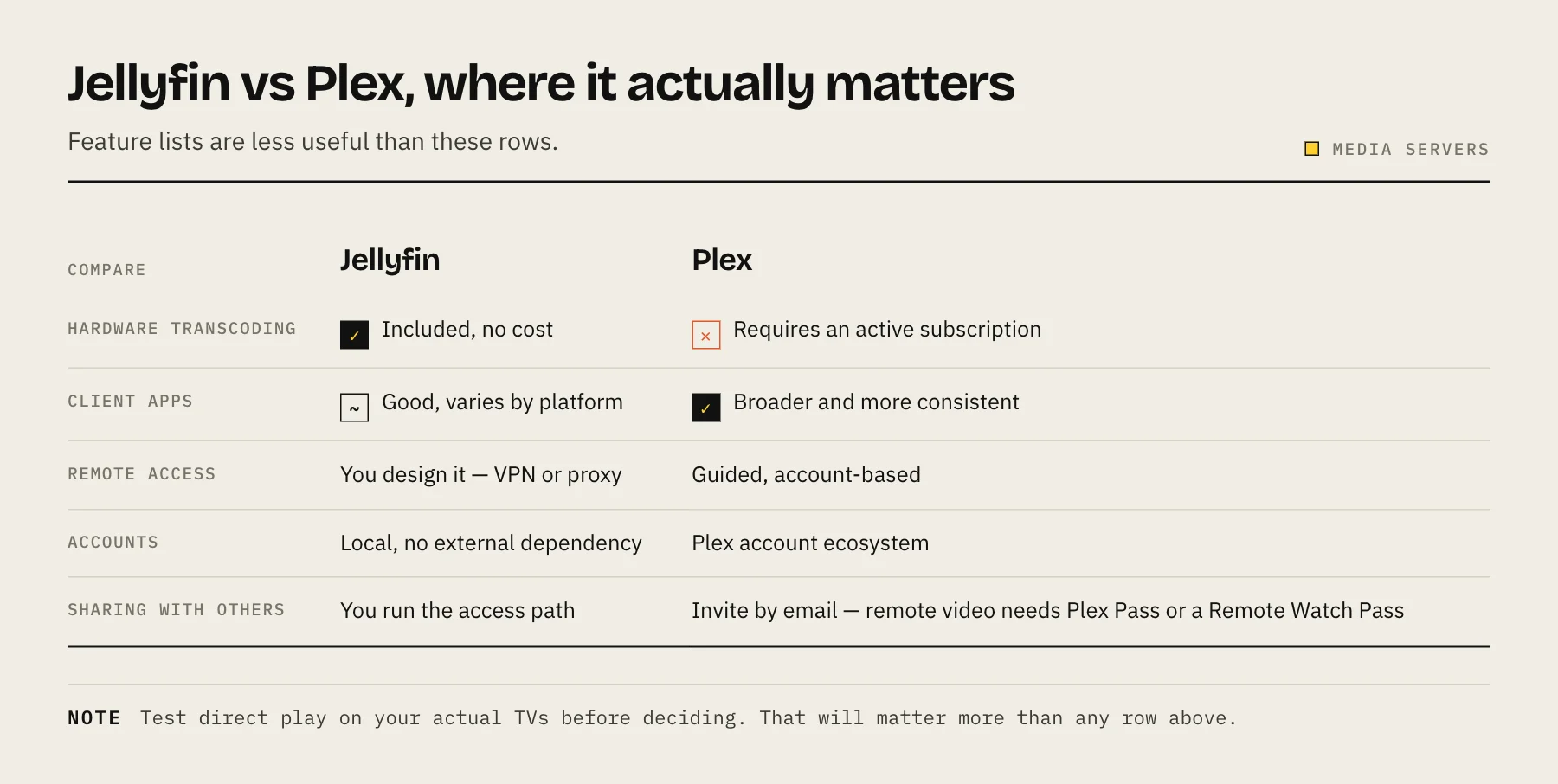
Side-by-side
| Factor | Jellyfin | Plex |
|---|---|---|
| Server licence | Open source, no feature subscription | Proprietary; free tier plus paid features |
| Hardware transcoding | Included | Requires an active subscription |
| Account dependency | Local accounts available | Plex account ecosystem |
| TV and console apps | Good, varies by platform | Broad and polished |
| Remote access | You design VPN or proxy | Guided, account-based |
| Metadata and control | Highly local and configurable | Polished defaults, discovery features |
| Live TV and DVR | Supported | Supported (DVR requires Plex Pass) |
| Sharing with others | Manual, you run the access path | Simple invitations; remote video playback needs a Plex Pass (admin or viewer) or Remote Watch Pass |
Pricing and feature boundaries change. Verify Plex's current plans before buying hardware around them.
Direct play matters more than brand
If a client supports the file's container, video codec, audio codec and subtitle format, it can direct play — the server just streams the bytes. Server load is negligible.
Transcoding starts when a codec is unsupported, bandwidth is capped, or image-based subtitles must be burned in. One incompatible 4K HDR stream can be far harder on the server than several direct-play streams.
Both servers face this identically. What differs is client coverage: Plex's apps are more consistent across TV platforms, which means fewer transcodes in a mixed household. Jellyfin's clients are good and improving, but vary more by platform.
This is the whole practical difference for most people. Test it before choosing.
Hardware transcoding: the cost difference
Jellyfin includes hardware acceleration at no cost, with official support across modern Intel, AMD, NVIDIA, Apple and some Rockchip hardware. Intel Quick Sync remains the practical low-power choice, though it is not the only valid one.
Plex gates hardware transcoding behind an active subscription. If you rely on transcoding, that is an ongoing cost or a one-off lifetime purchase, and it should be part of the comparison.
If everything in your house direct-plays, this difference does not matter. If you have a mixed set of clients or limited upload bandwidth, it matters a lot.
Run a fair trial
Both can run simultaneously. Give it an evening:
- Point both at the same media library, mounted read-only.
- Play your largest 4K file on your actual TV, not on a laptop.
- Play something with subtitles, ideally an image-based subtitle track.
- Test remotely with a bandwidth cap set.
- Check each dashboard to see whether it direct-played, remuxed or transcoded.
- Have someone else in the household use it without instructions. This finds more problems than any benchmark.
- Watch idle power and CPU before deciding you need new hardware.
Keep the configuration folders separate and mount media read-only, and there is no risk in running both.
Where Jellyfin wins
- No subscription, and hardware transcoding included.
- No external account dependency. Local users, no third-party service in the authentication path.
- Privacy. Nothing about your library leaves your network unless you configure it to.
- Open source, so the project cannot change terms on data you have already organised.
- Deep configurability for metadata, naming and plugins.
Where Plex wins
- Client apps are more consistent, especially on smart TVs and consoles — which is the difference between "the family uses it" and "the family gave up".
- Remote sharing is far simpler. Invite someone by email and it works, with no VPN or proxy to explain — though since April 2025 remote video playback requires a Plex Pass on your account or theirs, or a Remote Watch Pass.
- Discovery features and a more polished default experience.
- Maturity in edge cases — odd formats, unusual clients, long-tail behaviour.
Setup effort
Jellyfin is a container and a compose file. Remote access is your responsibility: a mesh VPN for your own devices, a reverse proxy for anyone else. See setting up Jellyfin with Docker and accessing Jellyfin remotely.
Plex handles remote access through its own relay and account system, which is genuinely easier and means trusting that infrastructure.
Neither is hard to install. The gap is entirely in the remote access story.
Who should choose which
Jellyfin if privacy, local accounts, open source and no subscription are priorities, and you are comfortable setting up your own remote access.
Plex if household members value the most consistent client apps, you share with people outside the house, and simplicity is worth an ongoing cost.
Emby is a third option that sits between them — Jellyfin was forked from it — with a similar paid-tier model to Plex.
FAQ
Can I migrate from Plex to Jellyfin? Your media files are untouched. Watch history and metadata do not transfer cleanly; there are community tools, with mixed results. Expect to rebuild the library and lose watch state.
Which is better for 4K? Identical if the client direct-plays. If transcoding is needed, whichever has working hardware acceleration on your machine — free on Jellyfin, subscription on Plex.
Do I need to expose either to the internet? No. Use a mesh VPN for your own devices. Only expose a service publicly if you are sharing with people who cannot install a client.
Which uses less power? Identical when direct-playing. Power draw is about transcoding, not the software.
Can I run both permanently? Yes, with separate config folders and a read-only media mount. Some people do exactly this — Plex for relatives, Jellyfin for themselves.
Sources
- Hardware Acceleration — Jellyfin documentation
- Using Hardware-Accelerated Streaming — Plex Support
- Plex Pass Overview — Plex Support
- Important 2025 Plex Updates — Plex