In one line: A homelab is a small environment you run at home to learn infrastructure skills or host private services. It can be a single efficient mini PC — no rack, no enterprise switch, no noisy second-hand server required.
The word makes it sound bigger than it is. Most homelabs are one machine running a handful of containers, and the ones that stay useful tend to be the ones that started small and solved a real problem on day one.
Start with an outcome, not with hardware
The most common way a homelab dies is buying equipment first and then looking for a use for it. Pick the outcome, then buy the smallest thing that delivers it.
| Goal | First project | What you learn |
|---|---|---|
| Private media | Jellyfin | Storage mounts, codecs, user management |
| Network visibility | Pi-hole | DNS, DHCP, log reading |
| Smart-home control | Home Assistant | Networking, USB devices, backups |
| Password management | Vaultwarden | HTTPS, secrets, restore discipline |
| Virtualization | Proxmox | VMs, bridges, snapshots |
| File protection | A NAS backup job | Permissions, retention, restore testing |
Three starter hardware paths
Use what you already own. An old laptop with an SSD is quiet, has a built-in battery backup, and comfortably runs several containers. This is the best possible first step because it costs nothing and teaches you what you actually need.
Mini PC plus NAS. Applications run on an efficient Intel mini PC; bulk data lives on the NAS. This separates compute upgrades from storage and is the most flexible arrangement for most people. It also means a botched container experiment cannot take your storage down with it.
One NAS for everything. Convenient, power-efficient, and one box to manage — but application load, storage maintenance and reboots all share a single failure domain. Rebooting to fix a container also stops the family's file access.
For a first container host, four cores, 8–16 GB of RAM and a 256 GB SSD are a practical baseline. Media transcoding benefits from a supported integrated GPU; virtual machines need more memory than containers do.
Containers or virtual machines?
Beginners often start with VMs because they are conceptually familiar, and then discover the overhead.
Containers share the host kernel. They start in seconds, use very little memory, and are defined by a short compose file you can version and re-create. For self-hosted applications this is almost always the right tool. Start with Docker on a NAS.
Virtual machines run a full guest OS. Use them when you need a different operating system, kernel-level isolation, or to safely break something. Proxmox is the usual host — see Proxmox vs TrueNAS vs Unraid.
Most homelabs end up with containers for services and one or two VMs for experiments.
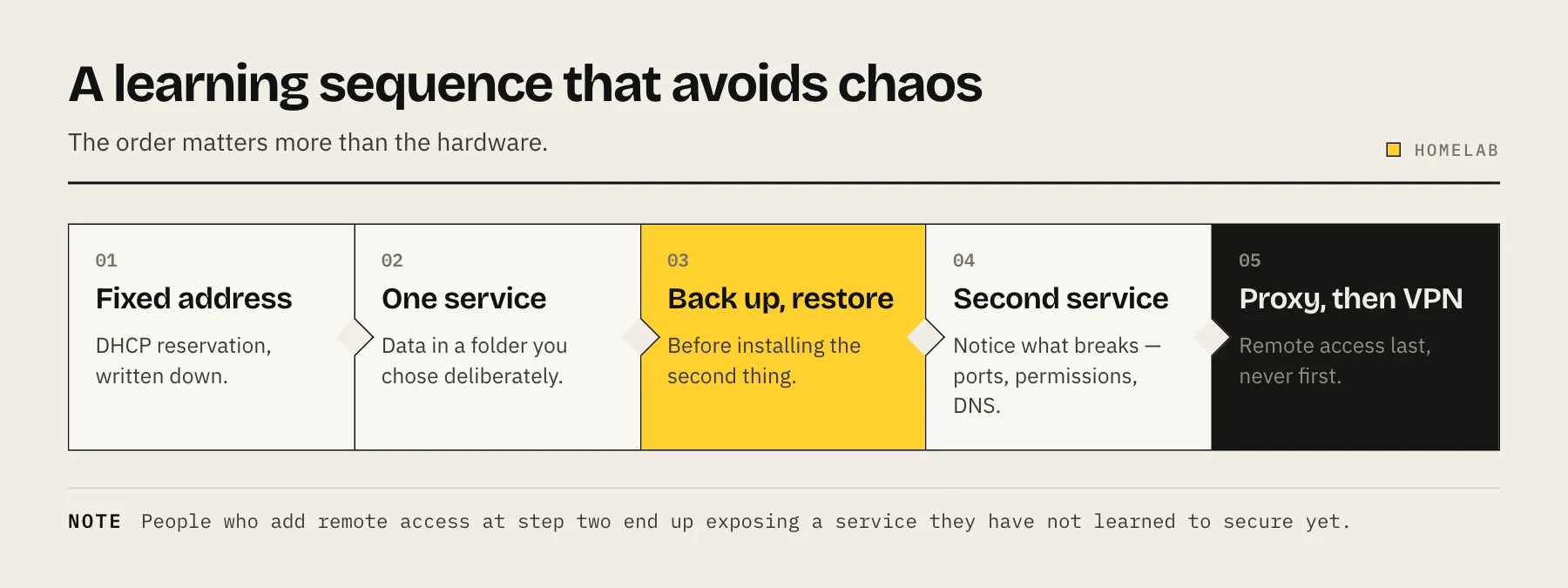
A learning sequence that avoids chaos
- Give the host a fixed address. A DHCP reservation on the router, documented somewhere you will find it again.
- Install one service, with its persistent data in a folder you chose deliberately — not buried in a container's internal storage.
- Back that folder up and restore it. Do this before installing the second service. It is the habit that makes everything afterwards safe.
- Add a second service and notice what breaks: port conflicts, permissions, DNS.
- Introduce a reverse proxy once you have three or four things running and typing IP addresses and ports has become tedious. See reverse proxy explained.
- Add remote access last, and do it with a mesh VPN rather than port forwarding.
The order matters. People who add remote access at step two end up with a publicly exposed service they have not learned to secure yet.
The three things that separate a lab from a mess
Documentation. A single text file listing what runs where, which ports, which folders hold data, and what the passwords protect. Future you will not remember. Keep it outside the lab, so it is readable when the lab is down.
Persistent data lives in one place. Every container's data folder under one parent directory means your backup is one job instead of eleven, and rebuilding the host means restoring one tree.
Backups you have actually restored. A backup you have never tested is a hypothesis. Restore something once a quarter.
Power, noise and heat are the real constraints
Homelabs live in houses. This is the difference between the advice you read on enterprise forums and what works in a spare room.
An old rack server is cheap to buy and expensive to live with — often over 100 W idle, loud enough to hear through a wall, and hot enough to make a small room uncomfortable. A modern low-power mini PC does the same container work at a fraction of the draw and is silent.
Run the numbers before buying second-hand enterprise gear: our power cost calculator turns watts into an annual figure, and NAS noise, heat and placement covers where the box can realistically live.
Security basics that apply from day one
- Nothing gets port-forwarded unless you have a specific reason and a plan for patching it.
- Update on a schedule, and pin container image tags so updates are a decision rather than a surprise.
- One admin account per person, with a password manager. Shared credentials make it impossible to revoke access.
- Separate the network if you can — IoT devices on their own VLAN is the single highest-value network change most homelabs make.
- Assume the lab will be compromised eventually and keep backups where a compromised host cannot delete them.
Where people overspend
10GbE networking before the disks can saturate 1GbE. Check the bottleneck first — see 2.5GbE vs 10GbE.
A rack. Racks are for many devices with rails. Two machines on a shelf is fine and much quieter.
Enterprise servers. Loud, power-hungry, and the management features you are paying for mostly matter in data centres.
More RAM than the workload needs. See how much RAM a NAS needs.
FAQ
Do I need to know Linux? Not to start. A NAS GUI and Docker Compose will take you a long way. You will pick up Linux gradually, which is a better way to learn it than a course.
Is a Raspberry Pi enough? For Pi-hole, Home Assistant or a small monitoring stack, yes. For media transcoding or anything storage-heavy, no.
How much does a first homelab cost? Zero if you use an old laptop. A capable new mini PC is a few hundred; storage is the part that scales with your ambitions.
What is the difference between a homelab and a NAS? A NAS is storage-first with apps bolted on. A homelab is compute-first. Many people run both, and that separation is a feature.
Sources
- What is a container? — Docker Docs
- Proxmox VE wiki — Proxmox Server Solutions
- Raspberry Pi installation (suggested hardware) — Home Assistant
- Pi-hole prerequisites — Pi-hole