Short answer first: TBW (Terabytes Written) is the total amount of data the manufacturer guarantees you can write to an SSD before the warranty's endurance clause is used up. DWPD (Drive Writes Per Day) expresses the same budget as a daily rate — how many times you can overwrite the drive's full capacity every day for the length of the warranty. NAND flash cells wear out with writes, not reads, so these two numbers are the closest thing you have to an official lifespan rating.
Why does this matter more in a NAS than in a laptop? Because a NAS writes around the clock. Surveillance recording, Docker containers, database engines, BitTorrent, snapshots, and — above all — SSD read/write caching can push write volumes far beyond anything a desktop drive ever sees. A drive that would comfortably outlive a gaming PC can burn through its entire endurance budget in under two years as a busy cache device. If you are still deciding whether SSDs belong in your NAS at all, start with our HDD vs SSD for NAS comparison; this guide assumes you have decided on flash and want to know how long it will last.
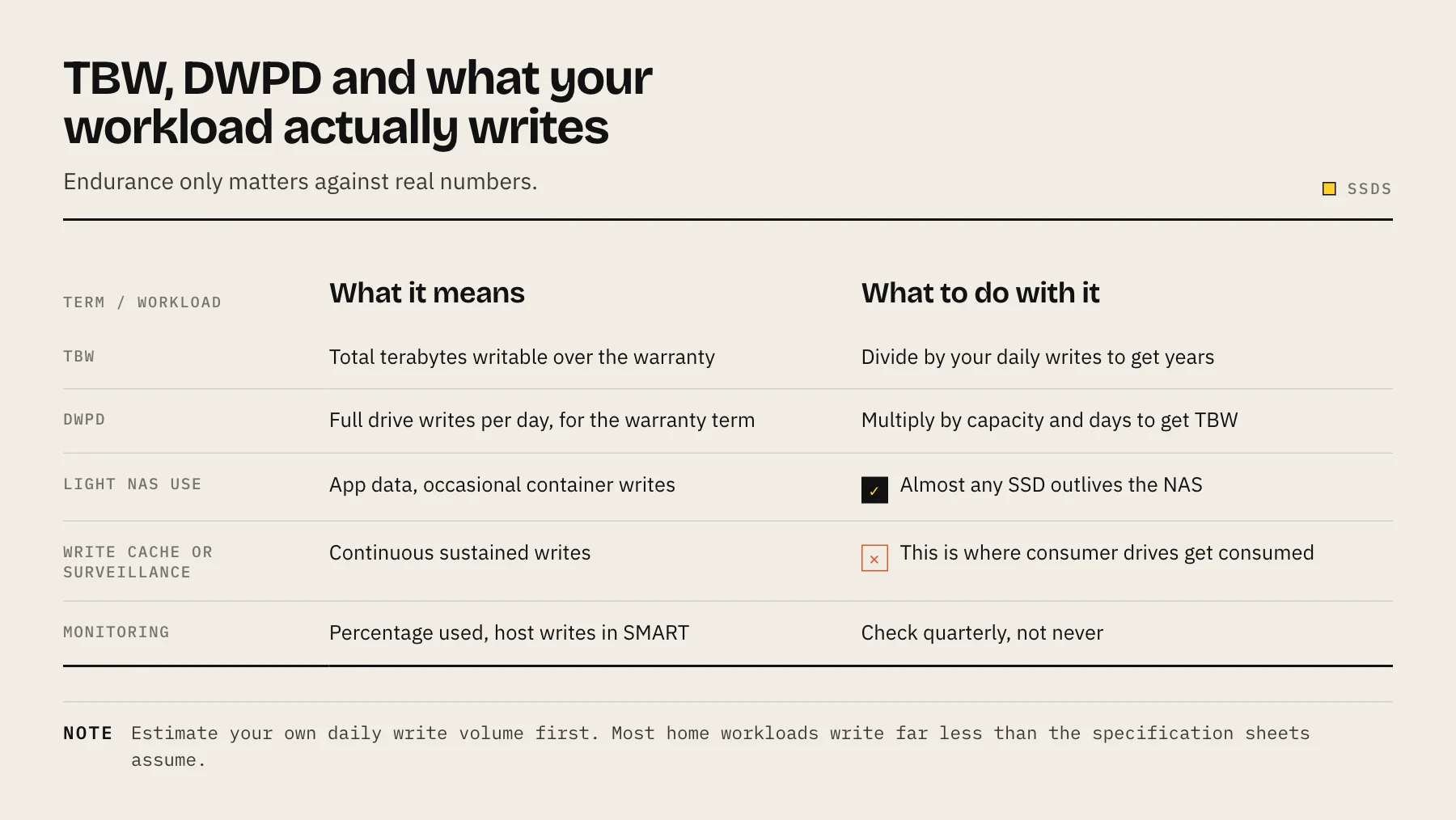
TBW and DWPD: the concepts and the conversion
The two ratings are interchangeable. The conversion is:
TBW = DWPD × capacity (TB) × 365 × warranty years
Two worked examples using official figures:
- Seagate IronWolf 525, 2TB (Gen4 NVMe): the datasheet lists 2,800 TBW over a 5-year warranty. Converting: 2,800 ÷ (2 × 365 × 5) ≈ 0.77 drive writes per day. Seagate's own datasheet rounds this down and publishes 0.7 DWPD, with a footnote stating the DWPD figure is derived from the 5-year TBW rating — a useful official confirmation that this formula is exactly how vendors do the math.
- Seagate IronWolf Pro 125, 3.84TB (SATA): rated 7,000 TBW over 5 years. 3.84 × 365 × 5 = 7,008 TB, so 7,000 ÷ 7,008 ≈ 1.0 DWPD — matching the official 1 DWPD rating on the datasheet.
One critical caveat before you compare numbers across brands: TBW ratings are not measured under a single universal workload. Most client and NAS-class drives are rated against the JEDEC client workload (JESD219); enterprise drives like Synology's SAT series are rated against the much harsher JESD219A enterprise workload (small random writes, high write amplification); and some vendors — WD, for the larger Red SA500 capacities — use mixed workloads. An enterprise-rated TBW is earned the hard way, so cross-vendor comparisons are directionally useful but not strictly apples-to-apples. Keep that in mind when reading the tables below.
The big endurance table
All TBW figures below are taken from the manufacturers' official datasheets. DWPD values marked (calculated) are derived with the formula above using the drive's warranty period; values marked (official) appear on the datasheet itself.
SATA — NAS-rated
| Drive | Capacity | TBW | DWPD |
|---|---|---|---|
| WD Red SA500 (5yr) | 500GB | 350 | 0.38 (calculated) |
| WD Red SA500 | 1TB | 600 | 0.33 (calculated) |
| WD Red SA500 | 2TB | 1,300 | 0.36 (calculated) |
| WD Red SA500 | 4TB | 2,500 | 0.34 (calculated) |
| Seagate IronWolf 125 (5yr) | 250GB | 300 | 0.66 (calculated) |
| Seagate IronWolf 125 | 500GB | 700 | 0.77 (calculated) |
| Seagate IronWolf 125 | 1TB | 1,400 | 0.77 (calculated) |
| Seagate IronWolf 125 | 2TB | 2,800 | 0.77 (calculated) |
| Seagate IronWolf 125 | 4TB | 5,600 | 0.77 (calculated) |
| Seagate IronWolf Pro 125 (5yr) | 240GB | 435 | 1 (official) |
| Seagate IronWolf Pro 125 | 480GB | 875 | 1 (official) |
| Seagate IronWolf Pro 125 | 960GB | 1,750 | 1 (official) |
| Seagate IronWolf Pro 125 | 1.92TB | 3,500 | 1 (official) |
| Seagate IronWolf Pro 125 | 3.84TB | 7,000 | 1 (official) |
Note the WD Red SA500 figures are rated under the JEDEC client workload, with the larger capacities rated under mixed workloads per the official datasheet.
NVMe — NAS-rated
| Drive | Capacity | TBW | DWPD |
|---|---|---|---|
| WD Red SN700 (Gen3, 5yr) | 250GB | 500 | 1.10 (calculated) |
| WD Red SN700 | 500GB | 1,000 | 1.10 (calculated) |
| WD Red SN700 | 1TB | 2,000 | 1.10 (calculated) |
| WD Red SN700 | 2TB | 2,500 | 0.68 (calculated) |
| WD Red SN700 | 4TB | 5,100 | 0.70 (calculated) |
| Seagate IronWolf 510 (Gen3) | 240GB | 435 | 1 (official) |
| Seagate IronWolf 510 | 480GB | 875 | 1 (official) |
| Seagate IronWolf 510 | 960GB | 1,750 | 1 (official) |
| Seagate IronWolf 510 | 1.92TB | 3,500 | 1 (official) |
| Seagate IronWolf 525 (Gen4, 5yr) | 500GB | 700 | 0.7 (official) |
| Seagate IronWolf 525 | 1TB | 1,400 | 0.7 (official) |
| Seagate IronWolf 525 | 2TB | 2,800 | 0.7 (official) |
An interesting quirk in the SN700 line: the 250GB–1TB models work out to roughly 1.1 DWPD, while the 2TB and 4TB models drop to about 0.7 — the TBW ceiling does not scale linearly with capacity. If you are buying SN700s specifically for cache duty, the 1TB model is the endurance sweet spot per terabyte.
Enterprise (JESD219A enterprise workload)
| Drive | Capacity | TBW | DWPD |
|---|---|---|---|
| Synology SAT5210 (5yr) | 480GB | 1,097 | 1.25 (calculated) |
| Synology SAT5210 | 960GB | 2,194 | 1.25 (calculated) |
| Synology SAT5210 | 1.92TB | 4,800 | 1.37 (calculated) |
| Synology SAT5210 | 3.84TB | 8,533 | 1.22 (calculated) |
| Synology SAT5210 | 7TB | >10,000 | ~0.8 (calculated) |
| Synology SAT5221 | 480GB | >900 | ~1.0 (calculated) |
| Synology SAT5221 | 960GB | >1,700 | ~1.0 (calculated) |
| Synology SAT5221 | 1.92TB | >3,500 | ~1.0 (calculated) |
| Synology SAT5221 | 3.84TB | >7,000 | ~1.0 (calculated) |
Remember: these TBW figures were earned under the punishing JESD219A enterprise workload. A ~1.2 DWPD enterprise rating represents substantially more real-world durability than a ~1.2 DWPD client-workload rating would.
Consumer drives, for comparison
| Drive | Capacity | TBW | DWPD |
|---|---|---|---|
| Samsung 870 EVO (5yr) | 1TB | 600 | 0.33 (calculated) |
| Samsung 870 EVO | 2TB | 1,200 | 0.33 (calculated) |
| Samsung 870 EVO | 4TB | 2,400 | 0.33 (calculated) |
| Samsung 870 QVO (3yr) | 1TB | 360 | 0.33 (calculated) |
| Samsung 870 QVO | 2TB | 720 | 0.33 (calculated) |
| Samsung 870 QVO | 4TB | 1,440 | 0.33 (calculated) |
| Samsung 870 QVO | 8TB | 2,880 | 0.33 (calculated) |
| Crucial MX500 (5yr) | 250GB | 100 | 0.22 (calculated) |
| Crucial MX500 | 500GB | 180 | 0.20 (calculated) |
| Crucial MX500 | 1TB | 360 | 0.20 (calculated) |
| Crucial MX500 | 2TB | 700 | 0.19 (calculated) |
| Crucial MX500 | 4TB | 1,000 | 0.14 (calculated) |
Samsung is explicit that the warranty is whichever comes first: the year limit or the TBW limit. The QVO's DWPD looks identical to the EVO's, but that is only because its warranty is 3 years instead of 5 — the absolute write budget on a QVO is 40% lower than the same-capacity EVO. Crucial helpfully publishes the equivalent daily write allowance on the MX500 datasheet: 54 / 98 / 197 / 383 / 547 GB per day for the 250GB through 4TB models respectively.
How much will your workload actually write?
TBW ratings only matter relative to your write volume. Nobody can give you an exact number without measuring your system, but three archetypes cover most homelab and small-office deployments:
1. Media library / file archive (light). Plex or Jellyfin libraries, photo backups, document shares. Writes happen in bursts when you add content, then the drive mostly serves reads. Realistic daily averages are typically in the single-digit to low-tens-of-GB range. At, say, 20 GB/day, even a modest 600 TBW drive (WD Red SA500 1TB or Samsung 870 EVO 1TB) has a write budget lasting on the order of 80 years. Endurance is essentially a non-issue here; buy on price and warranty.
2. Docker containers + databases (moderate). Container logs, PostgreSQL/MariaDB write-ahead logs, Home Assistant recorder databases, download clients. Individual writes are small but constant, and small random writes cause internal write amplification — the NAND writes more than the host asks for. Depending on how chatty your stack is, tens of GB per day up to low hundreds is a realistic band. At 100 GB/day, a 1,400 TBW IronWolf 125 1TB carries you roughly 38 years of budget; a 360 TBW MX500 1TB, about 10 years. Still fine — but the margin over a 5-year warranty is thinning, and a misconfigured logging container can multiply your write rate overnight.
3. SSD read/write cache (heavy — the endurance killer). This is the scenario NAS-rated endurance exists for. A write cache absorbs every write destined for the array, and cache churn adds its own multiplier: as hot data changes, blocks are continuously evicted, rewritten, and reshuffled, so total NAND writes can run at a large multiple of the user data you think you are storing. Small cache drives make it worse, because the same limited capacity gets overwritten far more frequently. It is entirely plausible for a busy cache device to sustain a full drive-write per day or more — which is why a 0.2 DWPD consumer drive in a cache slot is a warranty claim waiting to happen, while 1 DWPD-class drives (IronWolf Pro 125, SN700 at ≤1TB, SAT5210/5221) are designed for exactly this duty cycle. The honest guidance: don't guess — deploy, then measure your actual write rate with SMART data after a few weeks (see monitoring below) and extrapolate.
NAS-rated vs ordinary consumer SSDs: what you actually pay for
Endurance is the clearest, most quantifiable difference. Compare 1TB class drives, all official datasheet figures, all 5-year warranties:
- Crucial MX500 1TB: 360 TBW (~0.20 DWPD calculated)
- WD Red SA500 1TB: 600 TBW (~0.33 DWPD calculated) — 1.7× the MX500
- Seagate IronWolf 125 1TB: 1,400 TBW (~0.77 DWPD calculated) — nearly 4× the MX500
- Seagate IronWolf Pro 125 960GB: 1,750 TBW (1 DWPD official) — roughly 5× the MX500
At 4TB the gap widens dramatically: MX500 4TB = 1,000 TBW vs IronWolf 125 4TB = 5,600 TBW, a 5.6× difference. NAS-rated drives also tend to carry firmware tuned for sustained mixed workloads and longer vendor support, but the TBW column is where the price premium is most concretely justified. For pure bulk storage a consumer drive's endurance is usually sufficient; for cache or database volumes, the endurance gap is the whole ballgame.
Monitoring endurance: SMART, vendor warnings, and what "used up" means
Every SSD tracks lifetime writes in SMART. Look for attributes like Total LBAs Written / Total Bytes Written and Percentage Used (NVMe) or Wear Leveling Count / SSD Life Left (SATA; names vary by vendor). Check the value after 30 days of normal use, convert to TB/day, and divide your drive's TBW rating by that rate — that is your projected endurance lifespan, and it is a far better number than any generic estimate.
QNAP builds this in: per QNAP's official documentation, the SSD's own firmware calculates its estimated remaining life from the manufacturer's TBW rating and the NAS raises a warning when the threshold is reached, visible under Storage & Snapshots > Disks/VJBOD > Disk Health (QNAP FAQ). Synology similarly states that its own SSDs are warranted for 5 years or until the write endurance is used up, whichever comes first — so DSM's lifespan estimates are not cosmetic; they track your warranty status. On Synology's M.2 cache compatibility rules, the official compatibility list is the authority; Synology's own DSM 7.3 drive-policy FAQ confirms that 2025 DiskStation Plus models accept non-listed HDDs and 2.5" SATA SSDs for storage pool creation, while non-listed M.2 NVMe SSDs still cannot be used to create new pools or caches.
One important nuance: reaching the TBW limit does not mean the drive drops dead. Endurance ratings are conservative warranty thresholds, and drives routinely keep working well past them. What ends at TBW exhaustion is the warranty — from that point you are running without a safety net, and reallocated-sector or spare-block SMART attributes deserve close attention. Treat a TBW-exhausted drive like a car past its service life: usable, but plan the replacement.
Buying advice: match DWPD to the job
- Bulk SSD storage volumes (media, backups, file shares): endurance is rarely the constraint. WD Red SA500, Samsung 870 EVO, or even the MX500 are defensible; the 870 QVO's 3-year warranty and lower TBW make it a value play for read-mostly archives only. Size the volume first — our NAS capacity planning guide covers that math.
- App/VM/database volumes: aim for ~0.7 DWPD or better. IronWolf 125 or WD Red SN700 (1TB) fit well.
- Read-only cache: moderate endurance is acceptable since evictions are the main write source; a SA500-class drive can work, but monitor it.
- Read/write cache: 1 DWPD class minimum — IronWolf Pro 125, IronWolf 510, SN700 at 1TB, or step up to SAT5210/SAT5221 (mind Synology's compatibility list) if uptime is business-critical. Also oversize the cache: a bigger drive spreads the same writes over more NAND and gains TBW headroom simultaneously.
- General rule: buy the larger capacity when in doubt. TBW scales with capacity within a product line, so a 2TB drive at 40% full will outlast a 1TB drive at 80% full under identical workloads — on both endurance budget and write amplification.
FAQ
Q: Is a higher TBW always better than a higher DWPD? A: They are the same rating in different units — TBW = DWPD × capacity × 365 × warranty years. Compare drives of similar capacity in whichever unit you prefer, but check the warranty period: a 3-year drive with the same DWPD as a 5-year drive has a smaller absolute write budget.
Q: Will my SSD fail when it hits its TBW rating? A: No. TBW is a warranty threshold, not a death sentence; drives commonly outlive it. But warranty coverage ends when either the time limit or the TBW limit is reached (Samsung and Synology both state this explicitly), so plan replacements accordingly.
Q: Can I use a cheap consumer SSD as a NAS write cache? A: You can, but the math is against you. A Crucial MX500 1TB is rated 360 TBW versus 1,400 TBW for an IronWolf 125 1TB per the official datasheets — and write caching, with its churn-driven write amplification, is precisely the workload that exposes that 4× gap. For read-only caching on a lightly used system it is more defensible, if you monitor SMART writes.
Q: Are TBW numbers comparable between brands? A: Only loosely. Ratings are measured under different workloads — JEDEC client (JESD219) for most consumer/NAS drives, JESD219A enterprise workloads for drives like the Synology SAT5210, mixed workloads for some capacities of the WD Red SA500. An enterprise-workload TBW is a tougher test, so identical numbers do not imply identical real-world endurance.
Disclaimer: All TBW, DWPD, and warranty figures cited above are taken from the respective manufacturers' official datasheets and were verified as of July 2026. Vendors revise specifications between hardware revisions and firmware generations — always confirm against the latest official datasheet before purchasing.
Sources
- IronWolf 525 SSD data sheet — Seagate
- IronWolf Pro 125 SSD data sheet — Seagate
- Enterprise Series 2.5" SATA SSD (SAT5221 / SAT5210) specifications — Synology
- Samsung SSD 870 EVO Data Sheet — Samsung Semiconductor
- SSD Estimated Life Remaining Warning — QNAP
- Drive compatibility policies FAQs for Synology storage systems starting from 2025 (DSM 7.3 and above) — Synology