How much does it cost to run a NAS around the clock? Less than most people fear — but it adds up over years, and it is a genuine factor when choosing between a power-hungry second-hand server and an efficient modern box. This page gives you the yearly figure at a glance, and what actually moves it.
The formula
Yearly cost = watts × 8.76 × your electricity price per kWh
(24 hours × 365 days ÷ 1000 = 8.76.) Your price is on your electricity bill — use the total rate including standing charges spread across your usage, not just the unit rate, if you want the honest number.
Yearly running cost, 24/7
| Average power | $0.10/kWh | $0.15/kWh | $0.20/kWh | $0.30/kWh | $0.40/kWh |
|---|---|---|---|---|---|
| 10 W | $9 | $13 | $18 | $26 | $35 |
| 15 W | $13 | $20 | $26 | $39 | $53 |
| 20 W | $18 | $26 | $35 | $53 | $70 |
| 30 W | $26 | $39 | $53 | $79 | $105 |
| 40 W | $35 | $53 | $70 | $105 | $140 |
| 60 W | $53 | $79 | $105 | $158 | $210 |
| 80 W | $70 | $105 | $140 | $210 | $280 |
| 120 W | $105 | $158 | $210 | $315 | $420 |
Example: a modern four-bay NAS averaging 30 W at $0.20/kWh costs about $53 a year.
Measure, do not estimate
Vendor "maximum power" figures assume every bay is full and every drive is spinning up at once. Your real average is usually much lower — and your real peak is higher than idle, which matters for UPS sizing.
A plug-in energy meter costs very little and settles the question in a day. Record three numbers:
- Idle with disks spun down — often 10–25 W on a small unit.
- Idle with disks spinning — typically 25–60 W depending on drive count.
- Under load — during a backup, a rebuild or a media transcode.
Then weight them by how your NAS actually spends its time. Most home units sit near the second figure almost permanently.
What actually drives the number
Each spinning drive costs you roughly 4–8 W while active, permanently. This is why drive count matters more than drive capacity: four 4 TB drives draw noticeably more than two 8 TB drives for the same storage.
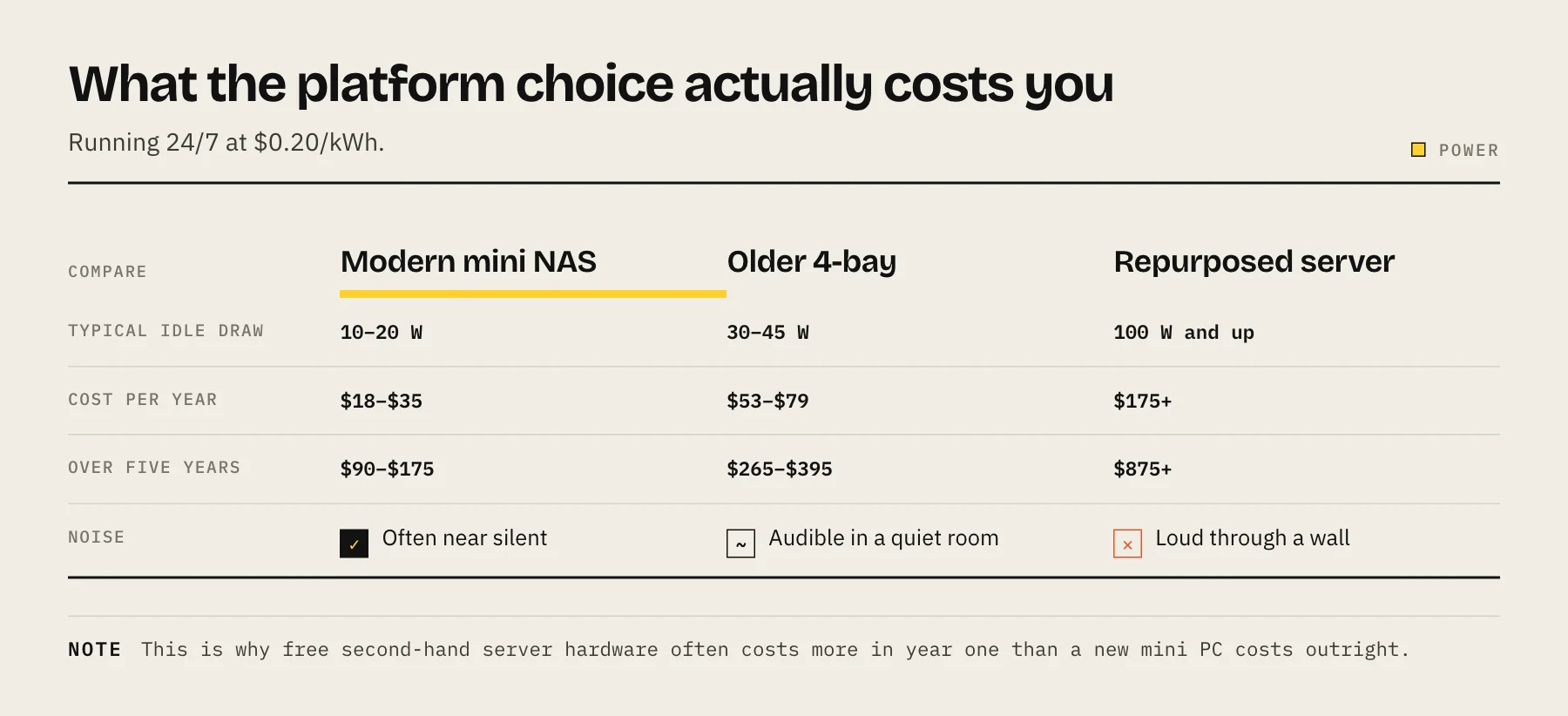
The CPU sets the floor. A modern low-power Intel N-series platform can idle in the single digits to low teens. An old repurposed enterprise server often idles over 100 W before any drives are attached — which is why "free" second-hand server hardware frequently costs more in its first year than a new mini PC costs outright.
The power supply's efficiency matters at low load. Many PSUs are least efficient in exactly the 10–20% load range a home NAS lives in, so a hugely oversized PSU in a DIY build wastes power continuously.
Everything you plug in. Expansion units, extra NICs and USB drives all add to the total.
Cutting the bill
Pick an efficient platform. This is by far the largest lever and it is decided at purchase. Compare idle draw, not peak.
Use fewer, larger drives. Better watts per terabyte, less heat, less noise.
Spin down idle disks — carefully. It genuinely saves power when the NAS is idle for long stretches. But if anything on your network touches the array every few minutes, the drives will cycle constantly, which adds wear without saving much. Check the start-stop count in SMART after enabling it.
Consider scheduled power off. If nobody uses the NAS between midnight and 7am, that is nearly 30% of the year. Most NAS firmware supports a power schedule. The caveat: scheduled backups, remote access and monitoring all need it awake.
SSDs draw less than spinning disks, especially at idle. All-flash is expensive per terabyte but silent and low-power — see NAS SSD endurance before committing.
Do not chase the last watt. The difference between 28 W and 25 W is about $5 a year. Spend the attention on the platform choice instead.
Power cost is not the whole running cost
The electricity figure is the easy one. Budget for these too:
- Drive replacement. Over five years, expect to replace at least one drive in a multi-disk array.
- Cloud backup, if you follow the 3-2-1 rule — often a few dollars per terabyte per month.
- A UPS battery every three to five years.
Does it pay for itself?
Against cloud storage, usually. Consumer cloud plans for several terabytes commonly run $200–400 a year with nothing owned at the end; a NAS is a few hundred up front plus $50–100 a year to run. Above a few terabytes the arithmetic favours the NAS within a few years — see NAS vs cloud storage for the full comparison.
Against doing nothing, that framing does not apply. The NAS is buying you availability, speed and a place your backups land, not just storage.
FAQ
Is it safe to leave a NAS on 24/7? Yes — these are designed for it, and constant operation is generally easier on drives than frequent power cycling.
How much does a Raspberry Pi NAS use? Very little for the board itself, but attached spinning drives dominate the total and USB-attached storage brings reliability trade-offs of its own.
Do larger drives use more power? Slightly, but far less than proportionally. Watts per terabyte improves as capacity increases, which is the argument for fewer, larger disks.
Does RAID level affect power? Only through drive count. Parity calculation is negligible on modern hardware.
Will spinning down disks shorten their life? Frequent cycling adds wear. Occasional spin-down during genuinely long idle periods is fine; cycling every few minutes is not.
Sources
- Electric Power Monthly, Table 5.6.A: Average Price of Electricity to Ultimate Customers by State — U.S. Energy Information Administration
- DS925+ specifications (power consumption: 37.91 W access, 12.33 W HDD hibernation) — Synology
- B2 Cloud Storage pricing — Backblaze