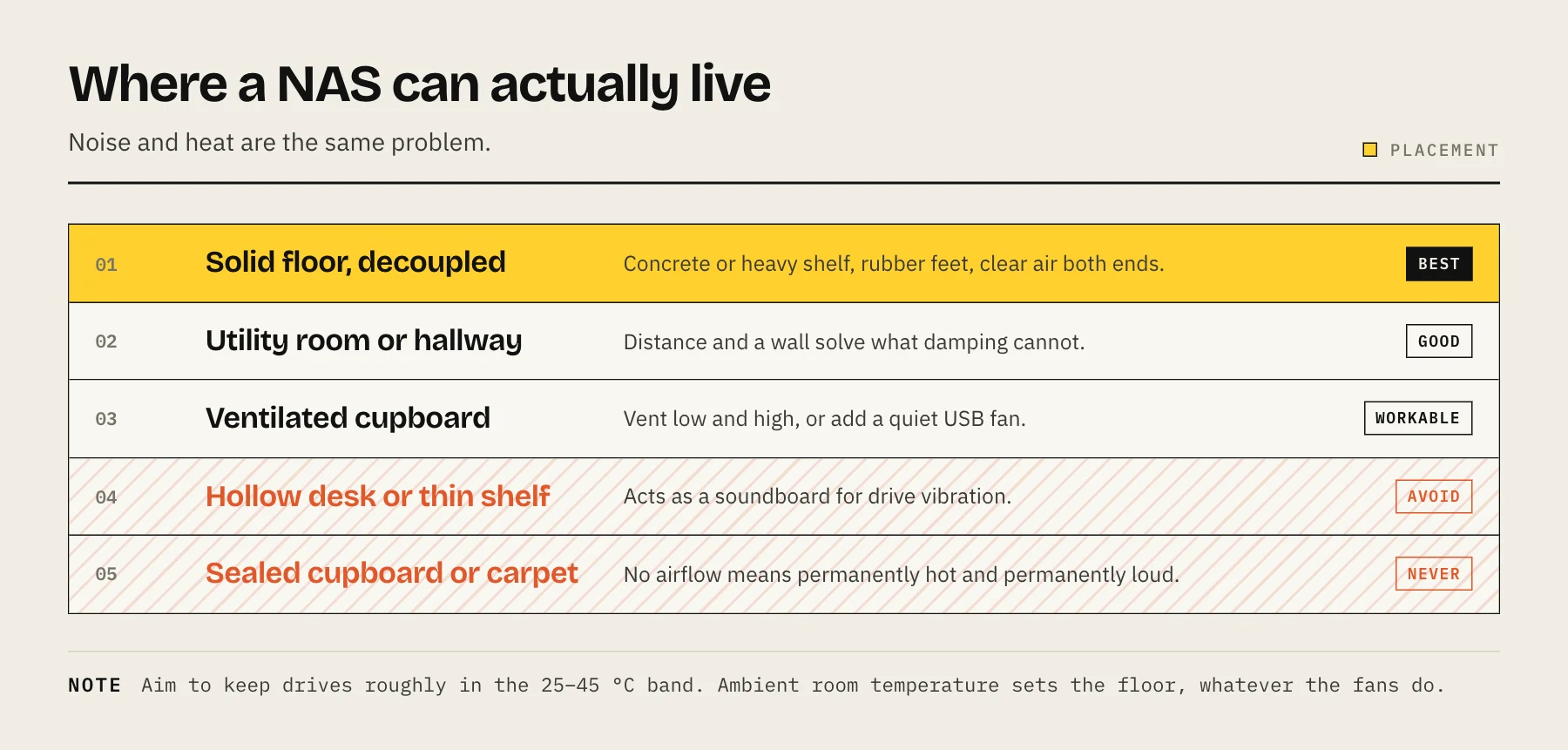
Noise from a home NAS is mostly drive vibration transmitted into furniture, not fan noise. Put it on something solid and decoupled, not on a hollow desk or a shelf that resonates. Keep drives in the 25–45 °C band with real airflow, and never put a NAS in a sealed cupboard. The two problems are related: throttled airflow means faster fans, which means more noise.
A NAS that lives in a cupboard because it is annoying, and then cooks itself because the cupboard has no airflow, is the single most common home NAS installation mistake. Both halves are fixable.
Where the noise actually comes from
Drive vibration is usually the loudest component, and it is the one people misdiagnose. Multiple spinning disks produce a low-frequency hum that couples into whatever the chassis is sitting on. A hollow desk, a thin shelf or a laminate floor acts as a soundboard and can be substantially louder than the NAS itself.
Seek noise — the chattering during heavy I/O — is drive-dependent. Higher-RPM and higher-capacity enterprise drives are generally louder than consumer NAS drives.
Fan noise rises with temperature. A NAS with adequate airflow runs its fans slowly and is close to silent. The same unit in a restricted space runs them hard, which is why heat and noise are the same problem.
Coil whine from the power supply is occasional and not something you can tune away.
Placement: what works
On a solid surface, decoupled. A concrete floor, a heavy shelf, or a piece of stone tile under the unit. Cheap sorbothane or rubber isolation feet under the chassis break the vibration path and often make a bigger difference than anything else you can do for free.
With clear air front and back. Most desktop NAS units draw air through the front, across the drives, and exhaust at the rear. Leave a hand's width of clear space at both ends.
Out of the living space if convenient. A utility room, a hallway cupboard with the door louvred or left ajar, a basement, or a garage in a temperate climate. Distance and a wall solve what damping cannot.
On a floor, not a desk. Low frequencies drop off with distance and desks amplify them.
Placement: what to avoid
A sealed cupboard. Without airflow, the cupboard's internal temperature rises until it stabilises well above room temperature, and the NAS runs permanently hot. If a cupboard is the only option, ventilate it — a vent at the bottom and one at the top gives passive convection, and a quiet USB fan makes it reliable.
Carpet. It blocks bottom intakes and traps heat. If the NAS must go on a carpeted floor, put a hard board underneath.
Direct sunlight or next to a radiator. Obvious, routinely done.
A dusty floor-level corner. Dust is a slow-acting thermal problem. Every few months, power down and clear the intake grille and fan blades.
An unheated garage or loft in a cold climate. Manufacturers specify a minimum operating temperature too — typically 0–5 °C for NAS drives. Condensation on a cold drive brought into a warm room is a genuine failure mode.
Temperature: what is actually fine
Aim to keep drives roughly in the 25–45 °C band under normal operation. Brief excursions above that during a rebuild or a scrub are not a crisis; sustained operation at the top end is what shortens life.
Where to look:
- Synology: Storage Manager → HDD/SSD shows per-drive temperature, and Control Panel → Hardware & Power sets fan behaviour.
- QNAP: the dashboard and System Status pages.
- TrueNAS / Linux:
smartctl -A /dev/sdXand read attributes 190/194.
Note that ambient room temperature sets the floor. A NAS in a 30 °C room in summer will never run as cool as one in a 18 °C hallway, regardless of fans. If your drives creep up in summer, that is the room, not the unit.
Temperature is not a failure predictor on its own — the counters in our SMART attributes guide are what actually correlate with failure. Treat temperature as an environmental control, not an alarm.
Quietening a NAS that is already annoying
In order of effort-to-benefit:
1. Move it and decouple it. Free, and usually the largest single improvement. Try the floor, on a hard surface, on rubber feet.
2. Set the fan profile to Quiet or Cool. Most NAS firmware offers preset fan curves. If the drives are comfortably in range, the quieter profile costs a few degrees for a meaningful noise reduction. Check temperatures for a week afterwards.
3. Enable disk hibernation — carefully. Spinning drives down when idle silences the unit completely. The trade-off is spin-up latency and additional start-stop cycles, and if something on your network touches the array every few minutes the drives will cycle constantly, which is worse for them than staying spun up. Only enable this if the NAS is genuinely idle for long stretches, and check the start-stop count in SMART afterwards.
4. Replace the stock fan. On many units the case fan is a standard 92 mm or 120 mm size, and a quality quiet fan is a cheap upgrade. Check whether it voids your warranty first.
5. Choose quieter drives next time. Consumer NAS drives are generally quieter than enterprise models. This is a purchase decision, not a fix — see our NAS hard drive guide.
6. Consider all-flash. SSDs eliminate vibration and seek noise entirely. Expensive per terabyte, and endurance needs thinking about — see NAS SSD endurance — but for a NAS in a bedroom or a studio it is the only truly silent answer.
The power question
Where the NAS lives affects what it costs to run. An always-on four-bay unit with spinning drives typically draws around 25–40 W while the drives are active and under 10 W with them hibernating (Synology rates the DS423+ at 28.3 W in access and 8.45 W in HDD hibernation), and that is a bill you pay every hour of every year. Our NAS power cost calculator turns that into a number for your electricity rate. Placement that lets the drives spin down for genuinely idle periods saves both noise and money — where the workload permits it.
FAQ
Is 50 °C too hot? It is above the comfortable band but not an emergency. Look at airflow and dust first, then ambient temperature. Sustained 55 °C+ warrants action.
Should I use disk hibernation? Only if the NAS is idle for hours at a time. Frequent spin-up/spin-down cycles add wear, and many services — monitoring, indexers, backup agents — poke the disks often enough to prevent it working anyway.
Do rubber feet really help? Noticeably, when the noise is vibration coupling into furniture. They do nothing for fan noise.
Can I put a NAS in a rack cabinet in a bedroom? A closed rack without ventilation has the same problem as a cupboard. A rack with a quiet exhaust fan and a solid door reduces noise well and manages heat properly.
Sources
- DS423+ Product Specifications (fan modes, power consumption) — Synology
- HDD Hibernation (DSM help) — Synology
- IronWolf 16TB data sheet — Seagate
- WD Red Plus product brief — Western Digital
- Failure Trends in a Large Disk Drive Population — Google Research