Use SMB for anything a human touches — Windows, macOS, phones, mixed households. Use NFS for machine-to-machine mounts on Linux, such as a hypervisor's datastore or a container host. Modern SMB3 is fast enough that "NFS is faster" is no longer a good reason to pick it, and NFS's weak default security is a good reason not to.
Both protocols share files over the network and both work on every mainstream NAS. The difference that matters in practice is not throughput — it is who is asking, and how identity is handled.
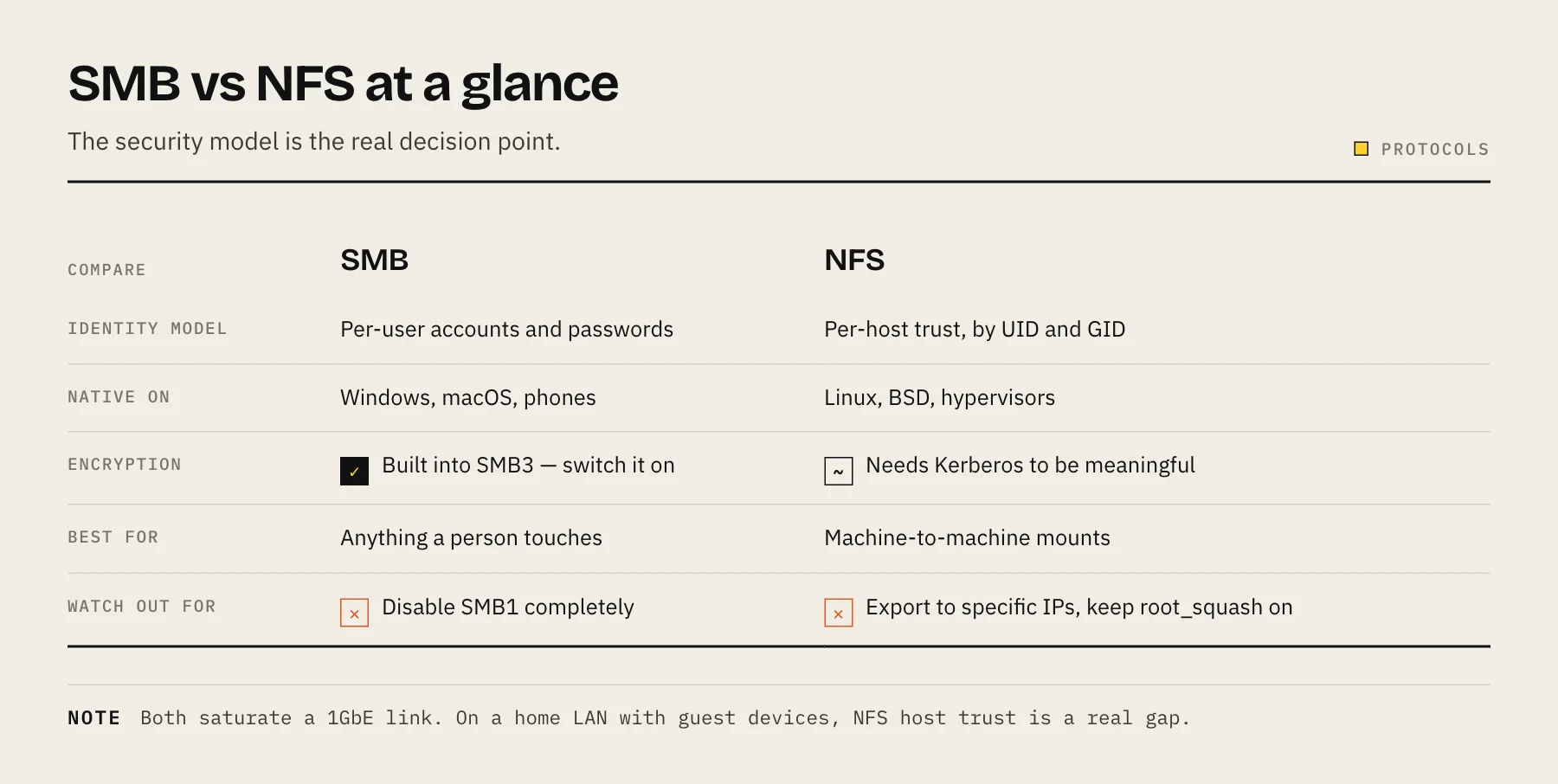
The short version
| SMB | NFS | |
|---|---|---|
| Native on | Windows, macOS | Linux, BSD, ESXi |
| Identity model | Per-user accounts and passwords | Traditionally per-host, by UID/GID |
| Encryption | Built into SMB3, easy to enable | Requires Kerberos (sec=krb5p) |
| File locking | Robust, well-tested | Works, historically more fragile |
| Mixed-OS household | Excellent | Painful |
| Hypervisor / container storage | Workable | Usually preferred |
The security difference is the real decision point
This is where most of the argument should end.
SMB authenticates users. A client presents a username and password; the server decides what that account may see. Every mainstream OS has a credential manager for it. SMB3 also offers in-transit encryption you can switch on per share.
Classic NFS (v3) authenticates hosts. The export says "10.0.0.0/24 may mount this", and once mounted, the client's own kernel decides which UID is accessing the file. If someone controls a machine on that subnet — or just sets their local UID to 1000 — they are that user. There is no password anywhere in this exchange.
That model is fine inside a rack where every host is under your control. On a home LAN with guest devices, IoT gear and a teenager's laptop, it is a meaningful hole.
NFSv4 with Kerberos (sec=krb5p) fixes this properly, with real authentication and encryption. It also requires running a KDC and keeping clocks in sync, which is a lot of machinery for a home NAS. Most people who "use NFSv4" at home are still using sec=sys, which is the old host-trust model with a newer version number.
Performance: mostly a tie now
The folklore that NFS is dramatically faster comes from an era of SMB1 and single-threaded transfers. On modern hardware with SMB3 and multichannel, sequential throughput on both protocols will saturate a 1 GbE link without effort and get close on 2.5 GbE.
Where genuine differences show up:
- Many small files. SMB's metadata round-trips have historically cost more here, though SMB3 improved it considerably. If you routinely copy source trees or photo libraries with tens of thousands of files, benchmark both on your own hardware rather than trusting a forum post.
- SMB Multichannel can aggregate multiple NICs or use RSS on a single fast NIC, which helps on 10 GbE. Our 2.5GbE vs 10GbE guide covers when the network is even your bottleneck — often it is not, because the drives are.
- NFS with
asynclooks dramatically faster in benchmarks because the server acknowledges writes before they hit disk. This is a data-integrity trade, not free speed. Do not enable it for anything you care about.
For a home NAS with spinning disks, the drives set the ceiling long before the protocol does.
When to pick NFS anyway
Proxmox, ESXi or another hypervisor mounting a datastore. These expect NFS, the integration is mature, and the hosts are trusted infrastructure you control.
Container hosts mounting application data. Docker and Kubernetes volume drivers handle NFS cleanly. That said, database files over any network filesystem are a known source of locking pain — keep Postgres, MariaDB and SQLite on local storage and use the network share for bulk data.
Linux-only workloads where you want native POSIX permission semantics without SMB's identity mapping layer in between.
When to pick SMB
Anything with a person in front of it. Windows Explorer, macOS Finder, phone file managers and every "connect to server" dialogue speak SMB natively. No client packages, no /etc/fstab, no UID alignment.
Time Machine backups. macOS uses SMB for network Time Machine destinations. See our Time Machine to NAS guide.
Mixed households. One share, one set of user accounts, everything works. This alone settles it for most home setups.
Configuration that actually matters
Disable SMB1 completely. It is obsolete, insecure and disabled by default on current operating systems for good reason. Set the minimum protocol to SMB2 or SMB3 in your NAS settings.
Enable SMB encryption for shares that leave the house — or better, do not let shares leave the house at all. Neither protocol belongs on the open internet. Reach them over Tailscale instead of forwarding port 445, which is one of the most heavily scanned ports there is.
Restrict NFS exports narrowly. Export to specific IPs, not whole subnets. Use root_squash (the default — leave it on) so a remote root user is mapped to an unprivileged account.
Align UIDs and GIDs for NFS. If the NAS thinks your files belong to UID 1000 and the client's UID 1000 is a different person, permissions will behave bizarrely. This is the same class of problem as container permissions — see Docker PUID and PGID explained.
Do not use both on the same share
You can technically export one folder over SMB and NFS simultaneously, and most NAS platforms will let you. Avoid it. The two protocols have different locking and permission models, and concurrent writes from both sides can produce corruption or lost updates that neither side reports.
If you genuinely need both, use separate directories, or accept that one protocol is read-only.
FAQ
What about AFP? Apple deprecated it years ago and modern macOS uses SMB for everything including Time Machine. If your NAS still offers AFP, turn it off.
Is iSCSI a third option? It solves a different problem. iSCSI presents a block device rather than a file share — one client owns it exclusively, formats it with its own filesystem, and no other machine can mount it concurrently without a cluster filesystem. Good for a VM disk, wrong for a family media folder.
Does SMB work well on Linux? Yes. cifs-utils mounts SMB shares reliably, and credentials in a .credentials file with 0600 permissions keep passwords out of /etc/fstab.
Why is my transfer slow on both? Check the drives before the protocol. A single spinning disk sustains roughly 100–200 MB/s sequentially and far less on random I/O, which is already at or below 1 GbE line rate.
Sources
- SMB security enhancements (SMB Encryption) — Microsoft Learn
- SMBv1 is not installed by default in Windows — Microsoft Learn
- exports(5) — Linux manual page — man7.org / Linux man-pages
- Backup disks you can use with Time Machine — Apple Support