Use a private mesh VPN like Tailscale for everything you access yourself — it reaches your NAS from anywhere without opening a single port and works behind carrier-grade NAT. Add Cloudflare Tunnel only when someone needs a public HTTPS URL without client software (not for video streaming — Cloudflare's terms restrict it), or a self-hosted reverse proxy when you want a public service on your own terms and will own the patching. Never port-forward the NAS admin panel.
There are only three real ways to reach a NAS from outside your house. They solve the same problem — getting a connection from outside to a service inside — but they differ enormously in how much of your box the internet can see, how much work they take, and who sits in the middle.
Option 1 — Tailscale and other mesh VPNs (the default answer)
What it is. An overlay network built on WireGuard. Each device runs a client, authenticates against your identity provider and gets a stable private address. Connections go peer-to-peer where the network allows, falling back to encrypted relays when it does not.
Exposure: effectively zero. No inbound port, no public listener, nothing for a scanner to find. Services are reachable only by devices you have authorised.
Effort: the lowest of the three. Install the client, log in, done. No router configuration, no dynamic DNS, no certificates to renew — and it works behind CGNAT, where port forwarding is impossible.
Limits: every device you connect from needs the client installed. Phones, tablets, laptops and Android TV are fine. A hotel lobby PC, a games console or a relative's browser is not.
Use it for: NAS admin panels, SSH, SMB shares, backup targets — everything you personally access, exactly as if you were at home. This should be your default, and every other option should be justified against it. Setup is covered in our Tailscale NAS guide. If you share access with family, restrict what each device can reach rather than handing out the whole network — see Tailscale ACLs for NAS.
Option 2 — Cloudflare Tunnel
What it is. A connector (cloudflared) on your network makes an outbound connection to Cloudflare's edge. Requests to your hostname arrive at Cloudflare and are passed down that existing connection. No inbound port is ever opened.
Exposure: your home IP stays hidden and Cloudflare absorbs scanning and volumetric attacks. But the service itself is now on the public internet — anyone who finds the hostname reaches your login page. Cloudflare Access can put an authentication layer in front, and if you expose anything sensitive you should use it.
Effort: moderate. You need a domain on Cloudflare's nameservers and the connector running reliably.
The caveat that matters: Cloudflare's service-specific terms say that, unless you are an Enterprise customer, you must use specific paid services (such as Stream) to serve video and other large files via the CDN, and Cloudflare may restrict traffic it suspects is serving video or a disproportionate share of pictures, audio or other large files without them. Media server traffic through a free tunnel sits squarely in that territory. Check Cloudflare's current terms yourself before building a household's media access on it.
Use it for: a public web app that is genuinely web-shaped — a document system, a wiki, a status page. Not Jellyfin or Plex.
Option 3 — A self-hosted reverse proxy with HTTPS
What it is. Caddy, Nginx Proxy Manager or Traefik on your network, with ports 80 and 443 forwarded to it. It terminates TLS with an automatically renewed Let's Encrypt certificate and routes by hostname to individual services on the LAN, giving you a normal https://app.yourdomain.com URL that works in any browser.
Exposure: the highest of the three. Your home IP is public and the proxy is directly reachable. That is manageable, but it is your responsibility: keep the proxy and every application behind it patched, use strong authentication everywhere, and ideally put an authentication layer or fail2ban-style blocking in front.
Effort: the highest, and ongoing rather than one-off. Control: also the highest — no third party in the path and no terms of service constraining what you serve.
Use it for: self-hosted services you want publicly available on your own infrastructure, including media servers where a tunnel's terms would be a problem. Expose individual applications, never the NAS control panel — a public Jellyfin or Nextcloud login page is a reasoned decision; a public DSM or QTS login page is the keys to everything. Our reverse proxy explainer covers the concepts.
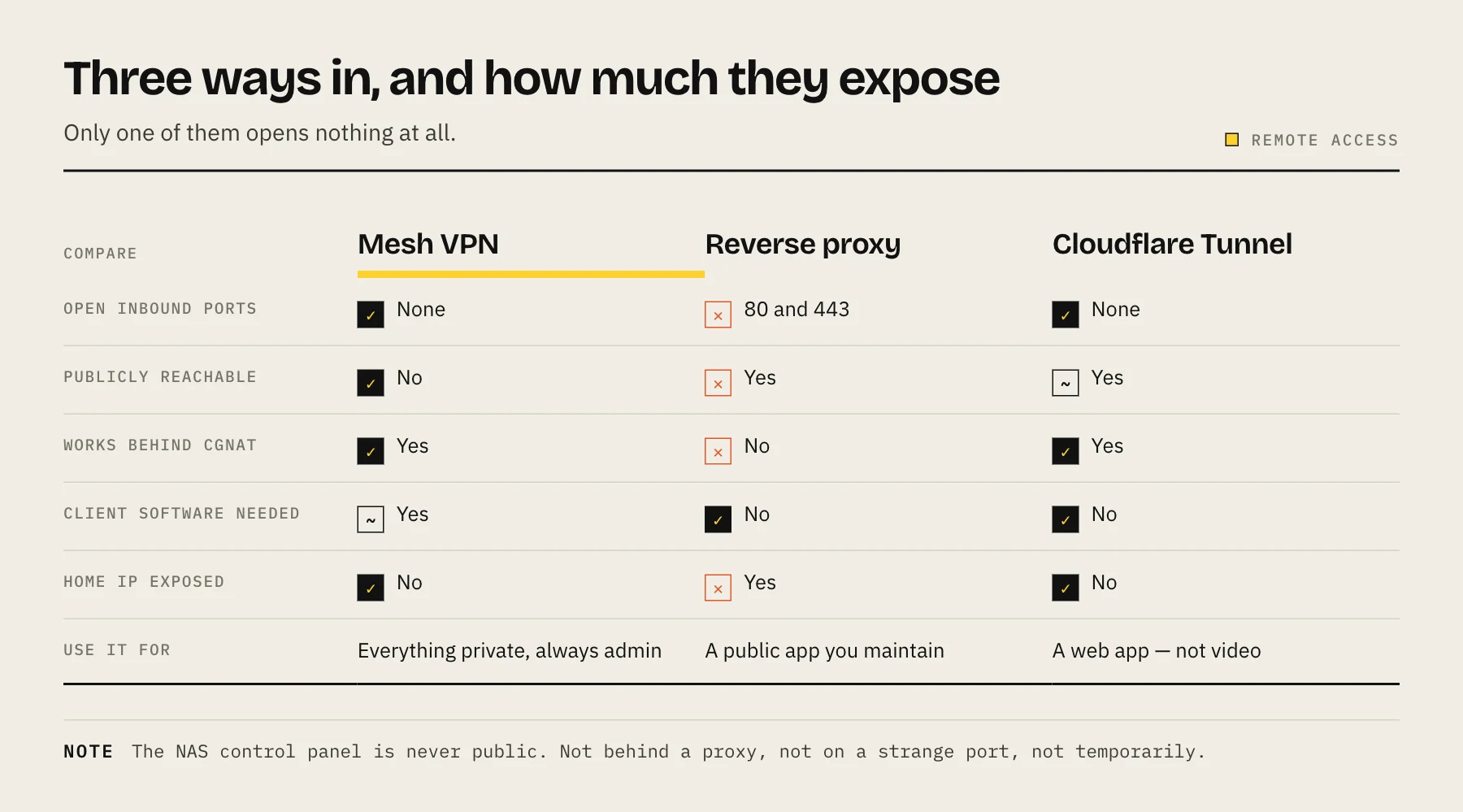
Tailscale vs Cloudflare Tunnel vs reverse proxy, side by side
| Tailscale | Cloudflare Tunnel | Reverse proxy | |
|---|---|---|---|
| Open inbound ports | None | None | 80 / 443 |
| Publicly reachable | No | Yes | Yes |
| Works behind CGNAT | Yes | Yes | No |
| Client software needed | Yes | No | No |
| Home IP exposed | No | No | Yes |
| Third party in the path | Relay fallback only | Always | No |
| Content restrictions | None | Yes — check current terms | None |
| Ongoing maintenance | Minimal | Low | Meaningful |
Which one should you use?
| You want | Use |
|---|---|
| Personal access from your own devices | Mesh VPN |
| Admin access of any kind | Mesh VPN, always |
| A public app for non-technical people | Reverse proxy or Cloudflare Tunnel |
| A public web app without exposing your home IP | Cloudflare Tunnel |
| Remote media streaming | Mesh VPN, or a reverse proxy |
Most people converge on a layered arrangement:
- Everything private over a mesh VPN. NAS admin, SSH, SMB shares, backup targets, container dashboards. None of it should ever be public.
- One or two genuinely public services behind whichever public option suits them — a tunnel for a web app, a reverse proxy for media.
- Nothing else forwarded. Audit the router's port-forwarding and UPnP tables and delete anything you cannot explain.
What not to do
Do not port-forward the admin panel. DSM, QTS, TrueNAS, Unraid — none of these belong on the public internet, not behind a tunnel, not behind a proxy, not on a non-standard port. Scanners sweep the entire port range continuously.
Do not enable DMZ. It forwards everything to one host. There is no home scenario where this is correct.
Do not forward SMB (445) or NFS. These protocols were designed for trusted local networks and are among the most attacked ports there are.
Do not leave vendor relay services enabled if you are not using them. They are convenient for occasional admin, but each one is another externally reachable path into the appliance.
Do not rely on UPnP. It lets applications open ports without telling you. Disable it on the router and audit what is already open.
Hardening, whichever route you choose
- A named admin account with a long unique password, and the default
adminaccount disabled. - Multi-factor authentication on every administrator account.
- Automatic account lockout after failed login attempts.
- Keep the OS, packages and containers patched. Remote access does not make outdated software safe.
- Least privilege. The account you use remotely does not need write access to everything.
- Read the login logs occasionally. Unexpected sources are the earliest signal you will get.
These are the same controls that matter for protecting a NAS from ransomware, because remote access is how most of it arrives.
FAQ
Is a WireGuard VPN on my router the same as Tailscale? Functionally similar and fully self-hosted, but you manage keys manually and need an open UDP port, which rules it out behind CGNAT.
Can I use Cloudflare Tunnel and Tailscale together? Yes, and it is a common pairing: the tunnel for the one service outsiders need, Tailscale for everything else.
Does Tailscale see my traffic? Direct peer connections are end-to-end encrypted between your devices. Traffic that falls back to a relay is still end-to-end encrypted; the relay forwards ciphertext. The coordination server handles key exchange and device authorisation.
Is my NAS vendor's remote access service safe? It is convenient and generally reasonable for occasional admin, but it depends on the vendor's infrastructure and widens your exposure. A mesh VPN puts you in control of the path.
Can I access SMB shares over Tailscale? Yes — the share behaves as if you were on the LAN. Performance depends on your home upload speed, so large transfers will be slow.
What if my ISP uses CGNAT? Port forwarding is impossible. A mesh VPN or an outbound tunnel are your options.
Which is fastest? A direct Tailscale connection is usually closest to line rate. A tunnel adds a hop through Cloudflare's edge. A reverse proxy is direct but limited by your upload speed — as all of them ultimately are.
How do I know if something is already exposed? Check the router's port-forwarding and UPnP tables and your NAS's own external-access settings. Delete anything you cannot justify.
Sources
- Cloudflare Tunnel — Cloudflare Docs
- Access policies — Cloudflare Docs
- Service-Specific Terms – Application Services (CDN) — Cloudflare
- DERP servers — Tailscale
- How NAT traversal works — Tailscale
- #StopRansomware Guide (block TCP 445 at the perimeter) — CISA