
Homelab & Home Server
2.5GbE vs 10GbE for NAS: Is the Upgrade Worth It?
Compare real NAS throughput, cabling, switches, SSD and HDD limits, client count and total upgrade cost for 2.5GbE versus 10GbE.
Quick answer: 2.5GbE is the value upgrade for backups, media and one or two home clients; it can move roughly 250–280 MB/s under good conditions. 10GbE is worth it for SSD pools, large creator files, fast workstation backups or several simultaneous users—but only after the NAS storage, client and switch can sustain it.
Headline line rate is not file-copy speed. Ethernet framing, TCP, SMB/NFS, disks, CPU, encryption and small files reduce throughput.
Realistic planning numbers
| Link | Theoretical | Good large-file planning range | 100 GB at 80% line rate |
|---|---|---|---|
| 1GbE | 125 MB/s | 105–118 MB/s | ~17 minutes |
| 2.5GbE | 312.5 MB/s | 250–290 MB/s | ~6.7 minutes |
| 10GbE | 1,250 MB/s | 850–1,100 MB/s | ~1.7 minutes |
The table is a planning model, not a guarantee. A folder with hundreds of thousands of files can be dramatically slower.
Storage must feed the network
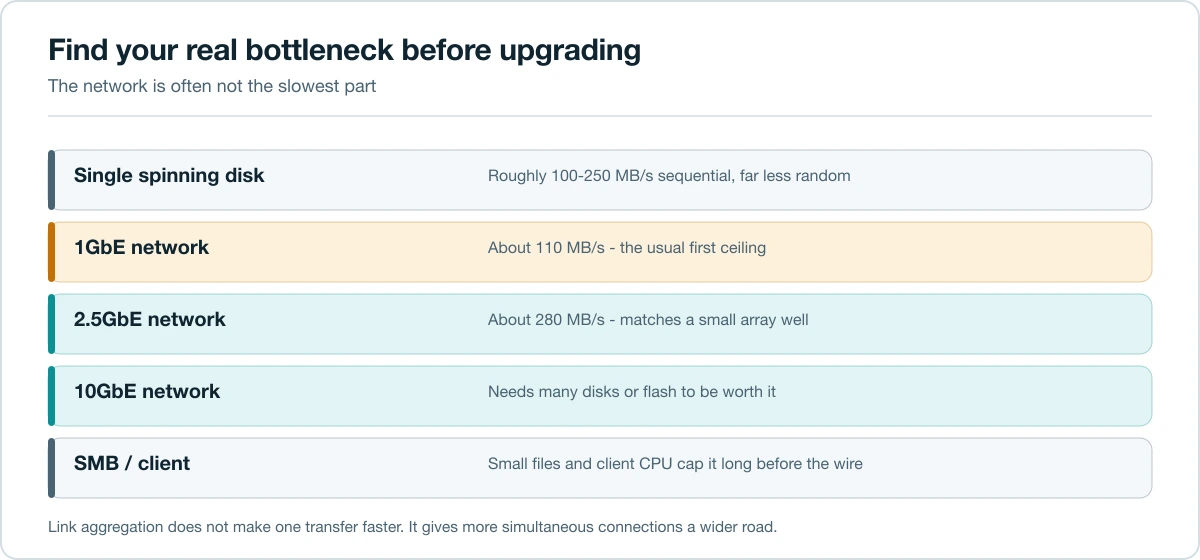
A single HDD often sustains roughly the same order of throughput as 2.5GbE for sequential work, but random I/O and inner tracks can be slower. Multiple HDDs in an array can feed faster sequential transfers. An SSD pool can justify 10GbE, while a single slow disk cannot.
For backups compressed or encrypted by a weak NAS CPU, the processor may cap speed before the link. Measure CPU, disk and network utilization during the actual workload.
When 2.5GbE is the right answer
- The NAS already has a 2.5GbE port.
- One desktop performs large backups or media transfers.
- Existing Cat5e cabling is short and in good condition.
- The storage pool sustains 200–300 MB/s.
- You want fanless, low-power switching.
2.5GbE often works over existing Cat5e, though installation quality and distance matter. It is a meaningful upgrade from 1GbE without rebuilding the entire network.
When 10GbE earns its cost
- Video/photo projects live directly on the NAS.
- Workstations have NVMe storage and frequently move 100+ GB datasets.
- Several users need high aggregate throughput.
- The NAS has an SSD pool or sufficiently fast multi-disk array.
- Backup windows must shrink substantially.
10GbE also provides headroom: three 2.5GbE clients can collectively exceed one 2.5GbE uplink to the NAS. A 10GbE NAS uplink prevents that bottleneck even if no single client uses 10GbE.
Copper or fiber/DAC?
10GBASE-T (RJ45) is familiar and can use suitable copper cabling, but adapters and switches often consume more power and run hot. SFP+ DAC is inexpensive and low-latency for short rack/desk runs. Fiber handles distance and electrical isolation but adds transceivers.
Choose one physical ecosystem before buying. A cheap used SFP+ card is not a bargain if the switch, transceivers and client cannot connect to it.
Calculate the complete upgrade
Include:
- NAS NIC or supported adapter.
- Client NIC/Thunderbolt adapter.
- Switch ports and uplinks.
- Cables or optics.
- Potential SSD/RAM upgrades.
- Power, noise and driver support.
A direct 10GbE link between one workstation and NAS can avoid a 10GbE switch, using separate IP addressing while ordinary traffic stays on the main LAN. This is useful but adds routing and troubleshooting complexity.
Link aggregation is not one faster connection
Two 1GbE or 2.5GbE ports can improve aggregate throughput across multiple clients and provide resilience when the switch and protocol are configured correctly. A single ordinary SMB transfer usually stays on one flow and does not automatically become twice as fast. SMB Multichannel can use multiple paths on supported clients and servers, but verify implementation rather than assuming.
Test before upgrading
- Use iperf3 between NAS and client to test network capacity without disk I/O.
- Test a large sequential file from a fast source/destination.
- Test the real small-file or backup workload.
- Watch disk, CPU, memory and network graphs.
- Change one bottleneck at a time.
If iperf3 reaches line rate but file copies do not, the network is not the first problem. If both are slow, inspect negotiation speed, cable quality, drivers, MTU and switch configuration.
Do you need jumbo frames?
Not usually. Modern CPUs can handle standard MTU at home speeds. Jumbo frames require every device on the path to agree and can create confusing failures. Start with MTU 1500, prove performance, and change only with a measured reason.
Recommendation by user
- Family backup/media NAS: 2.5GbE.
- Single creator with HDD array: start at 2.5GbE; measure before 10GbE.
- SSD NAS/workstation editing: 10GbE.
- Several 2.5GbE users: 10GbE uplink to NAS/switch core.
- Remote access: internet upload is likely the bottleneck; faster LAN does not fix it.
Pair networking with the right chassis using How Many NAS Drive Bays Do You Need?. For a separate compute/storage design, see What Is a Homelab?.
A simple bottleneck diagnosis
During a slow transfer, record four percentages: link utilization, NAS CPU, disk busy/latency and client disk utilization. A saturated link suggests faster networking may help. A pegged CPU points to protocol/encryption/compression. High disk latency points to storage. A slow client cannot validate NAS speed.
Multi-client example
Three desktops each backing up at 180 MB/s demand 540 MB/s aggregate. A 2.5GbE NAS uplink cannot deliver that even though each client individually fits below 2.5GbE. A 10GbE uplink with 2.5GbE edge ports can be a cost-effective design: fast aggregate capacity without 10GbE adapters on every client.
FAQ
Will 10GbE make Plex faster? Streaming usually needs far less bandwidth. It helps large library copies and multiple users, not ordinary playback.
Is Cat5e enough for 10GbE? Do not assume. 10GBASE-T cabling requirements depend on category, distance and installation quality; certified Cat6A is the conservative choice for full channel length.
Does 2.5GbE require a new router? Not if a suitable switch connects NAS and clients. Routing speed matters only for traffic crossing networks/internet.
Should I enable flow control or jumbo frames? Start with vendor defaults and MTU 1500. Tune only after establishing a baseline and understanding the whole path.
Can Wi-Fi use the full link? Real Wi-Fi throughput and stability vary. Wired Ethernet is the better benchmark and the better choice for sustained backups.
Upgrade sequence
- Measure current storage and CPU limits.
- Add a 2.5GbE direct/switch path if it solves the target workload.
- Upgrade NAS uplink for multi-client aggregation.
- Move to 10GbE clients only where transfer-time savings justify cost.
This sequence avoids buying a hot, expensive network to serve a storage pool that cannot exceed 200 MB/s.
Power and acoustics belong in the comparison
Multi-gig switches and 10GBASE-T adapters can run warmer than 1GbE/2.5GbE equipment, sometimes requiring active fans. Check idle power and fan behavior before placing a switch near a desk or bedroom. SFP+ DAC equipment is often cooler for short links, but compatibility lists matter. Over five years, an extra 20 watts used continuously consumes about 876 kWh, so the cheapest used switch can cost more than a newer efficient model once power and noise are included. Include spare ports, warranty, driver support and compatible optics in the same comparison.
Before ordering, draw the complete path from client NIC through every switch uplink to the NAS and label the negotiated speed of each segment. One forgotten 1GbE uplink can cap the entire upgrade, even when both endpoints advertise 10GbE.
Related guides
Last reviewed: July 2026.