The "*arr" stack is a set of tools that automate managing a media library: Sonarr for TV, Radarr for films, Prowlarr to manage indexers, Bazarr for subtitles, and a download client underneath. They organise, rename and file media so a media server can read it. What you point them at is entirely your responsibility — use them with sources you are legally entitled to.
Understanding the stack is mostly understanding that each tool does one narrow job and hands off to the next. Once the chain is clear, the configuration stops being mysterious.
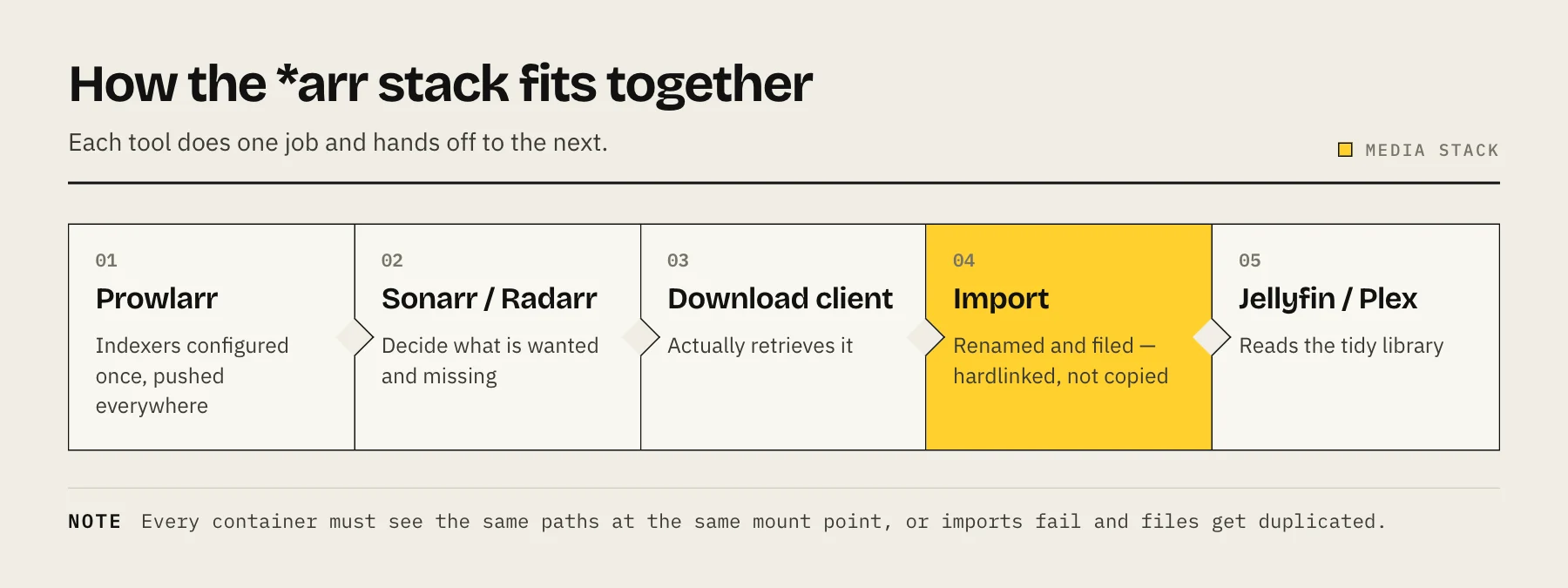
What each piece does
Prowlarr — indexer manager. You configure your sources once here, and it pushes them to every other app. Before Prowlarr, you configured the same indexers separately in each application, which is exactly as tedious as it sounds.
Sonarr — TV series. Tracks what you follow, knows which episodes you have, watches for what you do not, and hands requests to the download client. Then renames and files the result.
Radarr — the same, for films.
Bazarr — subtitles. Watches what Sonarr and Radarr have and fetches matching subtitle files.
A download client — the thing that actually retrieves files. The *arr apps do not download anything themselves; they instruct a client and monitor it.
A media server — Jellyfin or Plex, which reads the tidy library and presents it. See Jellyfin vs Plex.
Optionally Seerr (the merged successor to Overseerr and Jellyseerr) — a request interface, so household members ask for something in a friendly UI instead of asking you.
The single most important configuration detail
More people get stuck on this than on everything else combined: all the containers must see the same paths.
If your download client saves to /downloads internally but Sonarr sees that same folder as /data/downloads, Sonarr cannot find the completed file. It will report an import failure that reads like a permissions problem and is not.
The fix is a consistent layout across every container:
/volume1/data/
├── downloads/       # download client writes here
└── media/
    ├── movies/      # Radarr files here
    └── tv/          # Sonarr files here
Mount /volume1/data as /data in every container in the stack. Same mount point, same path, everywhere.
The reason this matters beyond convenience: when the download folder and the media folder are on the same filesystem, importing is an instant hardlink rather than a full copy. Get the paths wrong and every import duplicates the file, doubling your storage use.
Permissions
Every container in the stack needs to read and write the same folders as the same user. Set PUID and PGID identically across all of them, and make sure that user owns the data tree.
Mismatched IDs produce a stack that appears to work until an import silently fails. See Docker PUID and PGID explained.
A sensible setup order
- Create the folder structure and set ownership.
- Deploy the download client, confirm it writes where you expect.
- Deploy Prowlarr, add your indexers.
- Deploy Sonarr and Radarr, connect them to Prowlarr and to the download client.
- Test one item end to end before adding anything else. Watch it move from request to download to renamed file in the media folder.
- Add Bazarr once imports are reliable.
- Point your media server at the media folders.
- Add a request interface last, if you want one.
Do not deploy all seven containers and then debug. Add one, prove the handoff works, add the next.
Quality profiles: start conservative
Quality profiles tell Sonarr and Radarr what to accept. It is tempting to set everything to the maximum.
Two reasons not to:
Storage. 4K remuxes are enormous. A library that would fit comfortably at 1080p may not fit at all.
Transcoding. If your clients cannot direct-play the format you have chosen, your media server transcodes every playback — which is the difference between a silent NAS and one running its fans continuously. See the direct play discussion in our Jellyfin setup guide.
Choose quality that matches your clients and your storage, not the highest number available.
Naming matters more than it looks
Media servers identify content by filename and folder structure. Sonarr and Radarr have sensible default naming schemes — use them.
The recommended shape:
/data/media/tv/Series Name (2019)/Season 01/Series Name - S01E01 - Episode Title.mkv
/data/media/movies/Film Name (2021)/Film Name (2021).mkv
Include the year. It resolves the ambiguity between remakes and same-named titles, which is the most common cause of a media server attaching the wrong metadata.
Resource expectations
The *arr applications are light — each uses a few hundred megabytes of RAM. The load comes from elsewhere:
- The download client is I/O-heavy.
- The media server is CPU-heavy when transcoding.
- Library scans on a large library are disk-intensive.
A modest NAS runs the whole stack. What actually strains it is media transcoding, not the automation — see how much RAM a NAS needs.
Legal note
These tools are general-purpose automation. They index, retrieve, rename and organise — the same operations a podcast client performs. What you configure them to fetch, and whether you have the right to it, is entirely your responsibility and varies by country.
Use them with content you own, have licensed, or that is publicly and legally available.
Common problems
"Import failed" or files stuck in the download folder — path mismatch between containers. Check that every container sees the same tree at the same mount point.
Files copied instead of hardlinked, storage filling up — downloads and media are on different filesystems, or the paths differ. Same fix.
Nothing is found — Prowlarr's indexers are not syncing. Check the connection between Prowlarr and the other apps.
Permission denied on import — PUID/PGID mismatch, or the data folder is not owned by that user.
Media server shows nothing — check its library path points at /data/media/..., and trigger a manual scan.
FAQ
Do I need all of these? No. Start with a download client and one *arr application. Add the rest when you feel the friction they remove.
Can I run this on a Synology? Yes, via Container Manager. Use a Compose file rather than the GUI so the configuration is reproducible.
What about Lidarr and Readarr? Lidarr handles music and follows the same pattern, with more variable metadata quality. Readarr (books) has been retired; its repository was archived in June 2025.
Should I expose this to the internet? No. Keep it on your LAN or behind Tailscale. These interfaces have no business being public.
Sources
- Docker Guide — Servarr Wiki
- How to set up — Docker (hardlinks and folder structure) — TRaSH Guides
- Prowlarr — GitHub
- Readarr (retired, archived) — GitHub
- Seerr Release: Unifying Overseerr and Jellyseerr — Seerr