Use CMR drives in a NAS. SMR packs data more densely by overlapping tracks, which means rewriting one track forces the drive to rewrite its neighbours — fine for archive discs that are written once, potentially disastrous during a RAID rebuild, where sustained random writes can slow a resilver from hours to days or fail it outright.
The distinction is about how data is physically laid down on the platter, and it only becomes visible under exactly the workload a NAS produces during recovery — which is why so many people discovered it at the worst possible moment.
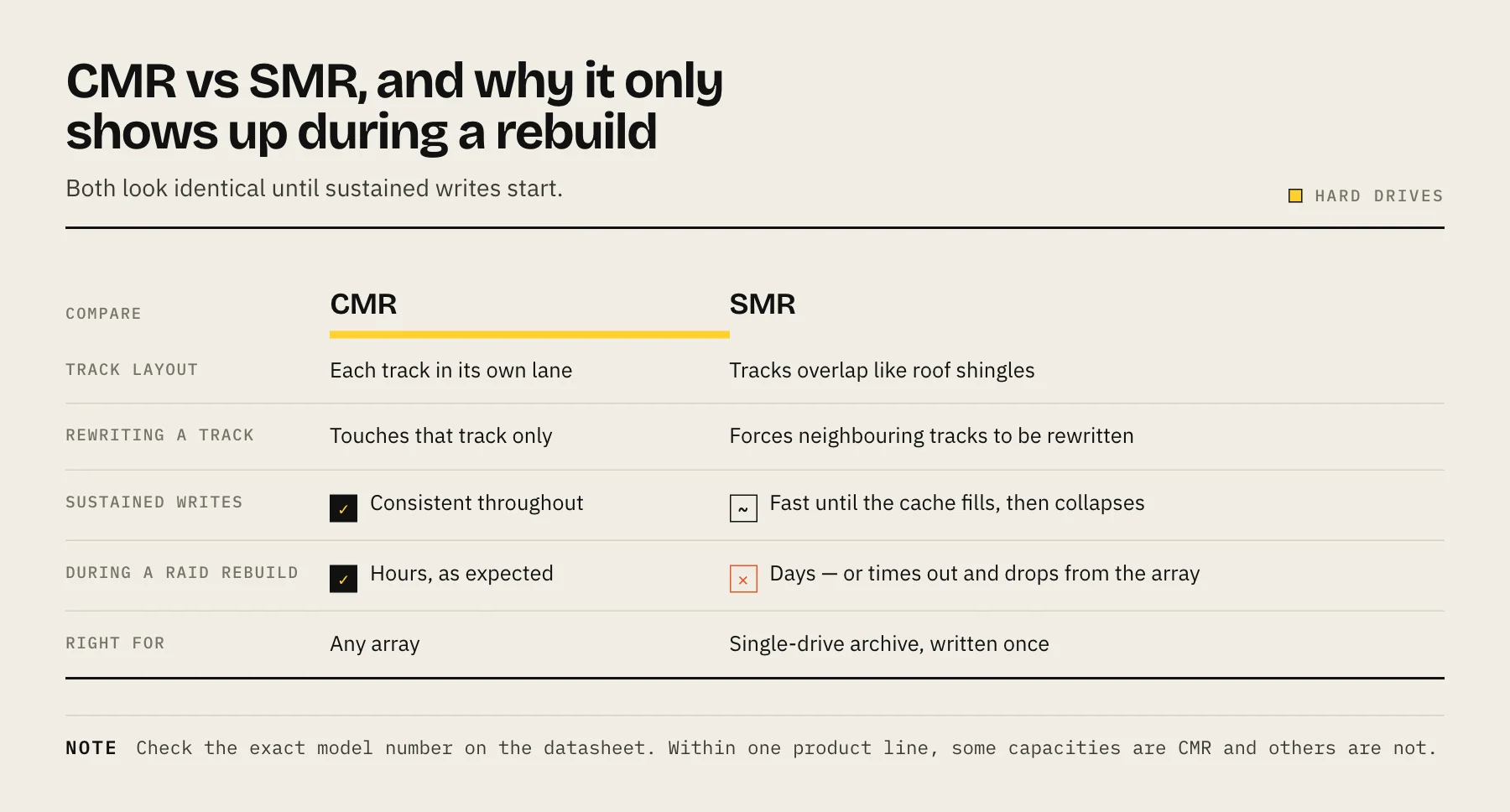
What the two actually do
CMR — Conventional Magnetic Recording. Each track is written in its own lane with a small gap. Rewriting a track touches only that track. Predictable, consistent write performance.
SMR — Shingled Magnetic Recording. Tracks are written overlapping like roof shingles, because the write head is wider than the read head. This fits more data on the same platter. The cost: you cannot rewrite one track without also rewriting every track that overlaps it.
To hide this, SMR drives use a CMR cache region — a conventionally recorded staging area. Incoming writes land there quickly, and the drive later reorganises them into the shingled zones during idle time.
Where it goes wrong
The cache is the whole story. While it has room, an SMR drive performs like a normal disk. When sustained writes fill it and the drive has no idle time to reorganise, throughput collapses — sometimes to a small fraction of normal, for hours.
A RAID rebuild is precisely that workload: continuous writes to the replacement drive for many hours with no idle gaps. Reported outcomes range from rebuilds taking several days instead of several hours, to the drive responding so slowly that the controller times out and drops it from the array — which, on a single-parity array, means losing the pool.
ZFS resilvers are especially unforgiving because the write pattern is more random than a plain sequential rebuild.
This also affects large restores, initial bulk data loads, and moving a media library onto a new array.
The 2020 disclosure problem
For a period, several manufacturers shipped SMR drives without stating it on the spec sheet — most notably Western Digital, inside its NAS-branded WD Red line (2–6 TB). Buyers put them into arrays and discovered the behaviour during a rebuild.
After significant pushback the major manufacturers published which of their models use SMR and improved labelling. The practical consequences today:
- Current spec sheets generally do disclose the recording technology. Check it before buying — do not assume a NAS-branded model is CMR.
- Older stock and used drives may not be labelled. Look up the exact model number, including its suffix.
- Manufacturers maintain published lists of which models use SMR. Check the current one for the specific part number rather than trusting a forum post from years ago.
How to check what you have
Look up the exact model number. Not the family — the full part number. Within one product line, some capacities are CMR and others are SMR.
On Linux: smartctl -i /dev/sdX gives the model number, then check it against the manufacturer's list. Some drives report zoned device characteristics that identify host-managed or host-aware SMR, but drive-managed SMR — the problematic consumer kind — deliberately hides itself from the host.
Behaviourally: a long sustained write that starts fast and then falls off a cliff after tens of gigabytes is the classic signature. This is a diagnosis, not a screening method.
When SMR is genuinely fine
SMR is not a defective technology. It is the wrong technology for arrays.
Good uses:
- Single-drive archive and cold storage, written once and mostly read.
- External backup drives used for periodic full copies where a slower write is acceptable.
- Sequential write workloads with idle time between them, such as surveillance footage in some configurations.
Bad uses:
- Any RAID or ZFS array, especially as a rebuild target.
- Anything with sustained random writes — databases, VM storage, busy application data.
- A drive you might one day need to resilver into an array.
What to buy instead
Choose a NAS-rated CMR drive and confirm the recording technology on the datasheet before ordering. Our best hard drives for NAS guide covers current suitable models.
If you already have SMR drives in an array and it is working, you do not need to panic — but plan to replace them before you need a rebuild, and make sure your backups are current in the meantime. Do not use an SMR drive as the replacement when a disk fails: see how to replace a failed NAS drive.
Does this apply to SSDs?
No. SMR is a magnetic-platter technology. SSDs have their own write-amplification and endurance characteristics, which are a different subject — see NAS SSD endurance: TBW and DWPD.
FAQ
Is SMR always slower? No. Reads are unaffected, and writes are normal speed until the CMR cache fills. It is sustained writes that expose it.
Can I use SMR for a Time Machine target? It will work, but the initial full backup is a long sustained write and may be slow. Incrementals afterwards are usually fine.
Do enterprise drives use SMR? Some do, in host-managed form where the operating system cooperates with the drive's zone layout. That is a different and well-behaved arrangement. The problem is drive-managed SMR in consumer disks, where the drive hides the behaviour.
How do I tell from the product page? Look for "CMR" or "conventional" explicitly stated. If the recording technology is not mentioned at all, check the manufacturer's model list before buying.
Is a mixed array a problem? Yes. The SMR member becomes the bottleneck during any rebuild, and it is the one most likely to time out.
Sources
- WD Red Internal HDD SMR and CMR Network Attached Storage (NAS) Drive Information — Western Digital
- Shingled Magnetic Recording Hard Disks — Zoned Storage (Western Digital-sponsored open project)
- IronWolf Pro 32TB data sheet (All IronWolf Pro drives utilize CMR) — Seagate
- Western Digital admits 2TB-6TB WD Red NAS drives use shingled magnetic recording — Blocks & Files