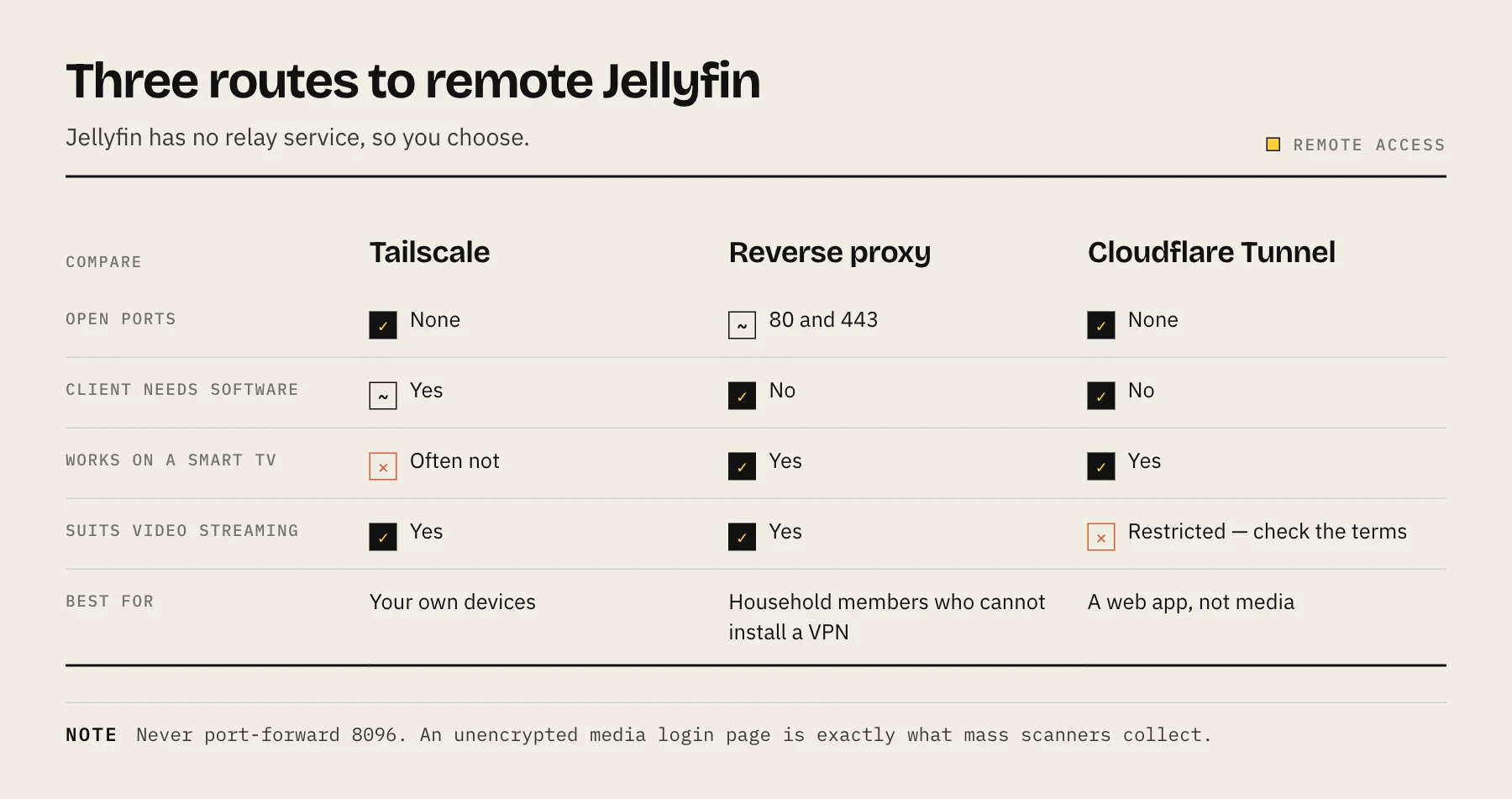
The safest way to watch Jellyfin away from home is a private mesh VPN like Tailscale — no open ports, no public exposure, works on phones and most streaming boxes via the Jellyfin app. Use a reverse proxy with HTTPS only if you need to share with people who will not install a VPN client, and read Cloudflare's terms carefully before tunnelling video through their CDN.
Jellyfin has no built-in relay service. Unlike Plex, there is no vendor middleman that punches through your router for you, which is a privacy advantage and a setup cost at the same time. You have to choose how the traffic gets home.
Option 1 — Tailscale (recommended for personal use)
Tailscale builds an encrypted WireGuard network between your own devices. Nothing is exposed to the public internet, and there are no router changes at all.
- Install Tailscale on the NAS or host running Jellyfin — Synology and QNAP both have packages, and there is an official container for TrueNAS, Unraid and plain Docker. Our Tailscale NAS setup guide walks through it.
- Install Tailscale on the phone, laptop or tablet you want to watch on, signed into the same account.
- Enable MagicDNS, then point the Jellyfin client at
http://your-nas-name:8096.
The trade-off: every viewing device needs the Tailscale client. Phones, tablets, laptops and Android TV handle this fine. Some TV platforms and older streaming sticks do not, which is where the next option comes in.
If you share with family, do not put everyone on your personal tailnet with full access. Use ACLs to restrict guests to the Jellyfin port only — Tailscale ACLs for NAS covers the least-privilege pattern.
Option 2 — Reverse proxy with HTTPS and a real certificate
If you need https://media.yourdomain.com to work on any device with a browser, run a reverse proxy in front of Jellyfin.
The shape of it:
- A domain you control, with an A record pointing at your home IP (or a dynamic DNS hostname).
- Only ports 80 and 443 forwarded to the reverse proxy. Never forward 8096 directly.
- Caddy, Nginx Proxy Manager or Traefik terminating TLS with an automatically renewed Let's Encrypt certificate.
- Jellyfin configured with the correct published server URL and the proxy's IP listed as a known proxy, so redirects and client IPs are right.
Our reverse proxy explainer covers the general setup. For Jellyfin specifically, three things matter:
Set strong passwords and disable the quick-connect flow you do not use. A publicly reachable login page will be found by scanners within days. Every account needs a real password, not a blank one.
Keep it patched. A reverse proxy does not make an outdated Jellyfin safe — it just gives it TLS. Subscribe to release notes and update deliberately.
Do not expose the admin dashboard more widely than you must. The dashboard path after #! is a client-side route that is never sent to the proxy, so it cannot be filtered there; instead untick Allow remote connections to this server for administrator accounts (Users → Edit User) so they can only sign in locally or over the VPN.
Option 3 — Cloudflare Tunnel (read the terms first)
Cloudflare Tunnel gives you a hostname and TLS without opening any inbound port, which is genuinely appealing. But Cloudflare's service-specific terms say that, unless you are an Enterprise customer, serving video and other large files through its CDN requires its dedicated paid services (such as Stream), and that Cloudflare may restrict access otherwise — and people running media servers through the free tier have reported enforcement.
If you want the tunnel's convenience, the workable pattern is to use it for the Jellyfin web UI and API while keeping actual playback on a direct path, or to accept the risk knowingly. Either way, check Cloudflare's current terms yourself before you build a household's media access on top of it, because the policy is theirs to change.
What not to do
Do not port-forward 8096. An unencrypted media server login page on the open internet is exactly the kind of thing mass scanners collect. Traffic is in the clear, including credentials.
Do not rely on your NAS vendor's relay service for this. Vendor quick-connect features are convenient for the admin panel but generally not designed for sustained video throughput, and they widen your exposure surface.
Do not use DMZ mode on the router. It forwards everything, which is the opposite of what you want.
Make remote playback actually work
Getting the connection up is half the problem. The other half is bandwidth.
Your upload speed is the constraint, not download. A 4K HDR remux can be 60–80 Mbit/s; most home connections cannot serve that remotely, so the server transcodes down and the CPU becomes the bottleneck instead.
Two fixes, in order of effectiveness:
- Set a remote bitrate limit per user in Jellyfin (Dashboard → Users → edit the user → Internet streaming bitrate limit (Mbps)). Capping remote streams at something your upload can sustain turns buffering into a slightly softer picture.
- Make sure hardware transcoding is actually engaging. If the dashboard shows a software transcode, playback will stutter and the NAS will run hot. See setting up Jellyfin with Docker for the Quick Sync passthrough, and Best NAS for Jellyfin if the hardware simply cannot keep up.
Keeping a lower-bitrate copy of your most-watched titles is unglamorous but effective — a 1080p version that direct-plays remotely beats a 4K file that transcodes badly.
FAQ
Can I use Tailscale and a reverse proxy together? Yes, and it is a good pattern: Tailscale for you and anyone technical, the proxy for the one relative with a TV that cannot run a VPN client.
Does Tailscale slow down streaming? Direct connections between peers are usually near line rate. If a connection falls back to a DERP relay, throughput drops noticeably — check the connection type with tailscale status or tailscale ping if remote playback feels slow.
Is a VPN on the router enough? A VPN server on your router works and is conceptually similar, but it needs an open port and manual key management. Mesh VPNs handle NAT traversal and key rotation for you.
What about my ISP's CGNAT? If you are behind carrier-grade NAT you cannot port-forward at all, which rules out the reverse proxy path without a relay. Tailscale works fine through CGNAT.
Sources
- Networking (ports, remote access, per-user remote connections) — Jellyfin
- Reverse Proxy (known proxies, forwarded headers) — Jellyfin
- Tailscale — Jellyfin
- Manage permissions using ACLs — Tailscale
- Connection types (direct vs DERP relay) — Tailscale
- Service-Specific Terms — Application Services (CDN) — Cloudflare