Keep NAS administration off the public internet, patch the OS and apps, require MFA, remove default accounts, give users only the shares they need, keep protected snapshots, and maintain an offline or immutable backup using credentials the NAS cannot freely erase.
Ransomware reaches NAS data in two common ways: it compromises the NAS/service itself, or it compromises a PC account that already has write access to shared folders. A firewall alone addresses only part of the problem.
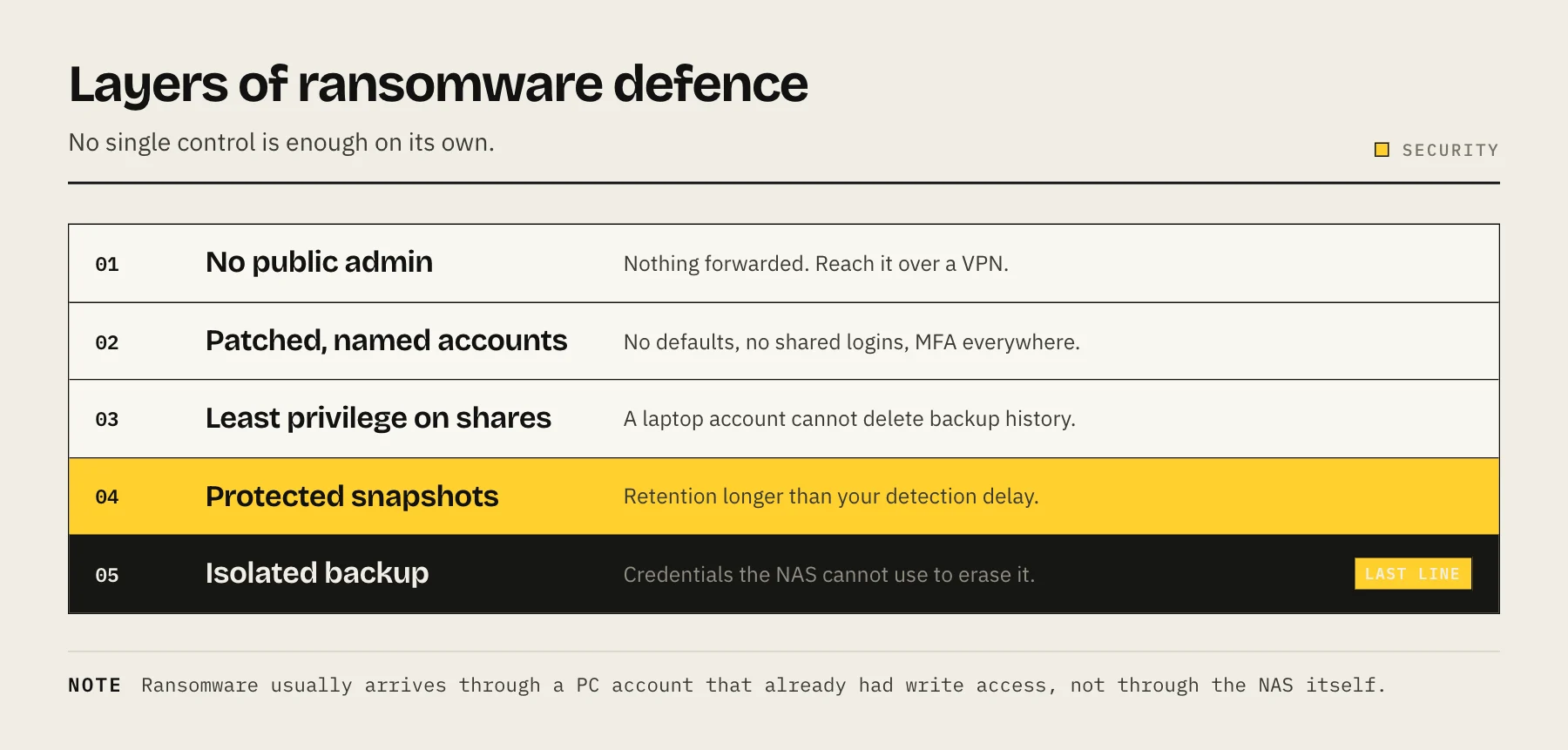
1. Remove public administration exposure
Do not forward DSM, QTS, SSH, SMB or Docker management ports from the router. Search router rules, UPnP mappings and vendor relay settings. For personal remote access, use a private mesh VPN; our Tailscale NAS guide covers the setup.
If a web application must be public, expose only that application behind an updated reverse proxy and strong authentication—not the NAS control panel.
2. Patch the entire path
Update NAS firmware/OS, packages, containers, router firmware and remote-access clients. Subscribe to vendor security advisories. Remove abandoned packages and disable services you do not use.
Schedule updates, but keep a recovery path: avoid major upgrades while away from the physical site and back up configuration before changes.
3. Eliminate default and shared admin accounts
Create named administrator accounts, disable the default admin account where supported, and do daily work as a non-admin. Shared credentials destroy accountability and make revocation difficult.
Require long unique passwords stored in a password manager. Do not reuse the router or email password.
4. Require MFA
Enable MFA for NAS administrators, cloud backup, Tailscale/identity provider and domain/DNS accounts. Store recovery codes offline. MFA does not fix vulnerable software, but it reduces damage from stolen passwords.
5. Apply least privilege to shares
Most users do not need write access to every dataset. Separate family photos, backups, media and application data. Give media players read-only access; give backup sources permission to write only to their target where the platform supports it.
Review service accounts and old users quarterly. A laptop account should not be able to delete backup history.
6. Use snapshots with protected retention
Frequent snapshots provide quick rollback after mass encryption or deletion, but only if the attacker cannot remove them. Restrict snapshot administration and keep retention longer than the likely detection delay.
Snapshots on the same pool are not independent backups. See ZFS Snapshots vs Backups for the failure boundaries.
7. Keep an isolated backup
CISA recommends offline, encrypted backups and regular testing. Practical options include:
- USB disks rotated and disconnected.
- A second NAS that is not administered by ordinary client accounts.
- Cloud object storage with restricted credentials and protected retention.
- Remote replication to a different location.
Map the copies with the 3-2-1 Backup Rule. A backup permanently mounted read-write under the same credentials may be encrypted alongside production.
8. Separate backup credentials
Use a dedicated cloud application key restricted to one bucket. Avoid storing provider master credentials on the NAS. Where possible, design the destination so the source can append new backups but cannot immediately erase retained history.
For Synology and B2, follow Back Up Synology to Backblaze B2.
9. Segment risky devices
IoT devices, guest laptops and internet-facing services should not share broad access to storage administration. VLANs can help, but simple firewall rules and separate accounts are more valuable than a complicated network nobody maintains.
Allow only required protocols from required subnets. Disable SMBv1 and legacy services.
10. Monitor behavior, not just health
Drive-health alerts will not detect encrypted files. Enable notifications for:
- Repeated login failures.
- New administrator accounts.
- Disabled MFA or changed firewall rules.
- Large deletion/rename activity where supported.
- Snapshot deletion.
- Backup failure or unusual destination growth.
Send alerts to an external mailbox or service so an attacker cannot erase the only evidence stored on the NAS.
11. Test recovery
Quarterly, restore a folder and one application backup to a temporary location. Annually, rehearse losing the whole NAS. Record encryption keys, configuration exports, software installers and the order services must return.
Measure time. A cloud backup that needs a week to download may protect data but fail the operational recovery objective; keep a fast local copy too.
12. Write an incident checklist before the incident
If ransomware is suspected:
- Isolate affected clients and NAS network interfaces without powering off blindly.
- Preserve logs and identify the first known affected time.
- Protect backup destinations from further deletion.
- Reset credentials from a known-clean device.
- Rebuild compromised systems rather than trusting a quick cleanup.
- Restore data from a point before the incident and verify it.
- Notify appropriate authorities, insurers or customers when required.
Do not rush to reconnect restored storage to an infected client fleet.
A 30-minute home NAS hardening pass
- Delete router port forwards and disable UPnP if unnecessary.
- Enable automatic security updates and MFA.
- Disable default admin and unused services.
- Make media shares read-only for playback accounts.
- Confirm snapshots are running.
- Confirm the offsite backup succeeded recently.
- Restore one test file.
These controls do not guarantee immunity, but they replace a single fragile perimeter with layers that prevent, detect and recover.
Prioritize controls by failure mode
If the NAS is publicly exposed, remove that exposure before tuning snapshot schedules. If every workstation has write access to every share, fix permissions before buying another security product. If backups use the same administrator and can be deleted instantly, isolation is the highest-value project.
Security work should reduce a specific path to loss, not merely add dashboard features.
Tabletop scenario
Imagine a family PC begins renaming thousands of photo files at 02:00. By 08:00 the NAS alert shows unusual activity.
- Can you disable that account without losing NAS administration?
- Is there a snapshot from before 02:00?
- Can the compromised PC delete that snapshot?
- Did the offsite job copy encrypted files over good versions?
- How far back does retention extend?
- Can you restore to a clean directory before overwriting evidence?
Run the scenario once with actual menus and credentials. Missing recovery codes and inaccessible encryption keys are easier to fix before an incident.
FAQ
Does RAID protect against ransomware? No. RAID reproduces the encrypted writes across the array.
Are snapshots enough? No. They share the storage system and may be deleted by a compromised administrator.
Should the NAS be powered off when unused? That reduces exposure but can interrupt backups and updates. A maintained always-on NAS with good controls may be safer than an occasionally powered system that is never patched.
Does antivirus solve NAS ransomware? It can detect some threats but cannot replace exposure control, permissions and isolated recovery copies.
Should I pay a ransom? Recovery, legal and law-enforcement decisions are situation-specific. Build tested backups so payment is not the only perceived option.
Quarterly review
Review public exposure, admins, MFA, patch level, share permissions, snapshot retention, backup isolation, restore results and alert delivery. Record the review date. Security degrades as new services, users and exceptions accumulate.
Sources
- #StopRansomware Guide — CISA
- Data Backup Options — CISA (US-CERT)
- Protecting Sensitive and Personal Information from Ransomware-Caused Data Breaches — CISA