Size a UPS by measuring your NAS's real wattage, then buy a unit rated for roughly twice that load so it can hold up for the few minutes a clean shutdown takes. The runtime you need is small — what matters far more is that the NAS is actually told to shut down, and that you test it.
A UPS is not there to keep the NAS running through an outage. It exists to buy the 60–180 seconds needed to flush write caches, stop services and power down cleanly. An unexpected power cut during a write is one of the few events that can damage a filesystem or a RAID array's consistency, and it is entirely preventable for the price of a small battery box.
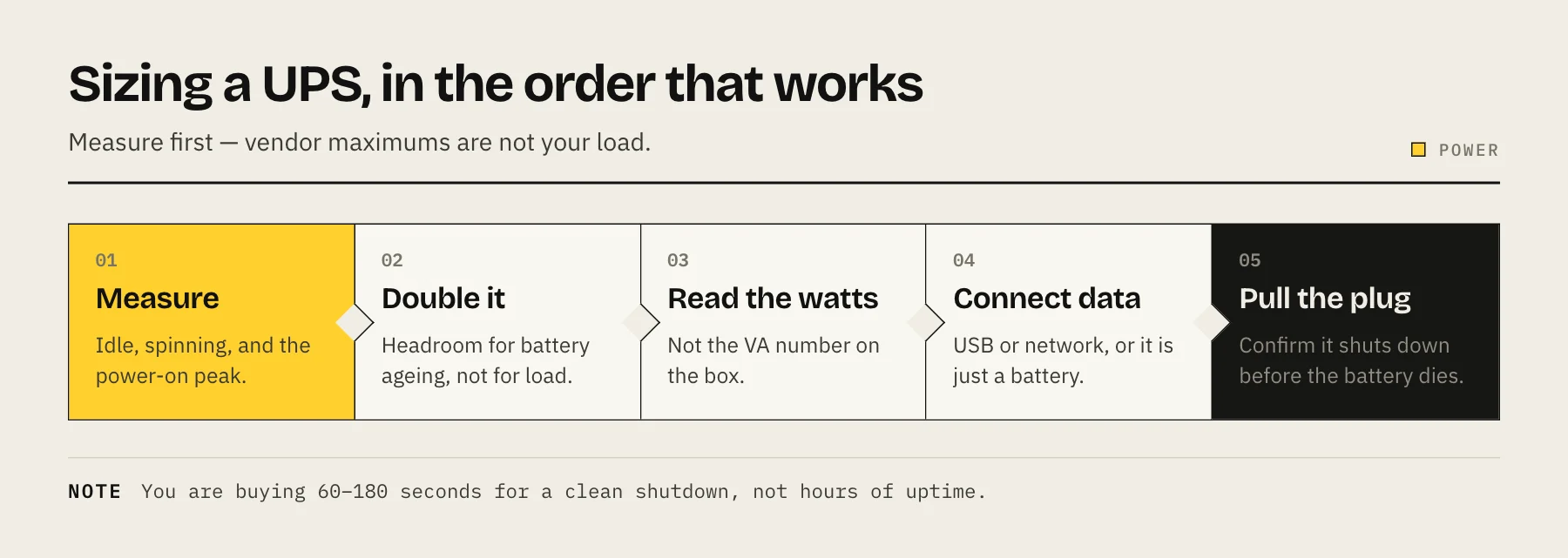
Step 1 — Measure the load, don't guess
Vendor "maximum power" figures assume every bay is populated with the hungriest drive and all of it is spinning up at once. Your actual load is usually much lower.
Put a cheap plug-in power meter between the NAS and the wall and record three numbers:
- Idle with disks spun down — often 10–25 W on a 2–4 bay unit.
- Idle with disks spinning — typically 25–60 W depending on drive count.
- Peak at power-on — the highest reading you will see, because every drive spins up together.
That peak is the number to size against. If you run other gear on the same UPS (a router and a modem are the usual companions, so remote alerts survive the outage), add their measured draw too.
Step 2 — Understand VA vs watts
UPS units are advertised in VA (volt-amps, apparent power) and W (watts, real power). The watt rating is the one that limits you. Consumer units commonly use a power factor around 0.6, so a "1500VA" unit may only be rated for about 900W — always read the watt figure on the spec sheet rather than converting it yourself.
Aim for the UPS's watt rating to be roughly double your measured peak. That is not because you need the headroom for load; it is because runtime falls off sharply as you approach the rating, and because batteries lose capacity as they age. A UPS running at 40% load will hold up far longer at year three than one running at 85% did on day one.
Step 3 — Decide how much runtime you actually need
Work backwards from the shutdown, not from the outage:
| What you want | Realistic runtime target |
|---|---|
| Clean shutdown only | 5–10 minutes |
| Ride out brief flickers, then shut down | 10–20 minutes |
| Keep NAS + network up for a work session | 30+ minutes (expensive, rarely worth it) |
Most home setups are well served by the first two rows. Chasing long runtime means a much larger, heavier and more expensive unit, and it does nothing to protect data that a clean shutdown does not already protect.
Step 4 — Line-interactive vs online, and the sine wave question
For a NAS, a line-interactive unit is the normal choice: it corrects mild over- and under-voltage without switching to battery, which spares the battery from constant cycling. Double-conversion ("online") units are quieter about transfer time but cost far more and run hotter — overkill for a home NAS.
The detail that catches people out is the waveform. Cheaper units output a simulated (stepped) sine wave on battery. Prebuilt NAS units with external power bricks generally tolerate this fine. DIY builds with active-PFC ATX power supplies often do not — they can shut down or make an audible complaint when the UPS transfers to battery. If you built your own TrueNAS box, budget for a pure sine wave unit and test the transfer before you rely on it.
Step 5 — Connect it so the NAS actually knows
A UPS that is not talking to the NAS is just a surge strip with a battery. Plug in the USB (or network) data cable and configure it:
- Synology DSM: Control Panel → Hardware & Power → UPS. Enable UPS support, set the time before the NAS enters Standby Mode, and optionally enable the network UPS server so other devices can listen to the same UPS.
- QNAP QTS: Control Panel → System → External Device → UPS, with the same USB or network-slave options.
- TrueNAS / Linux: use NUT (Network UPS Tools) — one machine runs as the
netserverfor the UPS it is physically attached to, and other machines connect asnetclient.
If more than one machine shares a UPS, only one of them holds the USB cable. Everything else must be a network client, or the second machine will simply never be told about the outage.
Step 6 — Test it, then test it again in a year
Configure the shutdown, then pull the UPS's wall plug and watch what happens. You are checking three things: the NAS logs the event, it begins shutdown at the threshold you set, and it powers off before the battery dies. A UPS that runs the battery flat while the NAS waits is worse than no UPS, because it guarantees the hard cut you were trying to avoid.
Repeat this test annually. Sealed lead-acid batteries in consumer UPS units typically need replacing every 3–5 years, and they fail quietly — capacity drops long before any warning light appears. Note the purchase date on the case with a marker.
What a UPS does not do
It does not replace backups. It protects against one specific failure mode — abrupt power loss — and does nothing about drive failure, deletion, ransomware or theft. Keep the 3-2-1 backup rule in place regardless, and keep snapshots separate from backups in your thinking.
FAQ
Can I plug a laser printer into the same UPS? No. Laser printers draw large surges when the fuser heats and can overload the UPS. APC advises against plugging them into either the battery outlets or the surge-only outlets; use a separate surge protector instead.
Should the network gear share the UPS? Yes, if the watt budget allows. Keeping the router and modem alive means the NAS can send its shutdown notification and you can see the alert.
Does a UPS protect against surges too? Line-interactive units include surge protection, but the surge components degrade after absorbing hits and are not individually replaceable. Treat surge protection as a bonus, not the reason you bought it.
My NAS uses 35W. What size UPS? Measure the power-on peak first — it will be higher than 35W. If the peak is around 90W, a unit rated for roughly 200W or more of real power gives comfortable headroom and years of margin as the battery ages.
Sources
- UPS | DSM — Synology Knowledge Center
- Configuring the UPS Settings (QTS 5.0) — QNAP
- nut.conf(5) — Network UPS Tools
- What is the expected life of my APC UPS VRLA battery? — APC / Schneider Electric
- Recommendations for protecting a laser printer — APC / Schneider Electric
- APC Back-UPS Pro BR1500G (1500VA/865W) — APC / Schneider Electric