A ZFS snapshot is a point-in-time reference inside a ZFS pool. It is excellent for fast rollback and efficient replication, but a local snapshot is not an independent backup because losing or compromising the pool can remove both live data and snapshots. Replicate snapshots to another system and keep an offsite copy for complete protection.
ZFS makes snapshots cheap because they initially reference existing blocks. As live data changes, old blocks remain available to snapshots. That is different from copying every file, and it explains both the speed and the dependency on the original pool.
Screenshot: TrueNAS Documentation Hub, captured July 2026. Interface and version labels may change.
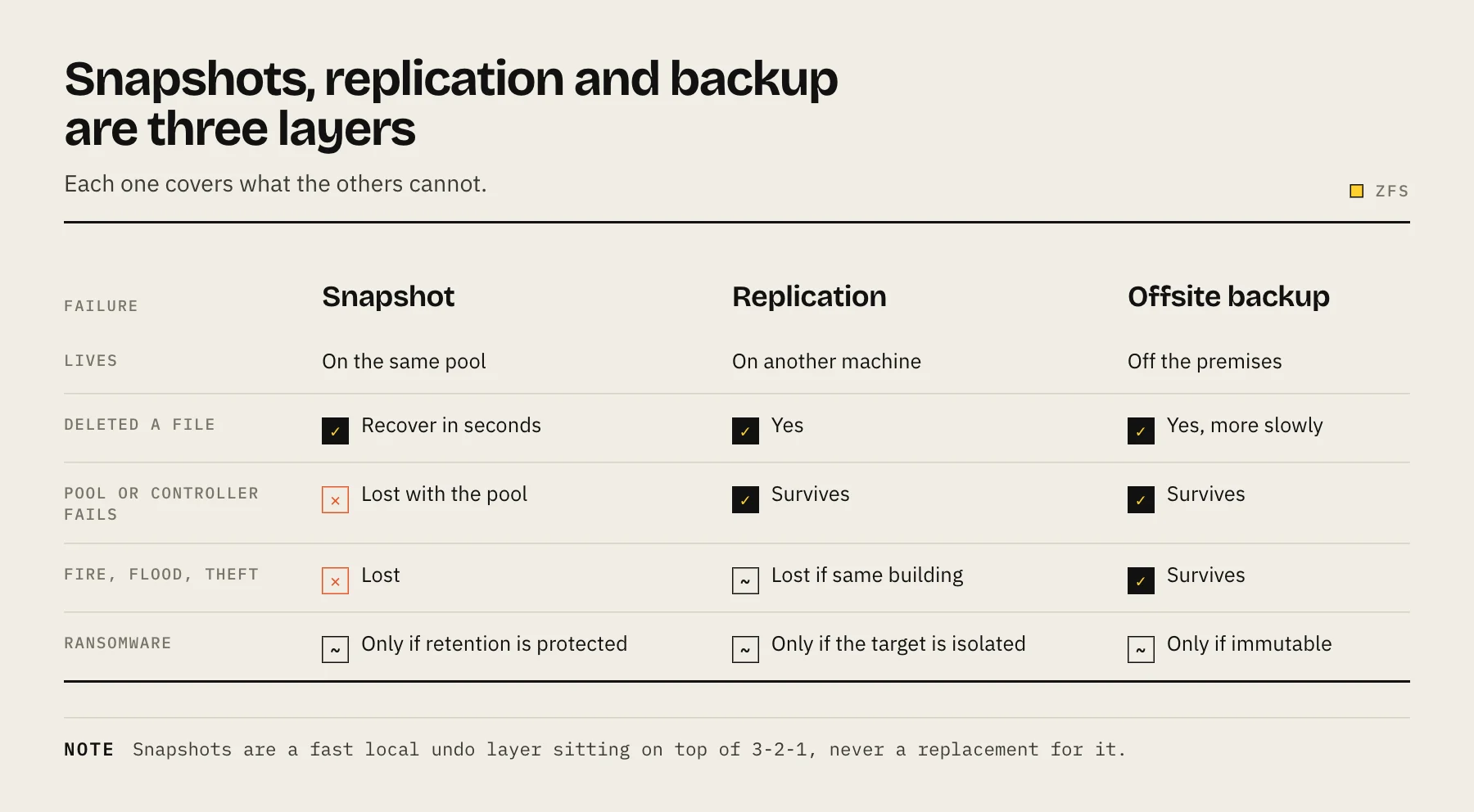
Snapshot, replication and backup are different layers
| Layer | Location | Fast rollback | Survives pool loss | Survives site loss |
|---|---|---|---|---|
| Local ZFS snapshot | Same pool | Yes | No | No |
| Local replication | Another pool, same system/site | Yes | Sometimes | No |
| Remote replication | Another system | Yes | Yes | If remote site |
| Cloud/file backup | Independent provider/repository | Slower | Yes | Yes |
A copy to another dataset on the same pool is not independent. A copy to a second pool in the same chassis protects against some pool failures but still shares power, controller and location risks.
What snapshots protect well
- Accidental deletion discovered within retention.
- Bad edits or application upgrades.
- Ransomware that cannot delete or reach snapshot administration.
- Consistent replication points.
- Rapid cloning/testing workflows.
Snapshots are not automatically application-consistent. A database may have in-flight transactions. Use application hooks, database dumps or guest-aware VM snapshots when the workload requires it.
What snapshots do not solve
- Theft, fire or catastrophic chassis failure.
- Administrator credentials that can delete snapshots.
- Pool-wide corruption or loss of encryption keys.
- Retention shorter than the time to detect damage.
- A backup job that was never restored and verified.
Design a retention schedule from detection time
Do not choose “keep 30 days” because it is a common default. Ask how quickly damage is noticed. A creator may notice a missing project in hours; an encrypted archive may not be opened for six months.
A starting grandfather-father-son schedule might keep:
- 24 hourly snapshots.
- 30 daily snapshots.
- 12 monthly snapshots.
Measure space use. Snapshots retain changed and deleted blocks, so heavy churn can grow storage even when the live dataset remains the same size. Set alerts before the pool becomes critically full.
Capacity behavior to watch
Deleting a large live file may not free space while snapshots still reference its blocks. This surprises administrators who see a small current dataset and a nearly full pool. Use ZFS/TrueNAS snapshot-space reporting and expire versions intentionally; never mass-delete snapshots during an incident without understanding replication dependencies.
TrueNAS replication workflow
TrueNAS can create periodic snapshot tasks and replicate them locally or remotely. Current documentation describes remote replication over an SSH connection to another TrueNAS or compatible destination; subsequent snapshots transfer incrementally after the initial full snapshot.
A practical design:
- Create a periodic snapshot task for selected datasets.
- Exclude caches and replaceable data.
- Create remote replication using a dedicated account/key.
- Choose destination retention independently when appropriate.
- Schedule replication after snapshots and outside peak usage.
- Monitor task logs and pending snapshots.
- Test a restore into a new dataset.
On any ZFS system, the same flow can be driven with the standard commands:
zfs snapshot tank/data@2026-07-26
zfs send -R tank/data@2026-07-26 | ssh backup zfs recv -u backuppool/data
After the initial full send, transfer only the difference between two snapshots with an incremental send: zfs send -i tank/data@previous tank/data@2026-07-26.
Replication destination choices
Same system, second pool: fast and useful for pool-level mistakes, but shares chassis, power and administrator risk.
Second NAS at home: protects against primary hardware failure and supports fast restore, but not a location disaster.
Second NAS offsite: adds location separation; bandwidth and remote hands become important.
Cloud/object backup: broad disaster separation, but not always native ZFS replication and potentially slow for full recovery.
Many good designs use local snapshots plus one fast replicated copy and one slower offsite copy.
Ransomware and credential separation
Snapshots help only if the attacker cannot delete them. Do not let an ordinary SMB user administer snapshots. For stronger isolation, replicate using credentials that allow the source to send data but do not let compromised client accounts erase destination history.
Where the platform supports immutable retention, treat it as one layer rather than a guarantee. Keep recovery keys and system configuration backups outside the NAS.
Restore tests
Quarterly, restore a file, directory and one application dataset. Verify checksums or application behavior. Annually, simulate the loss of the source pool: build a clean test destination, import or receive the replicated data, and document DNS/share/permission steps.
The exercise answers the real question: not “Do snapshots exist?” but “Can a different administrator recover the service within the required time?”
ZFS send is not magic
Replication efficiently transfers snapshot differences, but source and destination histories must share a common base for incremental sends. Manual deletion, retention mismatch or destination changes can force a new full transfer. Monitor failed tasks and avoid deleting “stuck” snapshots before understanding why they are held.
Dataset design improves recovery
Separate rapidly changing application data from large, mostly static media so each dataset can have an appropriate snapshot schedule. Give database exports their own dataset, keep temporary transcodes out of snapshots, and avoid one recursive policy that retains every child forever. Clear dataset boundaries also make remote replication, quotas and permission review easier. Document which datasets are authoritative, which are derived, and which can be rebuilt; this prevents paying to replicate replaceable cache while missing a small but critical configuration dataset. Review those boundaries whenever a new container, VM or share is introduced.
Name datasets by purpose rather than temporary hardware so the protection policy remains understandable after migration.
Operational checklist
- Snapshot task last ran at expected time.
- Replication destination has enough capacity.
- No failed/pending snapshots are silently accumulating.
- Encryption keys/configuration exports exist elsewhere.
- A recent snapshot has been restored, not merely listed.
- Retention covers the realistic detection window.
Combine ZFS with 3-2-1
A robust home plan is:
- ZFS snapshots for fast local recovery.
- Remote replication to a second system for NAS failure.
- Encrypted cloud or offline copy for site-level disaster.
Map it against the 3-2-1 Backup Rule for NAS. If you are moving pools to new hardware, use the NAS migration checklist.
FAQ
Does a snapshot double storage use? No. It starts by referencing existing blocks and grows as retained blocks diverge from live data.
Can snapshots protect against ransomware? They help when ransomware/client accounts cannot delete them and retention extends before detection.
Is ZFS send encrypted? The transport and dataset encryption behavior depend on the chosen replication method and raw-send settings. Follow current platform documentation and test key recovery.
Can I back up only selected datasets? Yes, and you should. Separate datasets make retention, replication and permissions easier to reason about.
What happens if the destination misses a run? Incremental replication can resume when a common snapshot remains. If retention deletes the common base, a new full transfer may be required.
Sources
- Replication Tasks — TrueNAS Documentation Hub
- Setting Up a Remote Replication Task — TrueNAS Documentation Hub
- zfs-send.8 — OpenZFS
- zfs-snapshot.8 — OpenZFS
- OpenZFS documentation — OpenZFS