Cloud storage wins on convenience and disaster protection; a NAS wins on speed, capacity per pound and control. The break-even is usually somewhere around 2–4 TB of long-term data — below that the cloud is hard to beat, above it a NAS pays for itself in a few years. For anything irreplaceable, the right answer is both.
This gets framed as a choice, but the two are solving different halves of the same problem. A NAS is fast local storage you own. Cloud storage is an offsite copy someone else keeps alive. Treating either as a complete solution is where people get hurt.
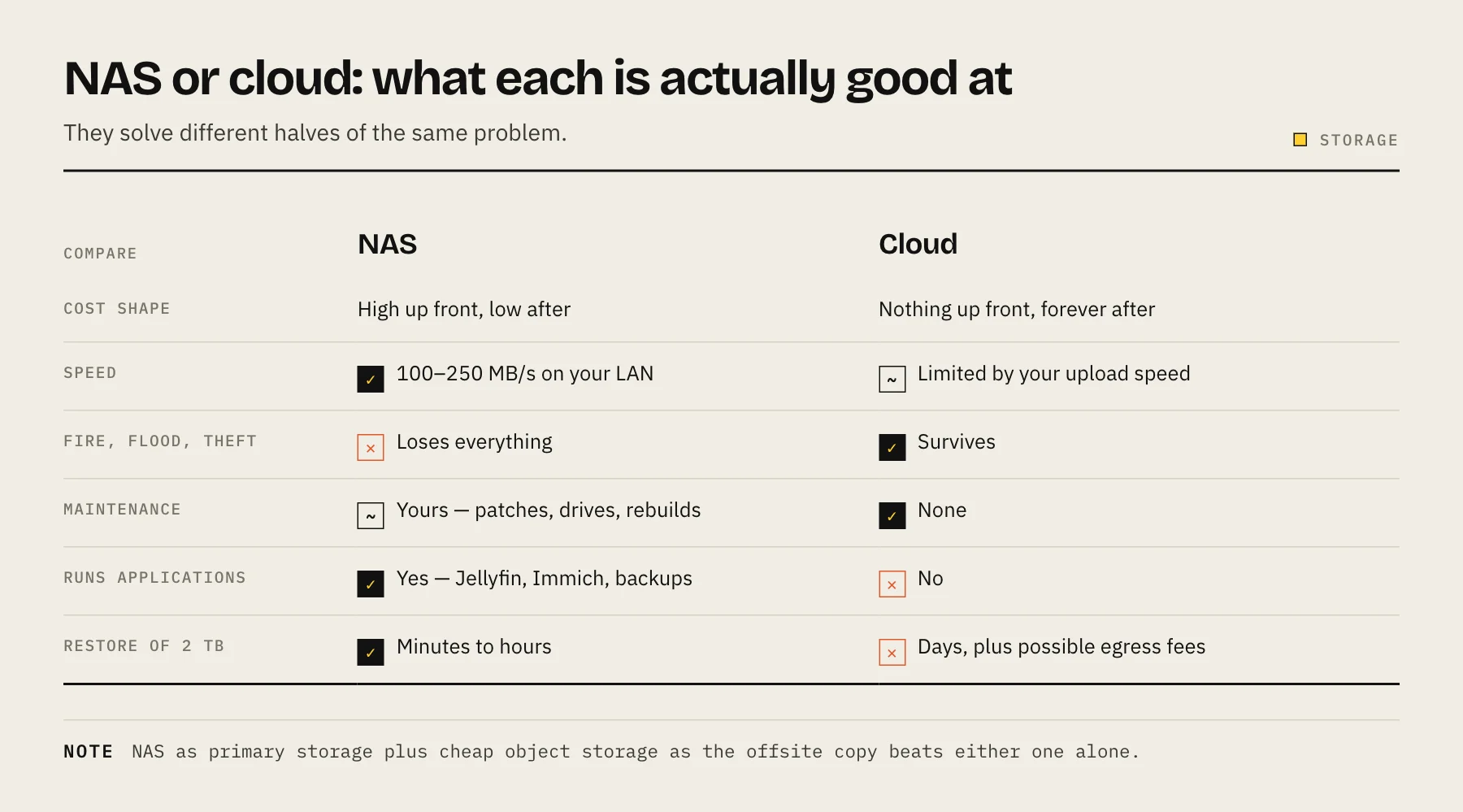
The cost comparison, honestly
A NAS costs money up front and then very little. Cloud storage costs nothing up front and then forever.
NAS, four-bay with 2 × 8 TB (8 TB usable in a mirror):
| Item | Rough cost |
|---|---|
| Enclosure | $400–600 |
| Two 8 TB NAS drives | $350–450 |
| Electricity, 30 W at $0.20/kWh | ~$53/year |
| Drive replacement over five years | budget one or two |
Call it $800–1,100 up front and roughly $60–100 a year to run.
Consumer cloud storage for the same 8 TB usually means buying a larger tier — Apple's US iCloud+ 12 TB plan, for example, is $59.99 a month (about $720 a year) at the time of writing. Over five years that is roughly $3,600 with nothing owned at the end.
Cloud object storage (Backblaze B2, Wasabi, IDrive e2) is much cheaper per terabyte than consumer sync services, which is exactly why it works so well as a backup target for a NAS rather than as primary storage — see best cloud backup for NAS.
The break-even shifts with how much you store. At 500 GB, cloud is cheaper and much less work. At 20 TB, a NAS is not a close call.
Speed is not a small difference
This is the factor people underestimate until they experience it.
A NAS on a 1GbE network moves data at roughly 100–110 MB/s. On 2.5GbE with capable drives, closer to 250 MB/s. Editing a video directly off a NAS share is practical; browsing a 100,000-photo library is instant.
Cloud storage is limited by your upload speed for writes and your download speed for reads. A typical home connection uploads at a small fraction of its download rate. Backing up 2 TB over a 20 Mbit/s upload takes roughly ten days of continuous transfer — and a restore of that 2 TB is what you will be waiting for on the worst day of your data life.
Where cloud storage genuinely wins
Disaster protection. A fire, a flood, a burglary or a house-wide power surge takes your NAS and everything on it. The cloud copy survives, and this is not a hypothetical — it is the failure mode a NAS structurally cannot protect against.
Zero maintenance. No drives to replace, no firmware to patch, no rebuild to supervise, no security posture to maintain.
Access from anywhere with no setup. No VPN, no reverse proxy, no port to worry about.
Sharing with people who are not technical. Sending a link is one step.
Versioning and ransomware resistance, when the provider offers immutable or object-lock storage. A backup target your NAS cannot freely erase is one of the strongest controls available against ransomware — see protecting a NAS from ransomware.
Where a NAS genuinely wins
Cost at scale. Above a few terabytes the arithmetic stops being close.
Local speed, as above.
Applications. A NAS is not just storage — it runs Jellyfin, Immich, Nextcloud, backup targets for every computer in the house, and Time Machine. Cloud storage stores files.
Control and privacy. Your data is not scanned, not subject to a provider's changing terms, and not at risk from an account lockout. Account suspensions with no meaningful appeal process are rare but genuinely devastating when they happen.
No dependency on your internet connection for day-to-day access.
The hybrid arrangement that actually works
Almost every experienced answer converges on the same shape:
- NAS as primary storage. Fast, local, big, running your applications.
- Cloud object storage as the offsite backup. Encrypted before upload, cheap per terabyte, ideally with versioning or object lock enabled.
- A local second copy if the data matters a great deal — an external drive that lives elsewhere, rotated occasionally.
That is the 3-2-1 backup rule with the cloud doing the job it is best at. You get local speed and control, plus genuine protection against the whole building being gone.
The cost of the cloud leg is far lower than using cloud as primary storage, because backup object storage is priced differently from consumer sync services — roughly $6–8 per terabyte per month at current list prices.
Watch the restore costs, not just the storage price
Storage price per terabyte is the number everyone compares. The one that bites is egress — what you pay to get the data back out.
Some providers charge nothing for egress up to a limit, some charge meaningfully per gigabyte, and some charge retrieval fees on archival tiers on top. A cheap archive tier can become surprisingly expensive at exactly the moment you need it.
Before committing, work out what a full restore of your entire dataset would cost and how long it would take. If either number shocks you, choose a different tier.
Which should you choose?
Cloud only if you have under about 1 TB, want zero maintenance, and your internet connection is good. This is a perfectly reasonable position and no one should be talked out of it.
NAS only — no. Not for anything you cannot replace. A NAS with no offsite copy is one accident away from total loss.
Both for most people with more than a couple of terabytes, or with photos and documents that genuinely cannot be recreated.
FAQ
Is a NAS cheaper than cloud in the long run? Above roughly 2–4 TB, usually yes within three to five years. Below that, cloud tends to win once you value your own time at anything.
Can I use a NAS as my only backup? No. Same building, same power, same flood. It is one copy.
What about backing up the NAS to a second NAS at a relative's house? A good option — offsite, no subscription, and both sides useful. It needs a reliable link and someone who will not unplug it.
Does encryption before upload matter? Yes. It means the provider cannot read your files and a breach on their side does not expose your data. Most NAS backup tools offer client-side encryption; keep the key somewhere separate from the NAS.
Sources
- iCloud+ plans and pricing — Apple
- B2 Cloud Storage Pricing — Backblaze
- Cloud Storage Pricing — Wasabi
- IDrive e2 plans and pricing — IDrive
- #StopRansomware Guide — CISA