For most NAS owners, Backblaze B2 is the safest default — cheap per-TB storage, generous free egress, and first-class support in Synology Hyper Backup, restic, and rclone. Choose Wasabi if you want flat, predictable per-TB pricing and can live with a 90-day minimum retention window. Pick IDrive e2 if you want the lowest headline per-TB price with S3 compatibility and no minimum storage duration. All three are S3-compatible, so you are rarely locked in.
How we sourced this: built from provider documentation and current data — not paid placement. Where our guidance is based on published data rather than our own bench testing, we say so. See How we test. Some links may be affiliate links — see our disclosure.
Why offsite backup matters
A NAS is not a backup. RAID protects you from a drive failure, not from ransomware, accidental deletion, fire, theft, or a controller that scribbles garbage across the whole array. The widely cited answer is the 3-2-1 rule: keep 3 copies of your data, on 2 different media, with 1 copy offsite. Cloud object storage is the cleanest way to satisfy that offsite copy without shipping drives to a friend's house. If you are new to the concept, start with our 3-2-1 backup rule guide, and if you are weighing whether to keep data local at all, see NAS vs cloud storage.
The three providers below are all S3-compatible object storage, which is the sweet spot for NAS backups: it works with Synology Hyper Backup, and with the open-source tools restic, rclone, and Duplicati that run on almost any NAS or in a container.
The comparison at a glance
Prices below are pay-as-you-go list prices captured from each provider's official pricing page. Cloud pricing changes often — always check the current pricing page before you commit.
| Provider | Storage / TB / mo | Egress | Min. retention | S3-compatible | NAS integration |
|---|---|---|---|---|---|
| Backblaze B2 | ~$6.95 (source) | Free up to 3× stored/mo; $0.01/GB beyond (source) | None published | Yes | Hyper Backup, restic, rclone, Duplicati |
| Wasabi | From $7.99 (source) | No egress fees (fair-use) (source) | 90 days (Pay-Go) (source) | Yes | restic, rclone, Duplicati, Hyper Backup (S3) |
| IDrive e2 | $6.00 (source) | Free up to 3× stored/mo; $0.01/GB beyond (source) | None (source) | Yes | Hyper Backup, QNAP, restic, rclone |
Wasabi (Pay-as-You-Go) and IDrive e2 enforce an effective 1 TB minimum (you are billed for at least 1 TB even if you store less), per each provider's pricing/FAQ pages; Backblaze B2 publishes no minimum and its first 10 GB is free. Verify the minimum for the specific plan you sign up to.
Backblaze B2
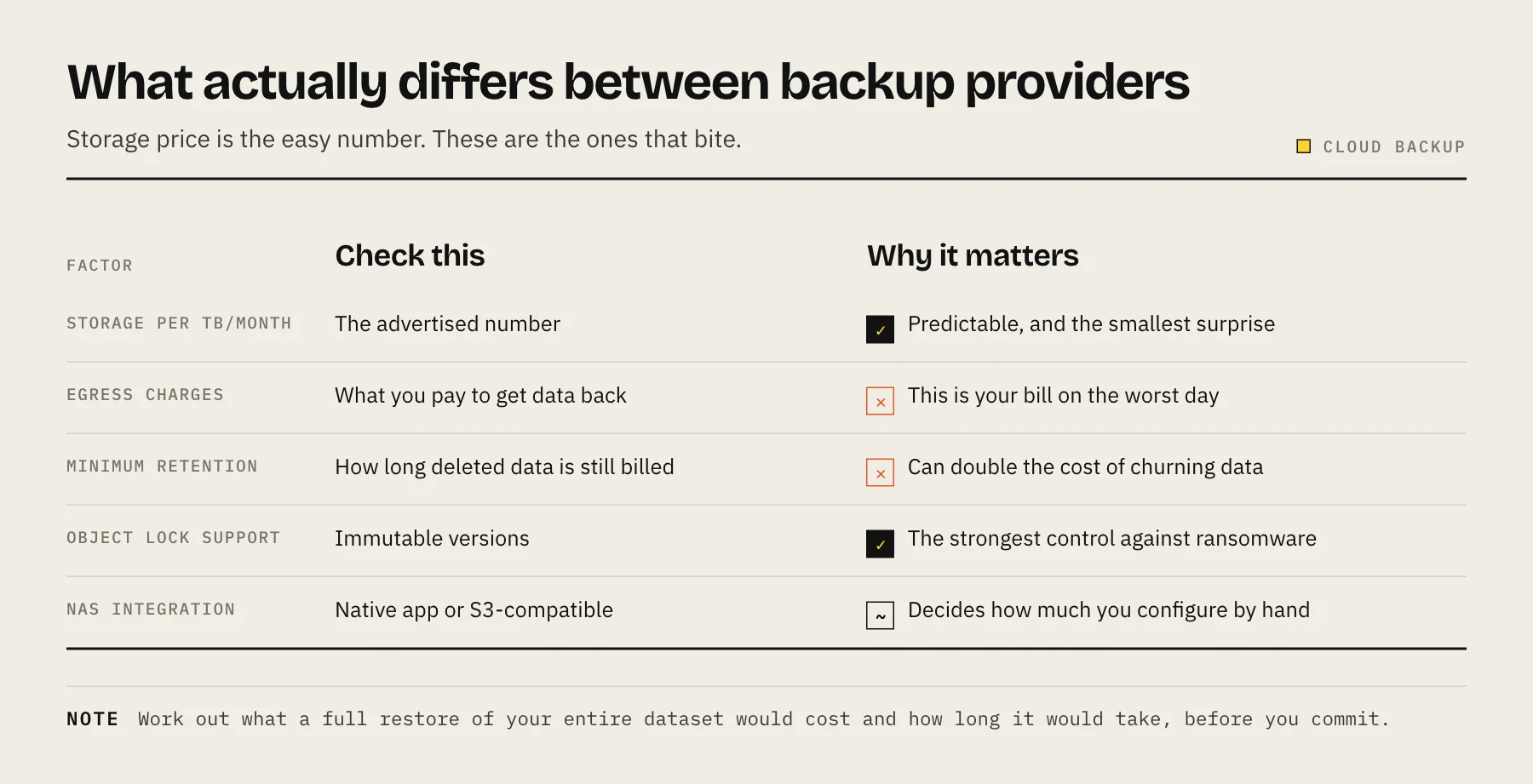
Backblaze B2 is the provider we recommend by default, and it is the one we cover step-by-step in Back up Synology to Backblaze B2. List storage is about $6.95/TB/month (Backblaze pricing). Egress is free up to 3× your average monthly stored data, then $0.01/GB beyond that (Backblaze B2). For a backup workload — where you upload a lot and download only during a restore — that 3× allowance is generous, and a full restore of your entire dataset usually still falls within or near it.
The reason B2 is the low-friction pick: Synology's Hyper Backup has a native Backblaze B2 target, so you do not have to hand-configure an S3 endpoint. It also works cleanly with restic, rclone, and Duplicati if you prefer client-side encryption and a tool you control. Note the free-egress benefit is measured against your average stored volume, so unusually heavy retrieval patterns can incur the $0.01/GB rate — check current terms if you expect frequent large restores.
Based on published documentation, not first-hand billing over a full year. Model your own numbers before committing.
Wasabi
Wasabi's pitch is flat, predictable pricing with no egress or API-request fees. Storage starts at $7.99/TB/month (Wasabi pricing). The "no egress fees" policy is genuinely attractive for restore-heavy or media workflows, but it is a fair-use model, not an unlimited hard guarantee — if your monthly downloads consistently exceed your stored volume, Wasabi may ask you to move plans. Read the current terms if egress is central to your use case.
The catch to plan around is the 90-day minimum storage duration on Pay-as-You-Go (Wasabi docs). If you delete an object before it has lived 90 days, you are still billed for the remaining days. That matters for backup tools that prune old snapshots frequently — a short retention policy on the NAS side can quietly generate "timed deleted storage" charges. If you keep backups for months anyway, this is a non-issue.
Wasabi does not appear as a named native target in older Hyper Backup builds the way B2 does, but because it is S3-compatible it works via Hyper Backup's generic S3 option, and with restic, rclone, and Duplicati.
IDrive e2
IDrive e2 has the lowest headline per-TB price of the three at $6.00/TB/month (IDrive e2 pricing), with the same free egress up to 3× stored data model as B2, then $0.01/GB beyond. Crucially, IDrive e2 states it does not impose a minimum storage duration and does not charge for deleting objects — which makes it friendlier than Wasabi for backup rotations that prune frequently.
For NAS owners, IDrive e2 documents integration with both Synology (via Hyper Backup) and QNAP (via QNAP backup apps), plus the usual S3-compatible tooling (restic, rclone). Don't confuse IDrive e2 (S3 object storage, the subject here) with IDrive's separate consumer "Personal/Team" backup product — they are different services with different pricing.
Note: IDrive e2 has historically run aggressive promotional first-year rates. Judge it on the standing pay-as-you-go price, and confirm the renewal rate before you build a multi-year backup plan around it.
How to choose
- Want the least fuss and a native Synology target? Backblaze B2. Best all-round default.
- Want flat pricing and don't prune backups often? Wasabi — just respect the 90-day minimum.
- Chasing the lowest per-TB and prune snapshots frequently? IDrive e2 — no minimum retention helps here.
- All-Synology household? Also consider Synology C2, which integrates tightly with DSM. Note C2 is transitioning to a unified "C2 OneStorage" plan structure in 2026 (Synology KB) — check current plans before committing.
Whichever you pick, use a tool with client-side encryption (restic, or Hyper Backup with encryption enabled) so the provider never sees your plaintext, and periodically run a test restore — an untested backup is a hope, not a backup. Your local array still matters too; see best NAS hard drives for building the primary copy the cloud is protecting.
FAQ
Is a NAS with RAID enough on its own? No. RAID survives a failed drive but not ransomware, deletion, theft, or fire. You still need an offsite copy — that is the whole point of the 3-2-1 rule.
Which is cheapest for pure backup? On list storage price, IDrive e2 ($6.00/TB) edges Backblaze B2 (~$6.95/TB), with Wasabi from $7.99/TB. But minimums, egress patterns, and promo-vs-renewal pricing can flip the real total — model your own usage. Figures per each provider's pricing page.
Will I get locked in? Minimally. All three are S3-compatible, so rclone can migrate data between them. Wasabi's 90-day minimum can add a one-time cost if you leave early.
Can I use these with Synology Hyper Backup? Yes. Backblaze B2 and IDrive e2 document Hyper Backup support; any of the three also works via Hyper Backup's generic S3 target, or with restic/rclone/Duplicati.
A restore-cost scenario
For a 5 TB backup, storage price alone is incomplete. Model three events: an ordinary month with no downloads, one full restore, and a migration away from the provider. Include minimum billable capacity, deleted-object retention, request charges and any egress allowance. The best provider is the one whose worst plausible restore bill you understand—not necessarily the lowest monthly line item. Recheck every linked pricing page before purchase.
Sources
- B2 Cloud Storage Pricing — Backblaze
- Cloud Storage Pricing — Wasabi
- Pricing FAQs — Wasabi
- IDrive e2 plans and pricing — IDrive
- S3 Compatible Storage - IDrive e2 — IDrive
- Understanding the C2 Storage plan changes — Synology