Forecast source data for three to five years, add version/snapshot growth and application data, then add 20–25% operating headroom. Convert that usable target into raw capacity using the intended RAID layout—and separately budget backup capacity.
Buying drives from today's folder size almost guarantees an early upgrade. Capacity planning is a model with explicit assumptions, not a guess that “four bays should be enough.”
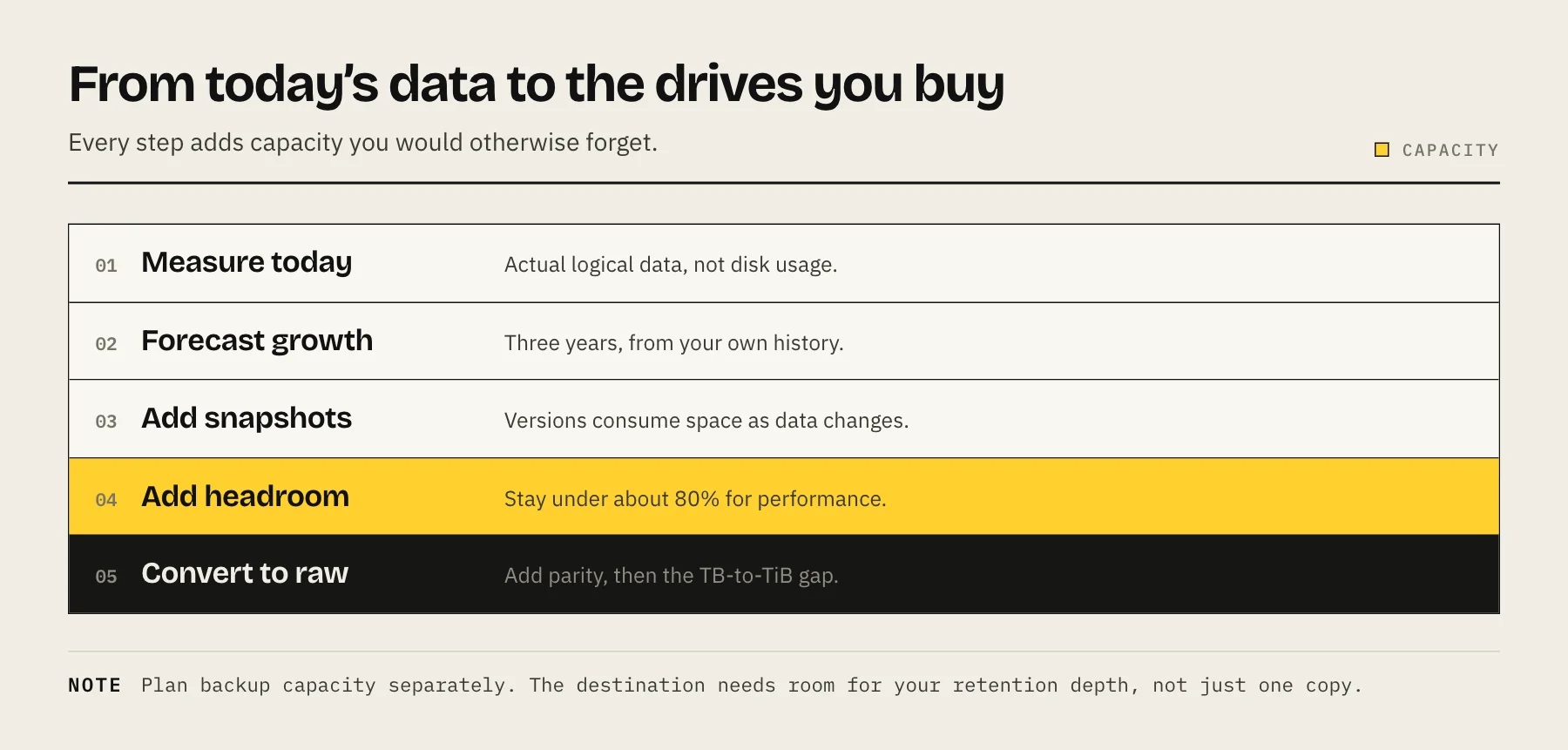
Step 1: measure current logical data
Record each dataset separately:
| Dataset | Current | Annual growth | Replaceable? |
|---|---|---|---|
| Photos | 3 TB | 0.8 TB | No |
| Work projects | 2 TB | 1.0 TB | No |
| Media | 6 TB | 1.5 TB | Mostly |
| Backups/apps | 1 TB | 0.4 TB | Mixed |
Exclude duplicate temporary files only after confirming they can be regenerated. Include hidden application data, recycle bins and workstation backups.
Step 2: forecast growth
future source data = current data + annual growth × years
The example starts at 12 TB and grows 3.7 TB per year. At five years, source data reaches 30.5 TB. Growth is rarely linear, so create low/base/high scenarios (for example 70%, 100% and 140% of expected growth).
Step 3: add snapshots and versions
Snapshots retain changed/deleted blocks. Estimate with measured daily change, not total dataset size:
version allowance ≈ daily changed data × retained days × efficiency factor
If 30 GB changes daily and 60 days are retained, the uncompressed ceiling adds 1.8 TB. Deduplication may lower it; VM images and database churn can make changes large.
Separate high-churn VM/application datasets from static media so policies do not waste capacity.
Step 4: add operating headroom
Filesystems, snapshots, updates and performance need free space. A planning allowance of 20–25% is conservative for many home systems, but follow platform-specific warning thresholds.
For 32 TB of future source + versions:
usable target at 25% headroom = 32 ÷ 0.75 = 42.7 TB
Round up to a layout with about 43 TB usable, not raw.
Step 5: convert usable to raw capacity
With equal drives:
- RAID 5/one parity: usable roughly (N − 1) × drive size.
- RAID 6/two parity: usable roughly (N − 2) × drive size.
- Mirror: usable roughly half raw.
Four 16 TB drives with one parity provide about 48 TB decimal before formatting; with two parity, about 32 TB. The latter misses the 43 TB target.
Formatted binary units and metadata reduce what the interface shows. Use the vendor calculator and exact supported drives before purchase.
Step 6: compare upgrade paths
Ask:
- Can you add a drive to the pool?
- Can drives be replaced one at a time?
- When does larger-drive capacity become usable?
- Does expansion require every bay to be occupied?
- How long will rebuild/expansion take?
- Is a complete backup available first?
SHR can use some mixed-size combinations more efficiently on Synology, while classic RAID generally follows the smallest member. Flexibility is valuable only when the supported path is documented.
Step 7: plan backup capacity separately
A 43 TB usable NAS may not require 43 TB of cloud storage if only 8 TB is irreplaceable. Classify:
- Irreplaceable: local + offsite backup.
- Expensive to recreate: local backup, optional offsite.
- Replaceable: snapshots or no backup.
Do not confuse RAID capacity with backup. If all data matters, budget a second destination and restore time from the start.
Worked home example
Current 10 TB, growth 2 TB/year, five-year horizon = 20 TB. Add 3 TB versions/apps = 23 TB. With 25% headroom, target 30.7 TB usable.
Possible layouts:
- 4 × 12 TB, one parity ≈ 36 TB decimal.
- 4 × 16 TB, two parity ≈ 32 TB decimal.
- 2 × very large drives mirrored, if supported capacity exceeds target.
Compare enclosure, drives, backup, electricity and next expansion—not only current purchase price.
Sensitivity analysis
Do not rely on one forecast. Calculate base, low and high growth. If annual growth is expected at 2 TB, model 1.4, 2 and 2.8 TB. If only the low case fits the proposed array, the design is fragile. If even the high case leaves half the array unused, reduce the initial purchase or choose an expandable chassis.
Cost per usable terabyte
complete five-year cost ÷ usable protected capacity
Complete cost includes enclosure, drives, RAM/NIC upgrades, electricity, replacement allowance and backup destinations. Raw $/TB hides parity and backup overhead. Compare systems at the same failure tolerance and protection level.
Data-reduction assumptions
Compression and deduplication should be separate scenarios, not guaranteed savings. Photos, video and encrypted files often compress poorly. Deduplication may save repeated VM/backup blocks but can add memory, metadata and recovery complexity. Size the system so a change in reduction ratio does not immediately fill the pool.
Performance and workload allowances
Capacity does not guarantee performance. VM/databases may need an SSD pool; media may fit HDDs. Surveillance creates continuous writes. Deduplication can need substantial RAM and should not be enabled merely to “save space.”
Keep replaceable cache/transcodes outside protected datasets. This makes both capacity and backups predictable.
Procurement timing
Large drives may offer better $/TB, but buying all future capacity today starts warranty and powered-on age immediately. An empty bay can defer spending, provided the expansion path is supported and matching drives will be available. Record the trigger—such as 70% projected use within six months—so expansion is planned rather than reactive.
Quarterly capacity review
- Record dataset sizes and monthly growth.
- Compare actual growth with base/high forecast.
- Measure snapshot/version space.
- Investigate unusual churn.
- Confirm backup destination headroom.
- Estimate date when free-space warning will be reached.
- Order expansion before the pool is nearly full.
When the model is wrong
Track forecast error, not only free space. If three consecutive months exceed the high-growth case, revise the acquisition plan immediately. Determine whether growth is valuable source data, retained versions, duplicate backups or accidental application logs. Fix waste before buying drives, but do not postpone expansion until emergency thresholds. Capacity work is successful when the next purchase date, required drives and migration risk are visible months ahead. Preserve the spreadsheet or assumptions with the NAS documentation so another administrator can distinguish measured data from guesses.
Common mistakes
- Using raw drive sum as usable capacity.
- Forgetting parity/mirror overhead.
- Treating one year of unusually low growth as normal.
- Ignoring snapshots, recycle bins and app databases.
- Filling every bay with small drives without modeling replacement.
- Building a huge NAS without a backup budget.
FAQ
How many years should I forecast? Three to five is practical for a chassis purchase; update the model quarterly.
Why keep 25% free? It is planning headroom, not a universal rule. It absorbs forecast error and avoids operating near platform warning thresholds.
Should I buy the largest drives? Compare $/usable TB, noise, power, rebuild time and number of failure domains.
Can compression change the plan? Yes for compressible documents/databases, little for already compressed media. Measure your data.
Use How Many Drive Bays Does Your NAS Need? after calculating the target, and RAID 5 vs RAID 6 vs SHR to choose redundancy.
Sources
- What is Synology Hybrid RAID (SHR)? — Synology Knowledge Center
- RAID Calculator — Synology
- zpoolconcepts(7) — vdev types and capacity — OpenZFS
- Workload Tuning (free space, deduplication memory) — OpenZFS