Two bays for backups and a small media library. Four bays is the sweet spot for most people — it allows double parity, leaves room to grow, and costs far less than twice a two-bay unit. Six or more for large media libraries, many services, or if you want to add capacity without replacing what you already own.
Bay count is the one decision on a NAS you cannot revise later. You can add RAM, swap drives for larger ones and upgrade the network — you cannot add bays. That is why it deserves more thought than the drives you put in it.
Quick guide
| Bays | Best for | Typical layout |
|---|---|---|
| 2 | Backup target, documents, small media | Mirror (RAID 1) |
| 4 | Most people — capacity, redundancy and growth | RAID 5/6, SHR, RAIDZ1/Z2 |
| 6–8+ | Large libraries, many services, power users | RAID 6 / Z2 |
Why two bays is more limiting than it looks
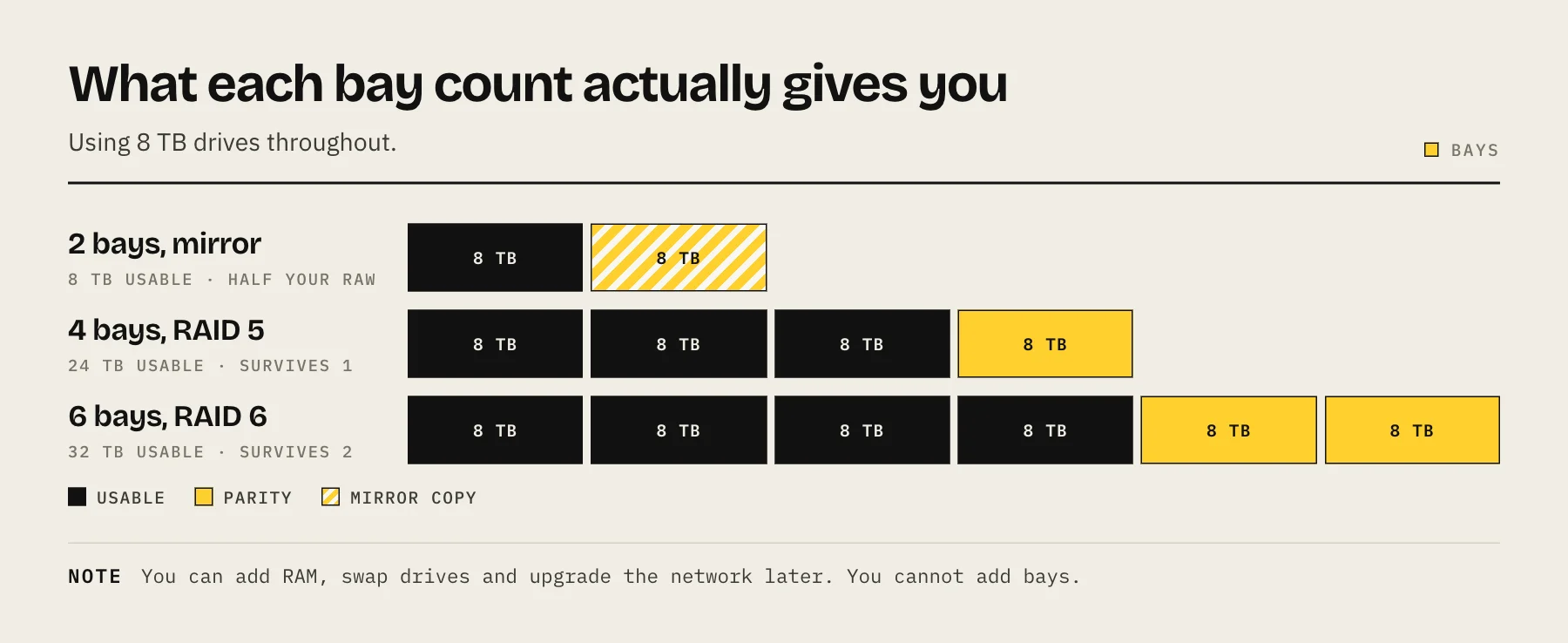
A two-bay NAS with two 8 TB drives gives you 8 TB usable, not 16. The mirror costs you half your raw capacity, and there is no arrangement that changes this.
Worse, there is no graceful growth path. When 8 TB is full, your only option is to replace both drives with larger ones — buying two disks and running two rebuilds — and the old drives have nowhere to go.
Two bays are the right choice when the NAS has one clearly bounded job: a Time Machine target, a documents share, a modest photo library. If you can articulate the job and it is not going to grow, two bays is efficient and cheap.
Why four bays is the sweet spot
Better capacity efficiency. Four 8 TB drives in RAID 5 or SHR give 24 TB usable — three times what the same drives deliver in mirrors.
Real redundancy choices. Four bays are the minimum for RAID 6, SHR-2 or RAIDZ2, which survive two simultaneous drive failures. That matters more than it sounds: the most dangerous moment in an array's life is the rebuild after the first failure, when every remaining disk is read end to end. Single parity means that rebuild happens with zero margin.
Graceful growth. Start with two or three drives and add more later. Synology's SHR handles mixed drive sizes particularly well; classic RAID 5 wants matched capacities.
Room for a different tier. Four bays let you run three spinning disks for bulk storage and one SSD for application data, which makes a real difference to container responsiveness.
Model the exact numbers for your drive sizes with the RAID capacity calculator, and read RAID 5 vs RAID 6 vs SHR before choosing a layout.
When six or more is worth it
- Large media libraries where you expect to keep adding for years.
- You want to grow by adding drives, not by replacing them. More bays means each expansion is one disk rather than a whole set.
- You want separate pools — for example spinning disks for media and a flash pool for VMs and databases.
- Higher efficiency at scale. Six drives in RAID 6 lose 33% to parity; eight drives lose 25%.
The costs are real: more bays means a bigger, hotter, more power-hungry and usually louder box. See NAS noise, heat and placement before putting an eight-bay unit in a bedroom.
Bays versus drive size
Given a capacity target, you can reach it with few large drives or many small ones. Few large drives is almost always better:
- Lower power draw — each spinning disk adds several watts, permanently.
- Less noise and heat, which are the same problem.
- Fewer components to fail.
- Bays left free for future expansion.
The counterweight is rebuild risk. Very large drives take longer to rebuild, and the array is exposed for that entire window — which is the argument for double parity rather than for smaller disks.
There is also a floor: you need enough drives for the redundancy you want. Three is the minimum for single parity, four for double.
Plan for growth honestly
Data grows, and it grows faster once the NAS makes storing things easy. A useful rule is to buy for twice what you currently need, and to prefer a chassis with a spare bay over one that is full on day one.
The specific trap: filling every bay immediately with the largest drives you can afford. It feels efficient and it leaves you with no cheap upgrade path. Leaving one bay free means your next expansion is a single drive.
What a NAS with more bays does not give you
More speed. Additional disks help sequential throughput somewhat, but a 1GbE network caps you at about 110 MB/s regardless — see 2.5GbE vs 10GbE.
More safety from backup. Eight bays with no offsite copy is still one copy of your data. Redundancy protects against a disk failing, not against fire, theft, deletion or ransomware. The 3-2-1 backup rule applies at every bay count.
FAQ
Is a 2-bay NAS enough? For a defined, bounded job, yes. For a growing library, four bays age much better.
Can I add bays later? Some models support expansion units over a dedicated port, but they cost nearly as much as another NAS and add a failure point. Most units cannot add internal bays at all. Plan ahead.
Should I fill every bay at once? Only if you are certain about your capacity needs. Leaving a bay free is a cheap upgrade path.
Do more bays mean more noise? Yes — more spinning drives means more vibration, and vibration coupling into furniture is the main source of NAS noise.
What about 5-bay units? They exist and are fine. An odd count works well with parity layouts; it just gives you fewer neat mirror options.
Sources
- Choose a RAID Type (DSM 7) — Synology Knowledge Center
- What is Synology Hybrid RAID (SHR)? — Synology Knowledge Center
- Managing Pools — Extending a RAIDZ VDEV — TrueNAS Documentation Hub