Choose RAID 5 or SHR-1 for a small three- or four-drive home NAS when capacity matters and a tested backup exists. Choose RAID 6 or SHR-2 for larger arrays, long rebuilds or data that must remain available after a second drive failure. Choose SHR when you value easier mixed-size expansion on Synology; choose classic RAID when portability and predictable layout matter more.
RAID keeps a storage pool available through drive failure. It is not a backup: deletion, ransomware, theft, fire and filesystem corruption can still affect every disk in the array.
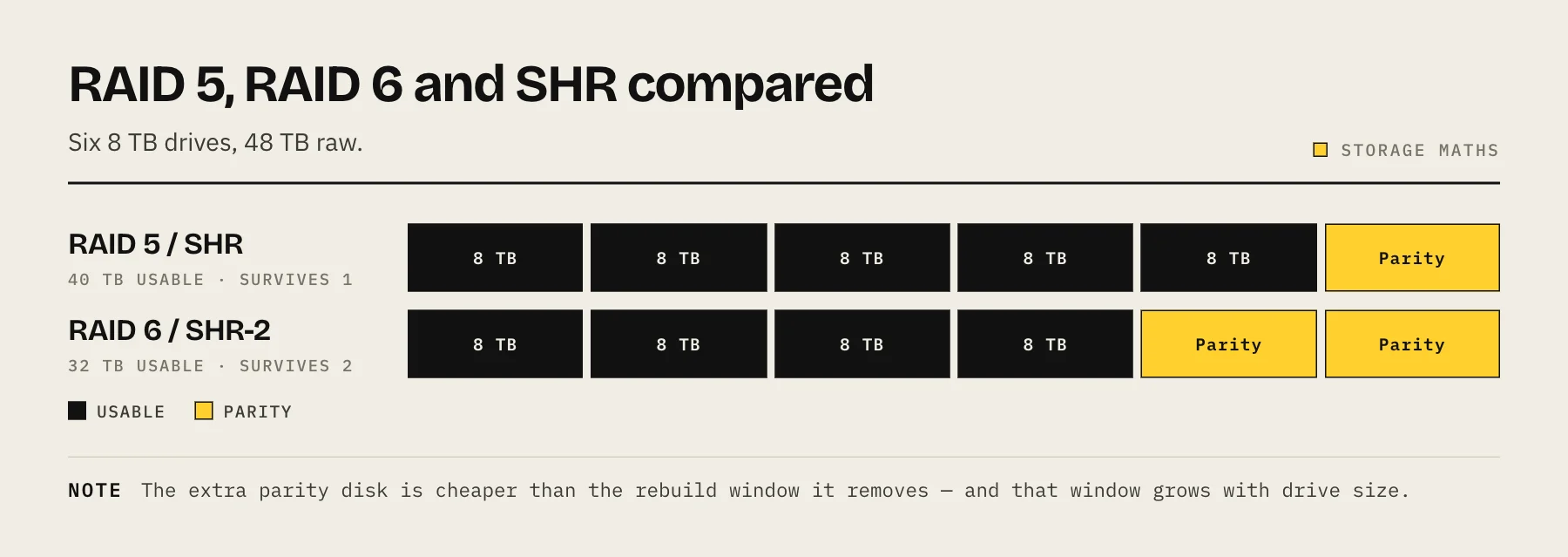
The practical differences
| Layout | Minimum drives | Failure tolerance | Equal-drive usable capacity |
|---|---|---|---|
| RAID 5 | 3 | 1 drive | (N − 1) × smallest drive |
| RAID 6 | 4 | 2 drives | (N − 2) × smallest drive |
| SHR-1 | 2 | 1 drive | Similar to RAID 1/5, can optimize mixed sizes |
| SHR-2 | 4 | 2 drives | Similar to RAID 6, can optimize mixed sizes |
Actual formatted capacity is lower due to units, metadata and filesystem overhead.
Capacity examples
With four equal 12 TB drives:
- RAID 5/SHR-1: about 36 TB decimal before formatting.
- RAID 6/SHR-2: about 24 TB decimal before formatting.
The second parity drive costs 12 TB of raw capacity in this example. You are buying a wider safety margin and continued availability after two drive failures—not another backup copy.
Mixed sizes reveal SHR's advantage. Classic RAID generally treats every member as if it were the smallest drive. Synology says SHR divides capacity into smaller RAID-backed chunks, which can use combinations of larger drives that classic RAID leaves unused. Exact usable capacity depends on the drive set, so check Synology's calculator for the proposed layout.
Rebuild risk matters more as drives grow
After replacing a failed drive, the NAS reads the surviving members and reconstructs data onto the replacement. Larger drives and busy systems can take many hours or days. During that period:
- Performance may fall.
- The remaining drives work continuously.
- A second failure is fatal to RAID 5/SHR-1 availability.
- Read errors or cabling/power problems can complicate recovery.
RAID 6/SHR-2 is attractive when arrays have six or more drives, when a rebuild would be long, or when downtime is costly. It does not guarantee recovery from every multi-failure sequence, but it tolerates one additional member loss.
SHR vs classic RAID
SHR is Synology's automated RAID management layer built on Linux RAID. Its main benefit is expansion flexibility, especially when drives are replaced with larger models over time. SHR-1 provides one-drive tolerance; SHR-2 provides two-drive tolerance.
Classic RAID has advantages too:
- The layout is easier to compare across vendors.
- Administrators may prefer explicit RAID levels.
- Migration outside Synology may be more familiar, although filesystem and metadata compatibility still matter.
Use SHR if the pool will stay on Synology and gradual drive replacement is likely. Use classic RAID when identical drives, fixed capacity and conventional terminology fit your operations.
Decision framework
Choose RAID 5/SHR-1 when:
- The array has three or four drives.
- The NAS is for home use and can tolerate rebuild risk.
- Independent local and offsite backups are current.
- Losing one drive's worth of capacity to parity is the acceptable trade.
Choose RAID 6/SHR-2 when:
- The array has five, six or more drives.
- Drives are very large and rebuilds will be long.
- The system must remain available after a second drive failure.
- Backup restore time would be operationally painful.
Consider mirrors/RAID 10 for write-heavy virtual machines or simpler recovery behavior, accepting lower capacity efficiency. Consider separate storage pools when workloads or drive generations should not share one failure domain.
Drive selection and maintenance
Use CMR drives supported by the NAS, not drive-managed SMR models, for conventional RAID rebuild workloads. Our CMR vs SMR guide explains why. Monitor SMART data without treating it as a perfect failure predictor, keep a tested cold spare strategy and replace one drive at a time.
Never expand or convert a pool before confirming the backup can be restored. A migration is exactly when power, cabling and operator errors cluster.
What RAID cannot protect
Pair the array with snapshots and the 3-2-1 backup rule. Snapshots help reverse deletion; an independent copy protects against loss of the NAS itself. Keep at least one backup credential isolated from the NAS administrator.
FAQ
Is SHR slower than RAID 5? The practical difference is usually less important than drive count, workload, filesystem and NAS hardware. SHR's value proposition is management and capacity flexibility.
Can I convert SHR-1 to SHR-2? Supported Synology configurations can change RAID type, but requirements depend on model, DSM and available drives. Back up first and follow the current official procedure.
Does RAID 6 replace backup? No. It adds drive-failure tolerance inside one system.
Estimate rebuild exposure
A raw rebuild-time estimate divides drive capacity by sustained reconstruction speed, but real arrays also serve users and encounter slower regions, verification and small I/O. A 20 TB replacement at an ideal 200 MB/s is already about 28 hours; a busy low-power NAS can take much longer.
Longer exposure does not mean RAID 5 is automatically wrong. It means availability, backup restore time and array size must be considered together.
Expansion questions to answer before choosing
- Can the platform add a drive to this RAID type?
- Can it replace members one at a time with larger drives?
- When does extra capacity become usable?
- Can SHR-1 convert to SHR-2 on this model?
- How long will expansion run, and what happens after power loss?
- Is there enough backup capacity before starting?
Write down the supported path using the current vendor manual. RAID capability can differ by enclosure model and software release.
FAQ
Is two-drive parity safer than a backup? It is safer for continued availability after drive failure, but it cannot recover an accidentally deleted folder from six months ago or a stolen NAS.
Should all drives match? Equal models/capacities simplify planning. Some administrators diversify purchase batches to reduce correlated manufacturing failures, while accepting firmware and performance variation.
Can a hot spare replace RAID 6? No. A spare shortens time before rebuild begins; it does not store independent parity while healthy.
What about URE risk? Drive error specifications inform planning but do not translate directly into a guaranteed rebuild failure probability. Backups and two-drive tolerance are practical mitigations.
Which layout is fastest? Workload, controller, CPU, cache and filesystem dominate. Benchmark the intended system instead of applying one universal ranking.
Final rule
Optimize RAID for availability and usable capacity. Optimize backups for recovery from everything outside the drive-failure model. Treating those as separate decisions produces a clearer, safer design.
Pre-deployment worksheet
Record the drive count, exact model/capacity, usable-capacity target, tolerated drive failures, estimated rebuild time, backup restore time and expansion plan. Then write the failure decision: if one drive fails during a busy week, will you replace immediately, reduce workload, or shut down until a verified backup completes? A written answer exposes whether the array is designed for real operations or only maximum capacity. Also verify UPS runtime and automatic shutdown, because parity does not protect an array from every consequence of repeated power loss during a rebuild.
Sources
- What is Synology Hybrid RAID (SHR)? — Synology
- Choose a RAID Type (Storage Manager) — Synology
- RAID Calculator — Synology
- DS423+ Product Specifications (supported RAID types and migration) — Synology