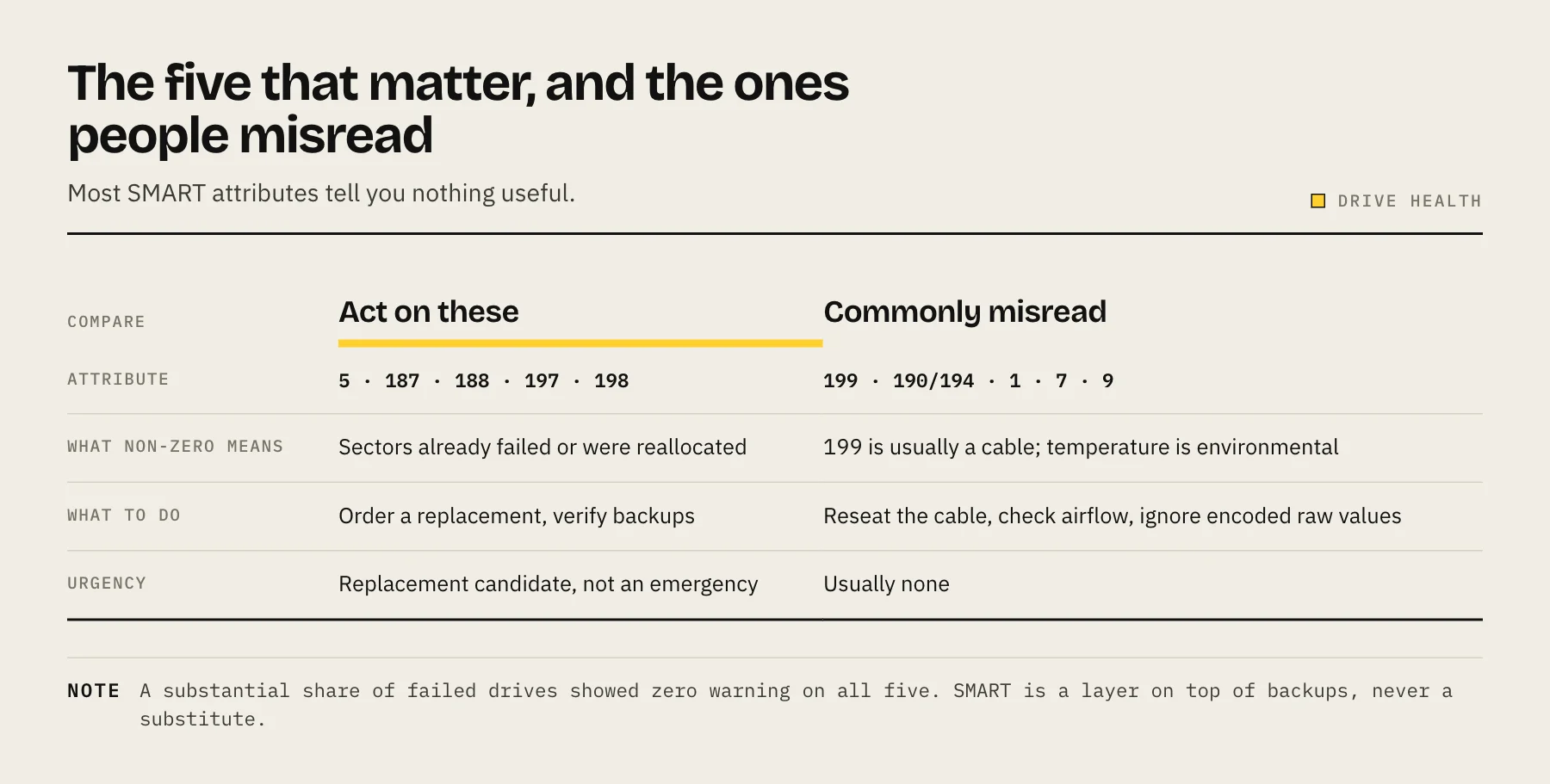
Most SMART attributes tell you nothing useful. Watch five: 5 (Reallocated Sectors), 187 (Reported Uncorrectable Errors), 188 (Command Timeout), 197 (Current Pending Sectors) and 198 (Offline Uncorrectable). Any non-zero value in those five means plan a replacement — but remember that most drives that die give no SMART warning at all.
SMART is a diagnostic system, not a prediction engine. It reports what has already gone wrong, which makes it excellent at confirming a drive is failing and mediocre at telling you one is about to. Understanding that boundary is what keeps you from either ignoring a dying disk or panicking over a harmless counter.
The five attributes that actually correlate with failure
Backblaze publishes failure statistics from a fleet of hundreds of thousands of drives, and their analysis consistently points at the same small set of attributes as being meaningfully associated with drive failure:
| ID | Name | What a non-zero value means |
|---|---|---|
| 5 | Reallocated Sectors Count | The drive found bad sectors and swapped in spares. The spare pool is finite. |
| 187 | Reported Uncorrectable Errors | Reads the drive's own ECC could not fix. Data was lost or recovered from redundancy. |
| 188 | Command Timeout | Operations that did not complete in time. Can also indicate cabling or power problems. |
| 197 | Current Pending Sector Count | Sectors that failed a read and are queued for reallocation on the next write. |
| 198 | Offline Uncorrectable | Sectors that could not be read even during background scans. |
Backblaze's rule is that a raw value above zero on any of these five is a reason to investigate, and a blunt version of that works well at home too: if any of these five is above zero, treat the drive as a replacement candidate. Not an emergency — a candidate. Order a replacement, verify your backups, and swap it on your schedule rather than the drive's.
Attributes people misread
199 — UDMA CRC Error Count. This is almost always a cable problem, not a drive problem. Errors occurred on the SATA link between the controller and the drive. Reseat the cable or replace it; the counter will not reset, but it should stop climbing. Replacing the disk usually fixes nothing.
190 / 194 — Temperature. Useful for environmental monitoring, not for failure prediction. Keep drives roughly in the 25–45 °C band. Sustained operation well above that shortens life, but a warm drive is not a failing drive.
9 — Power-On Hours and 4 / 12 — Start-Stop and Power Cycle counts. These describe wear exposure, not damage. A five-year-old drive with clean error counters is in better shape than a six-month-old drive with pending sectors.
1 — Raw Read Error Rate and 7 — Seek Error Rate. On Seagate drives especially, the raw values here are encoded and look alarmingly large by design. Read the normalized value against its threshold, or ignore these entirely.
The number that should temper your confidence
Backblaze's own analysis has repeatedly found that a substantial share of failed drives — historically in the region of a quarter — showed zero SMART warning on all five key attributes before failing. Controller boards, motors and firmware can fail outright with no gradual degradation to report.
This is the whole argument for redundancy and backups. SMART is a useful early-warning layer on top of those, never a substitute for them. If your recovery plan is "SMART will tell me," you do not have a recovery plan.
How to read SMART on your NAS
Synology DSM: Storage Manager → HDD/SSD → select the drive → Health Info. DSM surfaces a simplified health status plus the raw attribute table, and lets you schedule Quick and Extended tests.
QNAP QTS: Storage & Snapshots → Storage → Disks/VJBOD → Disk Health.
TrueNAS / Linux: smartctl -a /dev/sdX from the shell gives the full table. smartctl -t long /dev/sdX starts an extended self-test.
Unraid: the Main tab exposes per-disk SMART attributes and self-test controls directly.
Schedule the tests, or the data is stale
SMART attributes only update when the drive has a reason to notice a problem. A sector that has quietly gone bad in a region nothing has read for a year will not appear until something reads it.
Two habits fix that:
- Extended SMART self-test, monthly. It reads the entire surface. On a large modern drive this takes many hours — schedule it overnight. Stagger drives so they do not all run at once.
- Filesystem scrub, monthly or quarterly. A ZFS or Btrfs scrub verifies checksums against every block and repairs mismatches from redundancy. This catches silent corruption that SMART is structurally incapable of seeing, because the drive returned the data happily — it was just wrong.
Between these two, the extended self-test finds unreadable sectors and the scrub finds incorrectly readable ones. You want both.
What to do when a counter goes non-zero
- Do not start a rebuild yet. Confirm your backup is current and restorable first. A rebuild is the heaviest sustained read the array will ever see, and it is exactly when a second marginal drive tends to give up.
- Record the serial number, not the bay number. Bay labels and OS device names both drift.
- Watch whether it climbs. A single reallocated sector that never increases over a month is different from one that becomes forty. Both justify replacement eventually; only the second is urgent.
- Replace on your terms. Follow your platform's replace-and-resilver procedure rather than pulling the drive and improvising.
If the array is RAID 5 or single-parity, understand that you are running without redundancy for the entire rebuild window. Our RAID 5 vs RAID 6 vs SHR comparison covers why that window matters more as drives get larger.
FAQ
My NAS says the drive is "Healthy" but attribute 197 is 8. Who is right? Both. The vendor's health summary uses conservative thresholds designed to avoid false alarms. The raw attribute is the more sensitive signal. Trust the attribute.
Can I clear a pending sector count? Writing to the affected sector forces the drive to either rewrite it successfully or reallocate it. A full-surface write (a burn-in pass, or a rebuild) often clears pending sectors by converting them into reallocated ones. That is the counter moving from 197 to 5 — not the problem going away.
Do SSDs use the same attributes? No. The meaningful SSD attributes are wear-related — media wearout indicator, percentage lifetime used, and total host writes. See NAS SSD endurance: TBW and DWPD.
Should I run extended tests on every drive weekly? Monthly is enough for home use. Weekly full-surface reads add meaningful wear and heat for very little extra warning.
Sources
- What SMART Stats Tell Us About Hard Drives — Backblaze
- Hard Drive Data and Stats (Drive Stats dataset) — Backblaze
- smartmontools (official upstream repository) — smartmontools project