Buy a prebuilt NAS if you want a storage appliance that works, with mobile apps, an app store and someone to call. Build your own with TrueNAS or Unraid if you want much more hardware for the money and full control, and you are willing to be your own support department. Neither is wrong — the question is whether you want a product or a project.
The hardware argument usually favours DIY. The software and support argument usually favours prebuilt. Most people who are unsure should buy prebuilt, because the thing that actually determines whether a NAS is useful is whether you keep maintaining it.
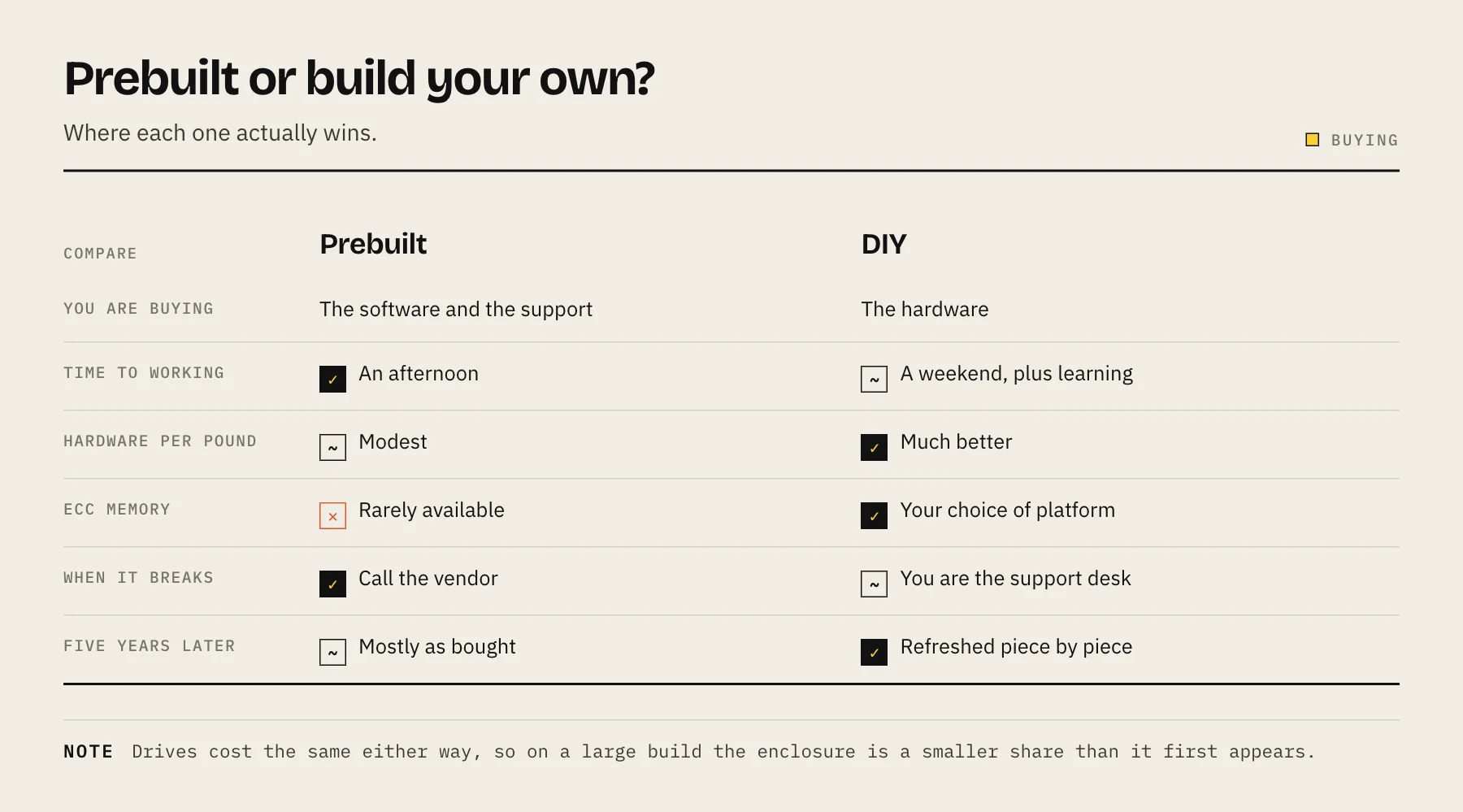
What you are really comparing
| Prebuilt | DIY | |
|---|---|---|
| Hardware per pound | Modest | Much better |
| Time to working | An afternoon | A weekend, plus learning |
| Operating system | Polished, vendor-supported | TrueNAS, Unraid — powerful, less hand-holding |
| Mobile apps | Mature, first-party | Third-party or web UI |
| Support | A vendor to call | Forums and yourself |
| Upgrades | Limited, sometimes soldered RAM | Anything the platform supports |
| Power draw | Usually very good | Depends entirely on your parts |
| Physical size | Compact | Usually larger |
The case for prebuilt
The software is the product. Synology DSM in particular is the reason people pay the premium — a coherent OS with backup tools, snapshot management, photo and file apps, a package centre and a genuinely good mobile experience. Reproducing that stack yourself is possible and it is a lot of assembly.
It works on day one, and it keeps working with modest attention. Updates arrive as notifications, not as maintenance projects.
Small, quiet, power-efficient. Vendors optimise for a box that lives in a house. A DIY build can match this, but only if you choose parts carefully.
Support and warranty. One number to call, one company responsible.
Resale value is meaningfully better.
The costs: you pay more per terabyte of enclosure, RAM is often soldered or limited, vendor-branded upgrades carry a premium, and some vendors have introduced drive compatibility restrictions on certain models — check the current policy for the exact model you are buying before assuming any disk will work.
The case for DIY
Hardware value. The same money buys substantially more CPU, RAM and expansion. If you plan to run virtual machines, heavy container workloads or ML photo indexing, this gap is large.
ECC memory. For a machine whose entire job is storing data, error-correcting memory is a genuine benefit, and most consumer prebuilt units do not offer it. If you are choosing your own platform, choose one that supports it — see how much RAM a NAS needs.
No artificial limits. No drive compatibility lists, no feature tied to a subscription, no vendor deciding your model is end-of-life.
Upgradeability. Add drives, cards, network interfaces, more RAM. A five-year-old DIY box can be refreshed; a five-year-old appliance mostly cannot.
You learn how it works, which is either a benefit or a cost depending on what you want from the machine.
The costs: you specify, assemble and troubleshoot it. Getting idle power low takes deliberate part selection. The OS is excellent but assumes more of you.
TrueNAS or Unraid?
If you go DIY, this is the next decision.
TrueNAS is built on ZFS — checksums, self-healing, snapshots, replication, mature and rigorous. Its model prefers matched drives in vdevs, so expansion has historically meant adding a whole vdev at a time. RAIDZ expansion exists in OpenZFS now; check whether your release includes it before planning around it.
Unraid takes a different approach: drives hold whole files independently with one or two dedicated parity drives. You can mix drive sizes freely and add one disk at a time, and only the drives in use need to spin. The trade is no ZFS-style checksumming on the array by default and lower parallel throughput. It also has an excellent container and VM experience, and it is paid software.
See Proxmox vs TrueNAS vs Unraid for how these compare when virtualization is also on the list.
The costs people forget on both sides
Drives are the bigger expense, and they cost the same either way. On a build with meaningful capacity, the enclosure difference is a smaller share of the total than it first appears.
Electricity. An efficient prebuilt might idle around 20–30 W; a poorly chosen DIY build can idle three times that, permanently. Over five years that gap can exceed the hardware saving — run the numbers with the power cost calculator.
Your time. Not a cost if you enjoy it. A real cost if you do not.
Noise and placement. Consumer cases are larger and often less well damped than a purpose-built NAS chassis. See NAS noise, heat and placement.
A useful way to decide
Buy prebuilt if: you want it working this weekend, mobile apps matter, it lives somewhere visible, or the idea of diagnosing a boot failure sounds like a bad evening.
Build if: you want VMs or heavy containers, you care about ECC, you enjoy the process, or you need capacity that appliance pricing makes painful.
A third option many people land on: a modest prebuilt NAS for storage plus a cheap mini PC for applications. Storage stays boring and reliable; compute can be rebuilt at will without taking the family's files offline.
FAQ
Is DIY actually cheaper? For the enclosure, usually yes, and the gap widens with capacity and RAM. Once you include your time and possibly higher power draw, it narrows.
Can I run DSM on my own hardware? Unofficial ports exist. They are unsupported, break on updates, and are not a sensible foundation for your data.
Which is more reliable? Both are reliable when built and maintained properly. Prebuilt is more forgiving of inattention, which for most households is the deciding factor.
Can I move my drives from a prebuilt to a DIY box later? Sometimes — Synology's Btrfs-on-mdraid layout can often be imported on Linux — but treat it as a recovery path, not a migration plan. Copy the data properly instead. See migrating to a new NAS.
Sources
- Managing Pools — Extending a RAIDZ VDEV (TrueNAS 24.10) — TrueNAS Documentation Hub
- TrueNAS Electric Eel: First to Integrate OpenZFS 2.3 Features — TrueNAS (iXsystems)
- Array overview (parity, write modes, file systems) — Unraid Docs
- What is Synology Hybrid RAID (SHR)? — Synology Knowledge Center
- DiskStation DS925+ specifications (power consumption) — Synology