For smooth Jellyfin hardware transcoding you want an Intel chip with Quick Sync (an integrated GPU). In 2026 the easiest turnkey picks are UGreen's NASync boxes — the 2-bay DXP2800 (Intel N100) and the 4-bay DXP4800 Plus (Intel Pentium Gold 8505). If you're comfortable with a little setup, a cheap Intel N100/N150 mini-PC running your Jellyfin server is the best value of all. Avoid AMD-based Synology models — and note that Synology's newest units disable hardware transcoding entirely.
How we sourced this: built from manufacturer specs, independent reviews and current data — not paid placement. Where our guidance is based on published data rather than our own bench testing, we say so. See How we test. Some links may be affiliate links — see our disclosure.
The one spec that matters: Intel Quick Sync
Jellyfin only has to work hard when it transcodes — that is, when it re-encodes your video on the fly because a client can't play the original file, the bitrate is too high for the connection, or subtitles need to be burned in. If every device could direct-play, a Raspberry Pi would do. But the moment a 4K HEVC HDR file has to become 1080p H.264 for a phone or a smart TV, you need a hardware encoder, or the CPU melts trying to do it in software.
Intel's built-in hardware encoder is called Quick Sync Video (QSV), and it lives inside the integrated GPU on most Intel chips. It's the reason a modest, low-power Intel NAS can push several simultaneous 4K transcodes while barely warming up. Jellyfin's own hardware-selection guide ranks Intel iGPUs highly for transcoding and explicitly discourages AMD, citing "poor encoder quality and poor driver support." Intel iGPUs from 7th-gen Kaby Lake and Gemini Lake onward decode and encode 10-bit HEVC, and Jellyfin supports HDR-to-SDR tone-mapping on every Intel GPU with 10-bit HEVC decoding, which is exactly what you need for a modern 4K library.
Two practical rules follow from this:
- Buy Intel with an iGPU. Quick Sync is the whole game for a transcoding media server.
- Give it enough RAM. Jellyfin's docs recommend at least 8GB for a typical deployment; a single 4K transcode can eat a big chunk of a 4GB buffer.
If you're still deciding between media servers, see Jellyfin vs Plex. Ready to build? Our how to set up Jellyfin guide walks through the Docker install.
The picks
We haven't bench-tested every unit here ourselves; the guidance below is built from manufacturer specs, the Jellyfin project's own documentation, and independent reviews, which we cite in Sources. Prices move constantly, so we link retailers rather than quote figures that go stale.
| Pick | Unit | CPU / Quick Sync | Best for | Price |
|---|---|---|---|---|
| Best value (DIY) | Intel N100 / N150 mini-PC | N100 / N150 with Quick Sync (Xe media engine) | Cheapest path to smooth 4K transcoding | Check current pricing |
| Best 2-bay turnkey | UGreen NASync DXP2800 | Intel N100, Quick Sync ✅ | First real NAS + Jellyfin | Check current pricing |
| Best 4-bay | UGreen NASync DXP4800 Plus | Intel Pentium Gold 8505, Quick Sync ✅ | Bigger libraries, multiple streams | Check current pricing |
| Turnkey with app ecosystem | ASUSTOR Lockerstor / Flashstor (Intel models) | Intel with Quick Sync ✅ (check the exact model) | Users who want a polished NAS OS | Check current pricing |
| Older Intel Synology (used/existing) | DS224+ / DS423+ | Intel Celeron J4125, Quick Sync ✅ | Only if you already own one | Check current pricing |
Why the DIY mini-PC keeps winning. The Intel N100 is rated at a 6W TDP, and independent testing shows the N100's iGPU comfortably handling multiple concurrent 4K HEVC transcodes — reviewers report three or more 4K streams, and many more at 1080p. XDA built a capable 4K Quick Sync Jellyfin box for well under $200. You lose the tidy NAS chassis and drive bays, but you gain the best price-to-performance ratio in the whole category. Pair it with a separate NAS or a couple of drives, and you have a fantastic setup.
Why UGreen for a real NAS. UGreen's NASync line puts genuine Quick Sync silicon in a proper multi-bay enclosure. The DXP2800 uses the Intel N100 (the same well-liked chip as the DIY route) with 8GB DDR5 and 2.5GbE; the DXP4800 Plus steps up to the 12th-gen Pentium Gold 8505, 8GB DDR5, and 10GbE plus 2.5GbE networking. Both run Docker, which is how you'll deploy Jellyfin.
The AMD-Synology trap (and a newer Synology problem)
This is the mistake that sends people back to the return counter. Synology's Plus models have split into Intel and AMD lines, and the AMD ones cannot hardware-transcode.
- The AMD Ryzen models — DS925+, DS923+, DS725+ — use chips (Ryzen V1500B / R1600) with no integrated GPU. No iGPU means no hardware encoder. They're fine for storage and direct-play, but a single software 4K transcode will bring them to their knees. Do not buy one expecting a smooth Jellyfin transcoding experience.
- The Intel models in the 2025 refresh — DS225+, DS425+ — do use the Quick Sync-capable Celeron J4125. But there's a catch: on 2025-and-later models Synology quietly removed the kernel graphics driver that Plex, Jellyfin and Emby rely on, so hardware transcoding no longer works out of the box even where the CPU supports it. Community SSH workarounds exist, but that's not something we'd recommend most buyers depend on.
The older Intel units (DS224+, DS423+) still transcode via Quick Sync on current DSM, so an existing or used one is fine. But for a new purchase in 2026, Synology is no longer the obvious Jellyfin choice it once was. For the wider brand comparison, see Synology vs UGreen vs QNAP vs TrueNAS.
Decision guide
- You want the cheapest thing that transcodes 4K well → Intel N100/N150 mini-PC running Jellyfin in Docker. Add storage separately.
- You want a real NAS and Jellyfin in one box, 2 drives → UGreen DXP2800 (N100).
- Bigger library, more simultaneous streams, faster networking → UGreen DXP4800 Plus (Pentium 8505, 10GbE).
- You love a polished NAS app store → an Intel-based ASUSTOR (verify the model's CPU supports Quick Sync before buying).
- You already own a DS224+/DS423+ → keep it; it transcodes fine today.
- You were about to buy a DS925+/DS923+/DS725+ for Jellyfin → don't. No iGPU, no hardware transcoding.
Once you've picked drives, our RAID capacity calculator helps you plan usable space, and it's worth setting up cloud backup for your NAS before you fill it with an irreplaceable library. Building a Plex box instead? See best NAS for Plex.
FAQ
Do I actually need hardware transcoding for Jellyfin? Only if clients can't direct-play your files. If every device plays your formats natively over a fast local network, almost any NAS works. But burned-in subtitles, high-bitrate 4K over the internet, and older TVs all force transcoding — and that's when Quick Sync saves you.
Is an Intel N100 really enough for 4K? Yes, for most homes. Independent testing shows the N100's Quick Sync engine handling multiple concurrent 4K HEVC transcodes and many more 1080p streams. It only struggles if you throw a large number of simultaneous 4K tone-mapping jobs at it.
Why is AMD such a problem for transcoding? Two reasons. Synology's AMD chips have no iGPU at all, so there's no hardware encoder. And even where AMD GPUs exist, Jellyfin's own docs rate AMD's encoder quality and driver support as the weakest of the major options. Intel Quick Sync is simply the safer bet.
Can I use Jellyfin on any Synology? You can install it, but hardware transcoding depends on the model: older Intel units (DS224+/DS423+) do it, AMD units can't, and 2025+ models have the transcoding driver removed. Check the exact model before buying.
How much RAM should I get? Jellyfin recommends at least 8GB for a typical deployment. It's cheap insurance, and both UGreen boxes above ship with 8GB DDR5.
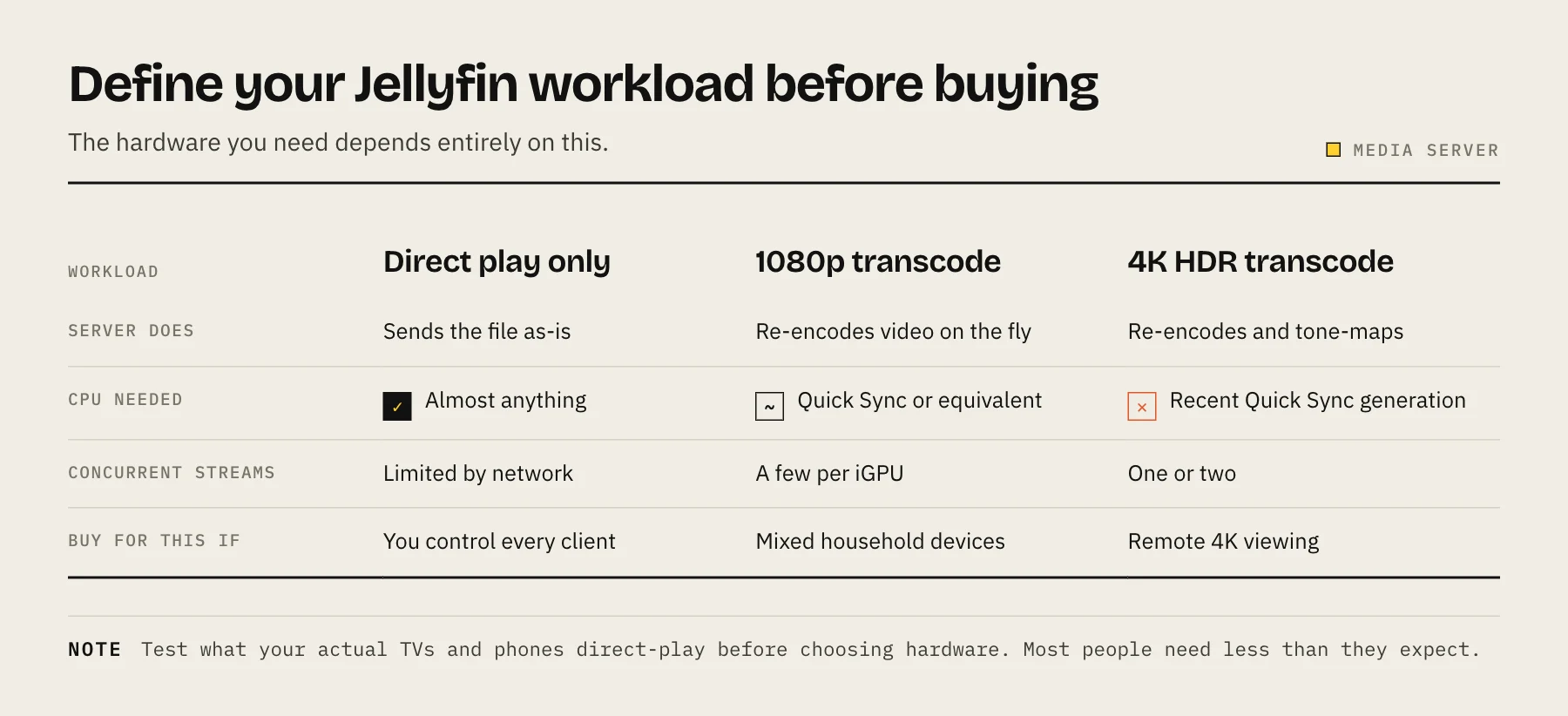
Define your Jellyfin workload before buying
List each client, its supported codecs, remote bandwidth and the maximum simultaneous streams. Direct play needs little CPU; subtitle burn-in, HDR tone mapping and codec conversion can trigger a full transcode. Jellyfin's official documentation supports several GPU families, so Intel Quick Sync is a practical default rather than the only possible solution. Test with your hardest real file before scaling a purchase recommendation.
Sources
- Hardware Selection — Jellyfin
- Intel GPU hardware acceleration — Jellyfin
- UGREEN NASync DXP2800 product page — UGREEN
- UGREEN NASync DXP4800 Plus product page — UGREEN
- What kind of CPU does my Synology storage system have? — Synology
- Intel Processor N100 product specifications — Intel