The best budget NAS under $500 in 2026 is a small x86 box with an Intel N100 (or Celeron J4125) CPU, because that's what gives you real Intel Quick Sync hardware transcoding for Plex or Jellyfin. The strongest picks are the UGreen NASync DXP2800 (Intel N100) and Synology's Intel-based DS225+/DS425+; a DIY Intel N100 mini-PC running TrueNAS or Unraid is often the cheapest route of all. Avoid cheap ARM or AMD boxes — they choke on transcoding.
How we sourced this: built from manufacturer specs, independent reviews and current data — not paid placement. Where our guidance is based on published data rather than our own bench testing, we say so. See How we test. Some links may be affiliate links — see our disclosure.
Don't buy a cheap NAS that can't transcode
This is the single trap that ruins more budget NAS purchases than any other. A NAS that stores files is easy; a NAS that can transcode video — re-encode a 4K stream down to 1080p on the fly so it plays smoothly on a phone, a smart TV, or over the internet — needs the right silicon. On a media server, that silicon is almost always Intel Quick Sync Video, the hardware encode/decode block baked into Intel's integrated GPUs.
Here's why the label on the box matters:
- ARM boxes (the cheapest tier). Entry Synology "j" models and many sub-$250 enclosures use Realtek ARM SoCs. Plex's NAS compatibility list counts hardware transcoding only on devices with Intel Quick Sync (or a supported external GPU), which these Realtek chips lack (Plex NAS compatibility list). They're fine for backups and file sharing and direct play, but ask them to transcode a 4K stream and they stall.
- AMD-based NAS units. This surprises people: Synology's AMD Ryzen models (DS923+, DS925+) have no Quick Sync and therefore no Plex hardware transcoding — they do direct play only (the DS925+ uses an AMD Ryzen V1500B with no integrated graphics — Synology DS925+ specifications). Spending more does not fix this; it's a wrong-CPU problem, not a budget problem.
- Intel boxes. An Intel N100 or Celeron J4125 with an integrated GPU has Quick Sync and handles 4K→1080p transcoding smoothly. That's the whole ballgame for a budget media NAS.
If you only serve files, any of the above works and you can buy on price alone. If Plex or Jellyfin is anywhere in your plans, buy Intel. Full stop. Our Best NAS for Jellyfin guide goes deeper on the transcoding side.
Budget picks under ~$500 (2026)
Prices move constantly on this category, so treat the figures below as reported at the time of writing — always check the live listing before you buy.
| Pick | CPU / transcoding | Bays & networking | Reported price* | Best for |
|---|---|---|---|---|
| UGreen NASync DXP2800 | Intel N100, Quick Sync ✅ | 2× SATA + 2× M.2, 2.5GbE, 4K HDMI | ~$350–$390 diskless | Best all-round value 2-bay |
| Synology DS225+ | Intel Celeron J4125, Quick Sync ✅ | 2-bay, 2.5GbE + 1GbE | ~$330–$340 diskless | Easiest software (DSM) |
| Synology DS425+ | Intel Celeron J4125, Quick Sync ✅ | 4-bay, 2.5GbE | ~$520 diskless | RAID 5 room to grow |
| DIY Intel N100 mini-PC + TrueNAS/Unraid | Intel N100, Quick Sync ✅ | 2–6 bays depending on chassis | Varies with chassis and RAM | Cheapest, most flexible |
*Prices were reported at the time of writing (UGREEN's own store listed the DXP2800 at $389.99) and change frequently — check current pricing before buying. None of these include hard drives.
A few honest notes on each, based on published specs and independent reviews rather than our own bench testing:
- UGreen DXP2800 — the current sweet spot. The Intel N100 comfortably outperforms the older Celeron J4125 in single-thread work, runs quiet, and brings Quick Sync for Plex/Jellyfin. It ships with 8GB DDR5 (expandable to 16GB), a single 2.5GbE port, and two M.2 SSD slots (UGREEN DXP2800 specifications).
- Synology DS225+ / DS425+ — you're paying a premium for DSM, Synology's genuinely excellent software. Both use the Intel Celeron J4125 with Quick Sync (Synology DS425+ specifications). One caveat worth knowing: Synology's 2025 lineup shipped with a controversial third-party-drive restriction, which the company walked back with DSM 7.3 for its 2025 models — but M.2 storage pools and cache still require drives on Synology's compatibility list (Synology DSM 7.3 announcement). Check the drive compatibility policy before you commit.
DIY vs prebuilt on a budget
The cheapest route to Quick Sync is often a DIY build around an Intel N100 mini-PC or mini-ITX board running TrueNAS, Unraid, or OpenMediaVault. The complete diskless cost varies widely with board, chassis, RAM and SATA expansion, so price the full parts list at the time you buy. The N100 is a low-power chip (Intel rates it at a 6W TDP) with Quick Sync for hardware transcoding; how many simultaneous 4K→1080p streams it sustains depends on codec, HDR tone mapping and client mix.
Choose DIY if you want the lowest cost per bay, hardware freedom (any drive, any brand), and you're comfortable configuring an OS yourself. Choose a prebuilt (UGreen/Synology) if you value a supported appliance, a polished mobile app, and a warranty on the whole unit — and you're willing to pay a bit more for that convenience.
For power draw, remember a NAS runs 24/7. Even a 15W difference adds up over a year — plug your numbers into our NAS power cost calculator before deciding.
How to keep costs down
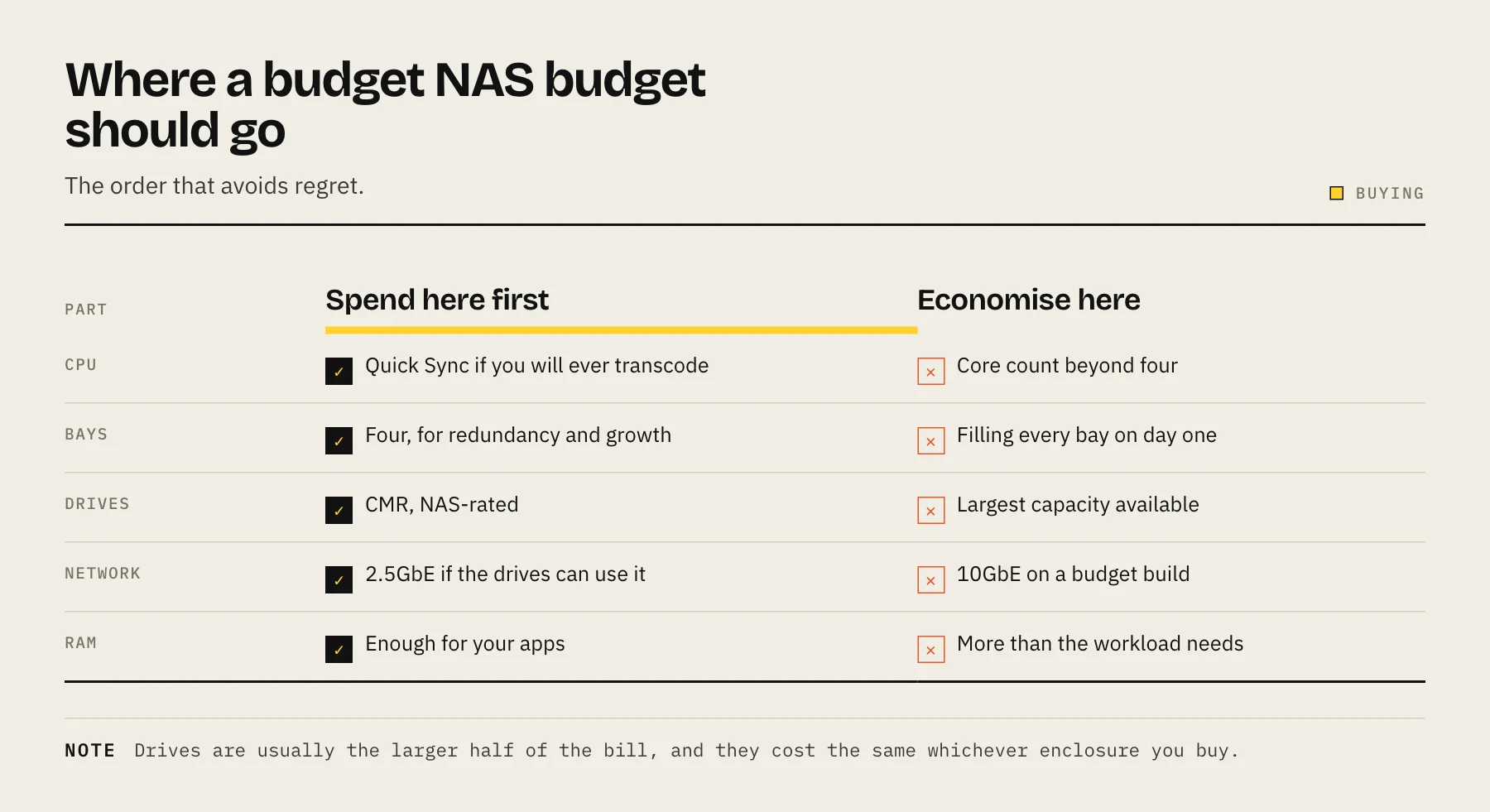
- The drives are now the expensive part. A pair of new NAS drives can cost as much as or more than the enclosure. Budget for storage first — see our best NAS hard drives guide, and think carefully about how many drive bays you actually need before buying a bigger box.
- Start with a 2-bay. For most homes, a 2-bay in RAID 1 (mirror) or JBOD is plenty. A 4-bay costs more up front and needs more drives to be useful.
- Buy the box now, add drives over time — but don't run without redundancy if the data matters.
- Watch sale events. Prime Day and similar events often bring discounts on current NAS hardware.
- Don't overspend on the CPU. For a home budget NAS, an N100 is enough; you only need an N305 or a discrete GPU if you're serving many simultaneous 4K transcodes.
FAQ
What's the single most important spec on a budget NAS? An Intel CPU with Quick Sync (N100 or Celeron J4125) if you plan to run Plex or Jellyfin. It's the difference between smooth transcoding and stuttering playback.
Can I get Quick Sync transcoding for under $500? Yes. The UGreen DXP2800 and the Synology DS225+ sit under $500 diskless, and a DIY N100 build can be cheaper still. Remember drives are extra.
Why avoid AMD and ARM NAS units for media? Neither has Intel Quick Sync. AMD Synology models do direct play only, and Realtek ARM chips aren't supported for Plex hardware transcoding — both stumble when a transcode is required.
Is DIY really cheaper than a prebuilt NAS? Usually yes on hardware, especially per bay, but you trade money for setup time and give up the appliance-style support and polished apps you get from UGreen or Synology.
Does the Intel N100 handle 4K? Yes — its Quick Sync engine handles 4K→1080p hardware transcoding. How many simultaneous streams it sustains depends on codec, HDR tone mapping and resolution.
Keep the $500 comparison honest
State whether the budget includes drives, RAM upgrades, shipping and backup media. A $300 diskless enclosure plus two suitable drives can exceed $500 immediately, while a DIY price can omit the case or SATA controller. Compare complete, usable systems at the same redundancy level rather than enclosure prices alone.
Sources
- UGREEN NASync DXP2800 product page and specifications — UGREEN
- DS225+ specifications — Synology
- DS425+ specifications — Synology
- Intel Processor N100 specifications — Intel
- Synology Releases DiskStation Manager 7.3 — Synology
- NAS compatibility list — Plex Support