If you want the most polished software and hand-holding and don't run a media server, Synology still leads — but read the drive-compatibility section first. If you want the most hardware for your money and Plex/Jellyfin transcoding, UGreen's x86 boxes are the value pick. Tinkerers and homelabbers who want data-integrity-first storage should build (or buy hardware for) TrueNAS with ZFS. QNAP sits in between with strong features, if you commit to keeping it patched and off the open internet.
How we sourced this: built from manufacturer specs, independent reviews and current data — not paid placement. Where our guidance is based on published data rather than our own bench testing, we say so. See How we test. Some links may be affiliate links — see our disclosure.
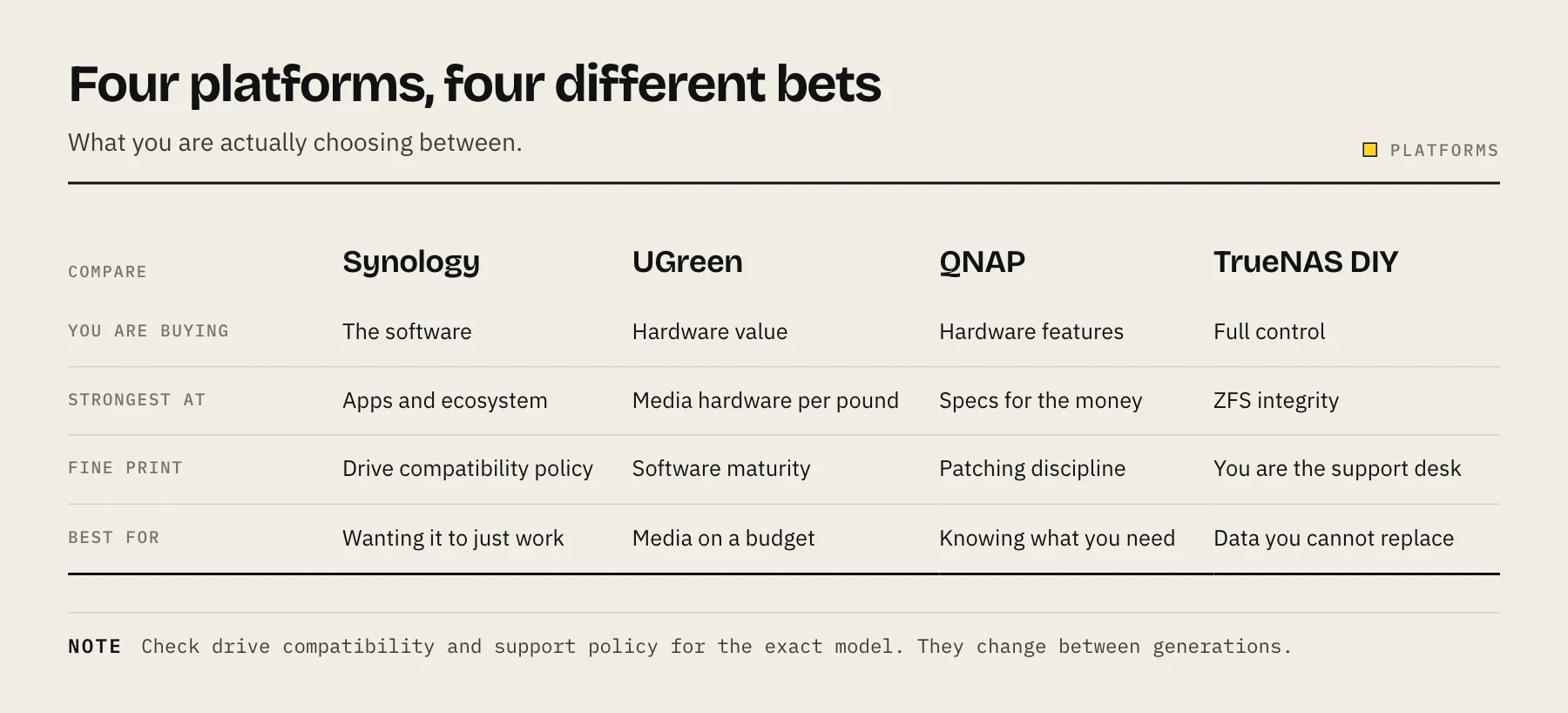
At a glance
| Synology | UGreen | QNAP | TrueNAS (DIY) | |
|---|---|---|---|---|
| Software | Most mature (DSM); best backup/photo apps | UGOS Pro — newer, improving fast | Feature-packed (QTS / QuTS hero) | ZFS-first; more manual |
| Hardware value | Weakest per dollar on 2025 models | Strongest — modern Intel x86 | Good | Best (you choose the parts) |
| Transcoding | Weak on 2025 models (see below) | Strong (Intel Quick Sync iGPU) | Strong on Intel models | Depends on your CPU/GPU |
| Drive rules | Restrictions on 2025 models (see below) | Any drive | Any drive | Any drive |
| Support / ecosystem | Largest, most beginner-friendly | Smaller but growing | Large | Community + optional paid |
| Price | Check current pricing (linked below) | Check current pricing | Check current pricing | Parts cost varies |
We haven't bench-tested every model here; hardware and transcoding claims below are drawn from manufacturer specs and independent reviews, cited in Sources.
Synology: still the software king, but read the fine print
Synology's DiskStation Manager (DSM) remains the most polished NAS operating system, and its backup (Active Backup for Business), sync (Synology Drive) and photo apps are genuinely excellent for non-technical users. That reputation is why it still tops many buying lists.
But two 2025 decisions changed the calculus, and you should understand both before buying a current-generation Synology.
1. The drive-compatibility restriction. With the 2025 Plus, Value and J-series models (for example the DS925+, DS1825+ and DS425+), Synology initially required Synology-branded or Synology-certified drives for full functionality. Reviewers reported that non-validated third-party HDDs and SSDs lost access to features such as storage-pool creation, drive health monitoring, deduplication and firmware updates (NAS Compares; ServeTheHome).
After significant backlash, Synology partly walked this back. With DSM 7.3 (released October 2025), 2025-model Plus, Value and J-series units can once again install and create storage pools with third-party 3.5" HDDs and 2.5" SATA SSDs from brands like WD and Seagate (Tom's Hardware; Born's Tech). The important caveat: M.2/NVMe storage pools and cache still require drives on Synology's official Hardware Compatibility List (Synology KB). So the situation is better than it was, but not fully open — and it only applies once you're on DSM 7.3. See our guide to the best NAS hard drives for drives that are widely reported to work.
2. Transcoding took a step backward on 2025 models. Synology's 2025 CPU split matters here:
- Intel Celeron J4125 models (DS225+, DS425+) have an iGPU that historically did Quick Sync hardware transcoding — but Synology removed the i915 graphics driver from DSM on the 2025 generation, disabling hardware transcoding for Plex, Jellyfin and Emby (NAS Compares; XDA).
- AMD Ryzen V1500B / R1600 models (DS925+, DS1525+, DS725+, DS1825+) have no integrated GPU at all, so there was never hardware transcoding to lose (Neowin; cpu-monkey).
Older Synology units (DS920+, DS423+, DS224+, etc.) keep their transcoding on DSM 7.3. If media serving is your goal, this steers you away from Synology's newest boxes — see Best NAS for Jellyfin.
Bottom line: Synology is still the safest pick for a non-technical household that mainly wants backups, file sync and photos and is happy on DSM 7.3 — just go in eyes-open on drives and transcoding. Check current pricing at Synology's store and your usual retailer.
UGreen: the value and media pick
UGreen's NASync DXP lineup is the story of the last two years. These are x86 Intel machines — for example the 2-bay DXP2800 on the Intel N100, and the DXP4800 Pro on a 13th-gen Intel Core i3 — with NVMe slots and modern DDR5 (Need to Know IT; iFeeltech). Because they use Intel chips with integrated graphics, they handle Quick Sync hardware transcoding well — a direct advantage over Synology's 2025 boxes for Plex/Jellyfin.
The software, UGOS Pro, is clearly Synology-inspired and covers the essentials: Docker, virtual machines, photos with search, snapshots, RAID, 2FA and remote access. It's maturing quickly but is younger and less battle-tested than DSM, and it doesn't offer ZFS (Need to Know IT).
The escape hatch is real leverage: because DXP hardware is standard x86 with UEFI and USB boot, you can install TrueNAS SCALE or Unraid on it if you outgrow UGOS — though UGREEN does not officially support third-party operating systems (check its current warranty terms first) and you'll need to sort out fan control and peripherals yourself (Need to Know IT). That optionality is why UGreen is our current value recommendation. Check current pricing on UGreen's site and major retailers.
QNAP: powerful, if you stay patched
QNAP packs the most features per dollar of the mainstream trio, and its high-end QuTS hero OS runs on ZFS, giving you ZFS snapshots, end-to-end checksums and self-healing (DSM offers comparable Btrfs checksums and snapshots; UGOS offers Btrfs snapshots) (QNAP). Intel-based QNAP models transcode well.
The honest caveat is security. QNAP has been a repeated ransomware target — DeadBolt, Qlocker, eCh0raix — with waves of attacks between 2019 and 2022 exploiting unpatched, internet-exposed devices (Bitdefender; The Record). The common thread was NAS units directly on the open internet running outdated firmware. QNAP does ship patches promptly, but that only helps if you apply them. If you buy QNAP: keep firmware current, never expose the admin interface to the internet, and reach it through a VPN. Do that and QNAP is a strong, capable choice; ignore it and you're a target. Check current pricing on QNAP's site.
TrueNAS: ZFS and DIY value
TrueNAS is the pick for people who care most about their data and don't mind doing more themselves. It's built on ZFS, so you get end-to-end checksums, copy-on-write snapshots and self-healing — the strongest data-integrity story of anything here.
As of 2026 the project has unified. The old CORE/SCALE split is gone: TrueNAS 25.04 "Fangtooth" merged them into a single Linux-based TrueNAS Community Edition, which is free and open source (TrueNAS blog; BetaNews). Recent releases moved app hosting to Docker (24.10) and added experimental LXC containers alongside KVM VMs (25.04), with a catalog of 100+ apps (TrueNAS docs). You run it on your own hardware — an old PC, a purpose-built box, or even a UGreen DXP — which is why it's the best raw value if you're comfortable assembling and maintaining it.
The trade-offs: no vendor hand-holding, ZFS wants a decent chunk of RAM, and you own the setup. If you're weighing this route, read Prebuilt NAS vs DIY TrueNAS and Proxmox vs TrueNAS vs Unraid.
Which should you buy?
- You want it to "just work," mostly for backups/photos/files: Synology on DSM 7.3 — accept the drive and transcoding caveats.
- You want a media server (Plex/Jellyfin) and the most hardware per dollar: UGreen DXP with its Intel iGPU.
- You want maximum data integrity and DIY value, and enjoy tinkering: TrueNAS with ZFS.
- You want the deepest feature set and will stay disciplined about updates: QNAP.
Still sizing things? See how many NAS drive bays you actually need, and don't forget an offsite copy — best cloud backup for NAS.
FAQ
Did Synology really block third-party hard drives in 2025? On 2025 Plus/Value/J models it restricted full functionality to validated drives, but DSM 7.3 (Oct 2025) restored third-party 3.5" HDDs and 2.5" SATA SSDs for storage pools. M.2/NVMe pools still require drives on Synology's compatibility list.
Can Synology's newest NAS do Plex/Jellyfin hardware transcoding? Generally no on the 2025 models. Intel J4125 units had their graphics driver removed, and the AMD-based units have no iGPU. Older Synology models keep transcoding.
Can I install TrueNAS or Unraid on a UGreen DXP? Yes — they're standard x86/UEFI machines that boot from USB. It isn't officially supported by UGREEN, so check the warranty terms first, and you'll manage fan control yourself, but it works.
Is QNAP safe to use? Yes, if you patch promptly and never expose it directly to the internet. Its past ransomware incidents mostly hit unpatched, internet-facing units.
Which is the best value? DIY TrueNAS for the technical; UGreen DXP for the best value in a prebuilt box.
Separate storage from application compute
A useful fifth option is a two-box design: choose the NAS for storage reliability and software, then run Plex, Jellyfin or virtual machines on a small Intel mini PC. This avoids rejecting a strong storage platform only because its CPU lacks the media engine you want. Compare the total power, support burden and backup path of both boxes before deciding.
Sources
- Drive compatibility policies FAQs for Synology storage systems starting from 2025 (DSM 7.3 and above) — Synology Knowledge Center
- Synology Releases DiskStation Manager 7.3 — Synology
- What kind of CPU does my Synology storage system have? — Synology Knowledge Center
- AMD Ryzen Embedded V1000 Series — AMD
- UGREEN NASync DXP4800 Pro — UGREEN
- Fangtooth Unifies the TrueNAS Community — TrueNAS