Separate NAS administrators, ordinary users and server devices; identify the NAS with a stable tag where appropriate; then allow only required ports from each group. Test both permitted and denied connections before removing your local recovery path.
Installing Tailscale solves private connectivity. Access policy solves who may connect to what. A flat tailnet where every phone, laptop and server can reach NAS administration trades public exposure for excessive internal trust.
Policy syntax evolves. Use this guide as a design method and validate the final JSON/HuJSON with Tailscale's current policy editor and tests.
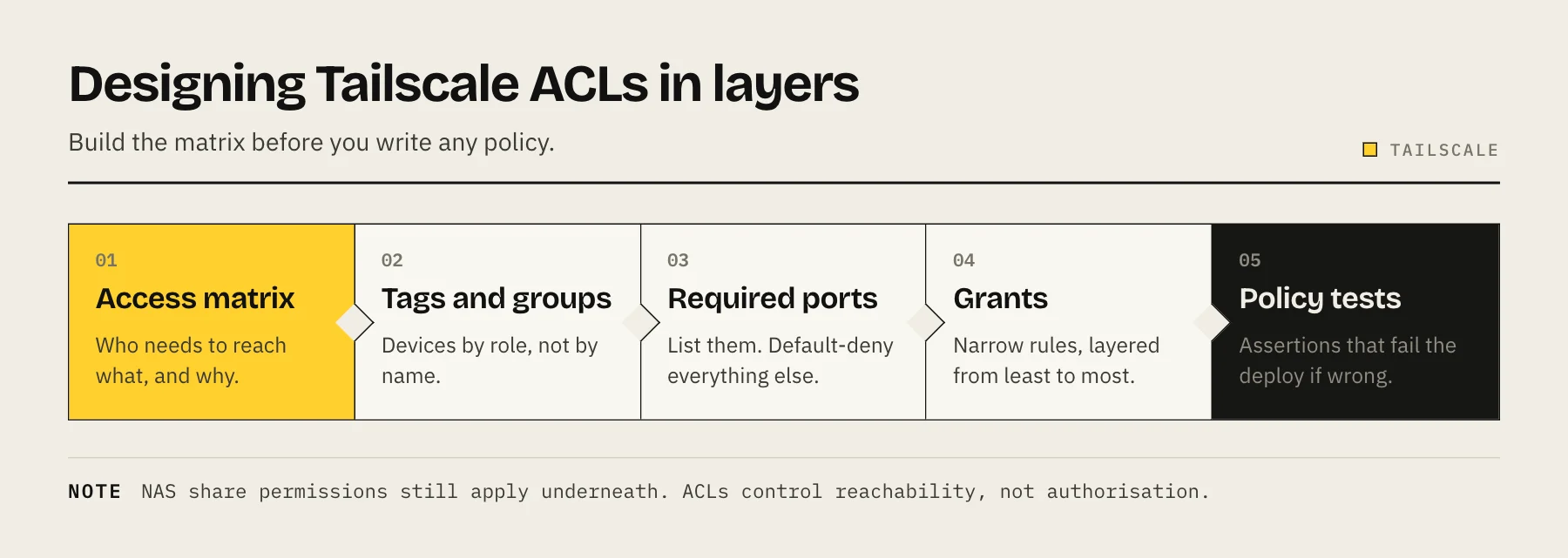
Build an access matrix first
| Identity | NAS admin | SMB/files | Jellyfin/app | Subnet routes |
|---|---|---|---|---|
| NAS administrators | Yes | Yes | Yes | As required |
| Family users | No | Selected | Yes | No |
| Backup server | No | Backup target only | No | No |
| Guest device | No | No | Selected shared app | No |
If you cannot explain a cell, default to no access. Network access complements NAS accounts; it does not replace share permissions.
Users, groups and tags
Users are human identities from the identity provider. Groups collect users such as administrators or family. Tags identify non-human devices/roles such as the NAS or backup server and can avoid tying infrastructure ownership to one employee account.
Tags are powerful. Restrict who may assign them; otherwise a user who can tag a laptop as a trusted server may bypass the policy's intent.
Identify required ports
Common examples include HTTPS administration, SMB, SSH and application-specific web ports. Do not copy a universal list: inspect which services are enabled on your NAS and bind them only where needed.
- Administration: only named admin devices/users.
- SMB: only devices that actually mount shares.
- SSH: a smaller admin subset, ideally key-based.
- Media/app ports: ordinary family devices where useful.
- Discovery/broadcast protocols: may not work like a local LAN; use explicit names/IPs.
Design policy in layers
- Define administrator and user groups.
- Define who may own infrastructure tags.
- Tag the NAS through the documented process.
- Allow admin group to management ports.
- Allow user group only to file/app ports.
- Add backup-server rules for the exact service/direction.
- Deny by omission.
- Add automated policy tests.
Tailscale recommends grants for all new policy files; legacy ACLs keep working but will not receive new features, although they remain common in older examples. Follow current documentation rather than mixing copied snippets from different generations.
Policy tests are part of the control
For every allow case, write a deny case:
- Admin laptop can reach NAS HTTPS.
- Family phone cannot reach NAS HTTPS.
- Family laptop can reach selected application.
- Guest device cannot reach SMB.
- Backup server can reach backup port but not SSH.
Run tests in the policy editor and then validate from real devices. A syntactically accepted policy can still represent the wrong intent.
NAS permissions still apply
Tailscale decides whether packets reach the service. The NAS decides whether the account can read, write or administer. Use named NAS users, MFA for administration and least-privilege share ACLs.
Do not grant a family user network access to SMB and then map everyone to one administrator account. That removes the attribution and containment the network policy was meant to create.
Subnet routers expand the boundary
When the NAS or another device advertises a LAN subnet, tailnet identities may reach devices that cannot run Tailscale. Approve only necessary routes and apply destination rules. Avoid advertising an entire home network when the requirement is one printer or service.
A dedicated subnet-router device may be easier to isolate and update than combining gateway and primary storage roles.
Device lifecycle
- Remove retired or lost devices immediately.
- Decide how key expiry works for headless servers.
- Review tag owners quarterly.
- Use device posture rules only when you can maintain them.
- Keep local LAN recovery for policy mistakes.
- Do not change the only remote-access policy during a critical offsite maintenance window.
Performance is separate from authorization
Policy does not make internet upload faster. A 40 Mbps home uplink caps remote reads near 5 MB/s before overhead. Use Tailscale diagnostics to determine whether a connection is direct or relayed before changing access rules.
Incident response
If a device is lost, expire/remove it from the tailnet and revoke its NAS sessions/credentials. If an identity-provider account is compromised, disable it there and review tailnet device authorization. Network revocation and application credential rotation are separate steps.
FAQ
Should every device be able to ping the NAS? No. Allow only needed services; ping is optional and platform behavior can differ.
Do ACLs replace the NAS firewall? No. Use both as layers, with rules documented consistently.
Can I share one NAS node with an external user? Tailscale supports node sharing, but consider whether sharing one application account is narrower and easier to revoke.
Should the NAS be an exit node? Only for a defined need. Exit-node traffic routing is unrelated to ordinary NAS access and increases responsibility.
Start with How to Set Up Tailscale for Secure Remote NAS Access, then apply this policy after connectivity works.
Rollout without locking yourself out
Start with a permissive rule only for a dedicated test group, then add explicit admin and user grants. Keep one local-network browser session open while applying changes. Test a second administrator device before removing the old rule. Save the previous policy text and a local NAS login recovery path.
Audit questions
Quarterly, list users who can modify policy, assign tags, administer the NAS, advertise routes and approve devices. These are different powers and should not accumulate silently in one broad group. Remove stale tag owners and shared devices; verify external collaborators still need access.
Service exposure inventory
Run the NAS vendor's service list or inspect listening ports from a trusted host. Map each listening port to an owner and policy rule. Disable unused services rather than relying only on network denial. This reduces both attack surface and confusion when a permitted connection unexpectedly reaches an old service.
Recovery scenario
Assume the identity provider account is locked while you are away. Can another authorized administrator remove a lost device, restore policy and reach the NAS? Keep recovery codes and local credentials outside the NAS. Least privilege should reduce compromise impact without creating a single identity that can permanently lock out the owner.
Keep policy readable
Prefer a small number of role-based groups over rules for every individual device. Add comments describing business intent, not obvious syntax, and keep names stable. Review broad wildcards and “any port” access first. When a temporary exception is required, give it an owner and expiry date. A short policy that administrators can test and explain is safer than an elaborate one copied from several examples. Export or version the policy outside the NAS so a mistaken edit can be compared and reversed from a trusted device.
Finally, test from mobile data and an ordinary user device—not only the administrator laptop that authored the policy. Real-device denial tests catch hidden ownership and group assumptions.
Sources
- Access control — Tailscale Docs
- Grants — Tailscale Docs
- Manage permissions using ACLs — Tailscale Docs
- Group devices with tags — Tailscale Docs
- Syntax reference for the tailnet policy file (tagOwners, tests) — Tailscale Docs
- Connect to network attached storage (NAS) — Tailscale Docs