For most home NAS builds, the best all-round choice is a NAS-rated NVMe drive like the WD Red SN700 — it has high endurance and a 5-year warranty, and it works as a cache, an SSD pool, or an all-flash volume. If you run ZFS with sync writes (a SLOG/ZIL), skip consumer drives and buy an enterprise SSD with power-loss protection. And be honest with yourself first: a lot of home NASes don't need an SSD cache at all — more RAM usually helps before any cache does.
How we sourced this: built from manufacturer specs, independent reviews and current data — not paid placement. Where our guidance is based on published data rather than our own bench testing, we say so. See How we test. Some links may be affiliate links — see our disclosure.
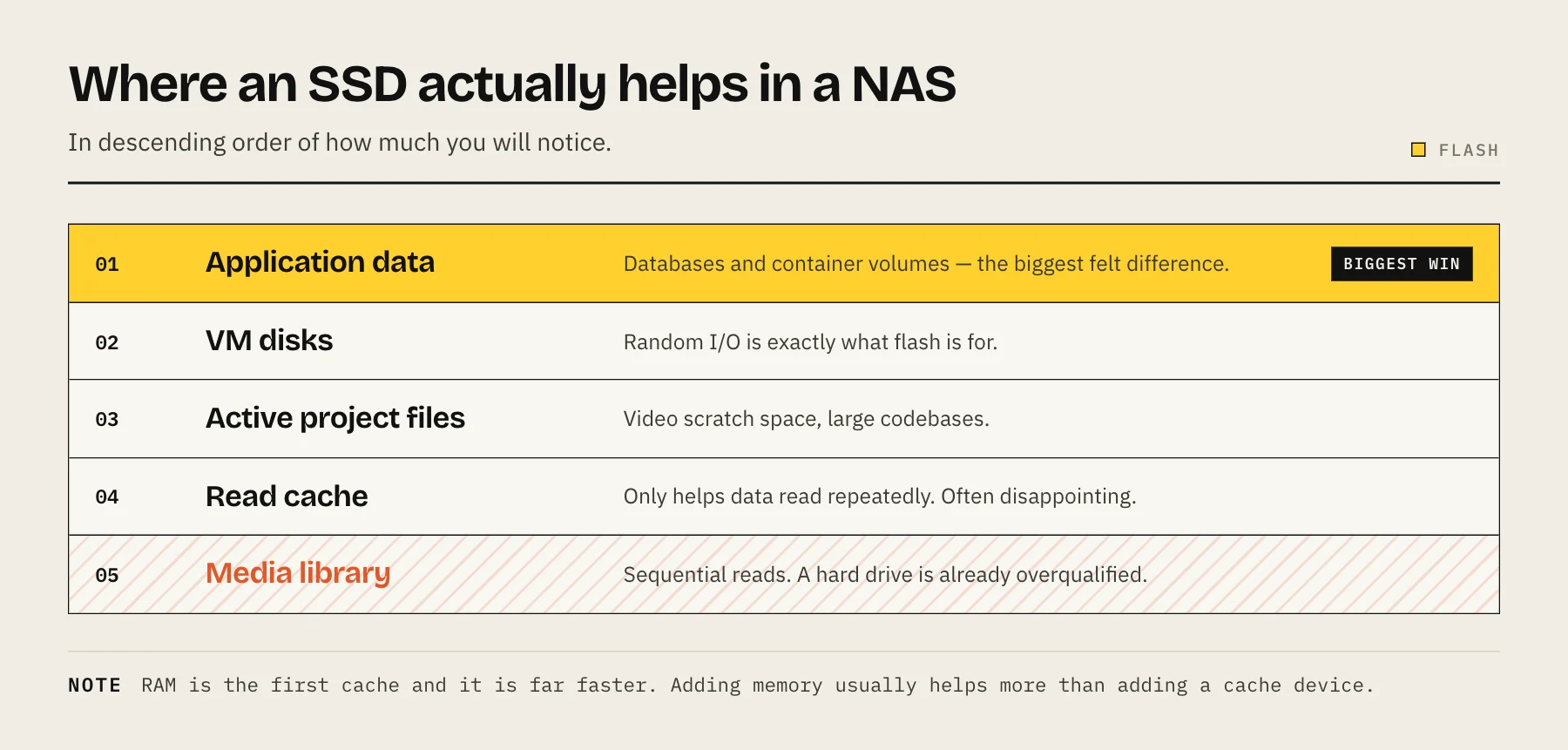
Where SSDs actually help in a NAS
There are three genuinely different jobs an SSD can do in a NAS, and they have different requirements:
- Cache (read and/or write). On Synology, QNAP and similar boxes, an SSD sits in front of your spinning disks and holds frequently accessed data. On ZFS (TrueNAS, Unraid) the equivalents are L2ARC (a read cache) and a SLOG/ZIL (a synchronous-write log). Caching only helps random access to repeatedly used data — think databases, VM datastores or a busy photo library. It does little for the sequential streaming that dominates most home setups (movies, backups, media).
- A dedicated SSD pool. A small all-SSD volume alongside your HDD pool — handy for VMs, containers, active project files or app databases that benefit from low latency.
- All-flash. The whole array is SSD. Fast and silent, but expensive per terabyte. Vendors like Synology, QNAP and Asustor ship dedicated all-flash chassis for this (ASUSTOR Flashstor, QNAP TBS-h574TX).
What to look for
Consumer gaming SSDs are optimised for burst speed, not the sustained, write-heavy life of a NAS. These four specs matter far more than headline sequential numbers:
| What to check | Why it matters | Rule of thumb |
|---|---|---|
| Endurance (TBW / DWPD) | NAS and especially cache workloads write constantly. TBW = total terabytes written over the warranty; DWPD = full drive writes per day. | Prefer NAS-rated drives with a high TBW rating; more for cache/SLOG. |
| DRAM cache | On-drive DRAM speeds up small random writes. But DRAM without power-loss protection can lose buffered data on an outage. | For a general pool, DRAM helps. For a ZFS SLOG, you specifically want PLP (see below). |
| Power-loss protection (PLP) | Capacitors flush in-flight data to NAND if power drops, preventing corruption (Kingston). | Essential for ZFS sync writes / SLOG; nice-to-have elsewhere. Almost always an enterprise feature. |
| Form factor | 2.5" SATA is universal and cheap; M.2 NVMe is far faster but limited by how many slots your NAS has. | Match to your bays. Cache slots are usually M.2; pools are often SATA. |
Recommended picks
We haven't bench-tested every drive below in a NAS ourselves — these picks are based on manufacturer specs and independent reviews, and we flag where that's the case. Prices move constantly, so check current pricing at the links rather than trusting any number.
NAS-rated NVMe — WD Red SN700. The default recommendation for home caching and SSD pools. It uses 96-layer TLC NAND, runs on PCIe Gen3 x4 in M.2 2280, is rated up to ~3,400/3,100 MB/s read/write, and carries a 5-year warranty (Tom's Hardware review; Sandisk/WD specs). Endurance is its selling point: WD rates it at roughly 2,000 TBW for the 1TB, 2,500 TBW for the 2TB and 5,100 TBW for the 4TB model — well above typical consumer drives (Tom's Hardware). Note it is not an enterprise PLP drive, so treat it as a cache/pool device rather than a sync-log SLOG. Check current pricing on Sandisk/WD and retail listings.
Endurance-focused consumer NVMe. For a general SSD pool where you want speed on a budget, high-endurance Gen4 DRAM drives such as the Crucial T500 and Kingston KC3000 are reasonable NAS choices (Crucial T500 specs). They are consumer drives without PLP — fine for pools, not for a ZFS SLOG.
ZFS SLOG / critical sync writes — enterprise SSD with PLP. This is the one place we're firm. A SLOG is only read after an unclean shutdown, so if a consumer drive loses its buffer during that outage, you can silently corrupt exactly the data the SLOG existed to protect (Tom's Hardware; TrueNAS forum). OpenZFS explicitly recommends drives whose PLP protects both internal metadata and flushed data, and notes SLOGs rarely use more than a few GB — so a small enterprise NVMe (Intel/Solidigm Optane historically, or a modern enterprise U.2/M.2 with capacitors) is the right tool, not a big consumer drive (OpenZFS Hardware docs).
Do you even need a cache?
Probably not, if you're a typical home user. Synology's own documentation is blunt: SSD cache benefits predominantly re-read, randomly accessed data, and its benefits are limited for large sequential reads and writes such as HD video streaming — which is what most home and small-office NASes mostly do (Synology).
Two rules of thumb, both backed by published guidance rather than our own testing:
- Max out RAM first. RAM cache is faster than any SSD, and OpenZFS's hardware guidance says far larger IOPS gains come from adding RAM for ARC (OpenZFS).
- Add a cache only for the right workload — VM datastores, container hosts, databases, or a heavily re-accessed photo library. Otherwise you're spending money and burning SSD endurance for little gain.
If you're still deciding between spinning disks and flash for the main array, see Hard drive vs SSD for NAS, and for capacity planning use the RAID capacity calculator.
FAQ
Can I use a normal gaming SSD in my NAS? Yes, for a pool or a light read cache — but it'll have lower endurance and no PLP. For anything write-heavy or a ZFS SLOG, choose a NAS-rated or enterprise drive.
Do I need power-loss protection? For a ZFS sync-write log (SLOG), yes — it prevents corruption on an unclean shutdown (OpenZFS). For a simple read cache or SSD pool, it's a nice-to-have, not a must.
SATA or M.2 NVMe? NVMe is much faster and is what most cache slots use; SATA is cheaper and universal for pools. Match the interface to your NAS's available bays and slots.
Is the WD Red SN700 good for TrueNAS? It's a strong cache/pool drive thanks to its high TBW and 5-year warranty (Tom's Hardware), but it lacks enterprise PLP, so don't use it as a SLOG for sync-critical pools.
Will a cache make my media streaming faster? Usually no — streaming is sequential, and caching helps random re-access. More RAM and a healthy HDD pool matter more (Synology).
Measure before adding flash
Capture latency, random IOPS, queue depth, ARC/RAM hit rate and network saturation during the slow workload. If the network is already the limit or the workload is sequential, an NVMe cache may not help. A dedicated SSD application pool is often easier to reason about and recover than an opaque write-back cache.
Sources
- WD Red SN700 NVMe SSD — specifications — Sandisk (Western Digital)
- WD Red SN700 SSD Review — Tom's Hardware
- Performance and Tuning: Hardware — OpenZFS
- SSD Cache (DSM 7) — Synology Knowledge Center
- FLASHSTOR 6 Gen2 (FS6806X) — ASUSTOR
- TBS-h574TX all-flash NASbook — QNAP