For Plex hardware transcoding in 2026, you want a NAS with an Intel CPU that has Quick Sync — that means UGreen's DXP line (Intel N100 / Pentium Gold), an Intel-based ASUSTOR or QNAP, or a DIY N100/N305 box. Avoid AMD-based Synology and, critically, the 2025-and-newer Synology models, which no longer ship the driver Plex needs to hardware-transcode. Note that hardware transcoding and remote streaming are now paid Plex Pass features — verify current pricing on Plex's site before you buy anything.
How we sourced this: built from manufacturer specs, independent reviews and current data — not paid placement. Where our guidance is based on published data rather than our own bench testing, we say so. See How we test. Some links may be affiliate links — see our disclosure.
Before you buy: the Plex Pass situation has changed
If you're planning a Plex server in 2026, the software economics matter as much as the hardware. Plex spent 2025 and 2026 moving features that used to be free behind a paywall.
Remote streaming is no longer free. Streaming your own personal media outside your home network now requires either an active Plex Pass on the server-owner account, or a Remote Watch Pass on the viewer's account. The Remote Watch Pass launched at an introductory $1.99/month or $19.99/year, per Plex's announcement; that introductory pricing ended on June 1, 2026, and the standard rate is $2.99/month or $29.99/year (check Plex's plans page for your region). This paywall rolled out in stages — mobile first in April 2025, then enforced more broadly through late 2025 and onto smart TVs and consoles into 2026.
Hardware transcoding also requires Plex Pass. Plex's hardware-accelerated streaming documentation states plainly: "Hardware-accelerated streaming is a premium feature and requires an active Plex Pass subscription." So the moment you buy a NAS specifically for Quick Sync transcoding, you're also committing to Plex Pass.
Plex Pass itself is priced at roughly $6.99/month or $69.99/year, with a lifetime option that rose from $249.99 to $749.99 on July 1, 2026, per Plex's announcement, which also added a 5-year Plex Pass at $249.99. Plex changes pricing and policy often, so treat every number here as "as of mid-2026" and check Plex's current pricing before purchasing. If you already hold a lifetime Plex Pass, you're grandfathered in.
This is exactly why Jellyfin has gained ground: it does hardware transcoding for free. If the paywall bothers you, read our Jellyfin vs Plex comparison before committing — the hardware advice below applies to both, because both lean on Intel Quick Sync.
Why Intel Quick Sync matters
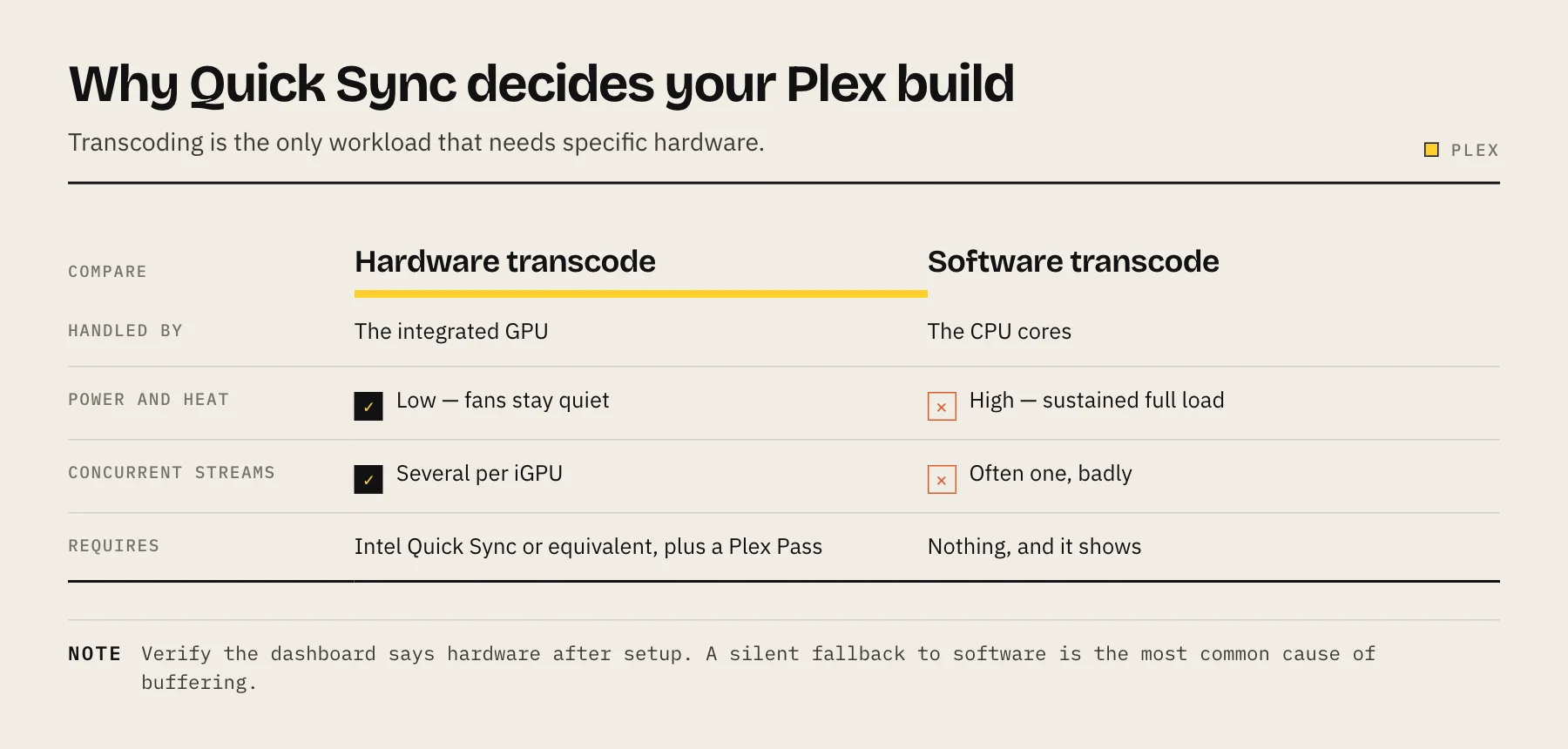
Transcoding is what happens when Plex has to convert your video on the fly — because a client can't play the original format, or bandwidth is limited. Doing that in software hammers the CPU and struggles with 4K. Doing it on Intel's built-in Quick Sync Video engine offloads the work to the iGPU, which is dramatically faster, cooler and more power-efficient.
Plex's documentation notes that Quick Sync is available in "all recent Intel Core (i3/i5/i7/i9) processors as well as some other Intel processors," recommends 5th-gen or newer, and requires a 7th-gen chip for HEVC encoding. In NAS terms, that points you at Intel-powered units — the low-power Alder Lake-N chips (N100, N305) and Intel's Pentium/Core-based boxes all carry a capable Quick Sync engine.
The picks (published-data guidance, not our own bench testing)
The table below is compiled from manufacturer specs and independent reviews, not first-hand testing in our lab. Stream counts are review estimates and vary heavily with bitrate, codec and client — treat them as ballpark.
| NAS | CPU | Quick Sync? | Best for | Notes |
|---|---|---|---|---|
| UGreen DXP2800 | Intel N100 (4-core Alder Lake-N) | Yes | Most people | 2-bay, 2.5GbE; strong value with modern silicon (review) |
| UGreen DXP4800 Plus | Intel Pentium Gold 8505 (12th-gen) | Yes | Power users, 4K | 4-bay, 10GbE + 2.5GbE, DDR5; handles multiple 4K→1080p transcodes (specs) |
| QNAP TS-464 | Intel N5095 | Yes | QNAP ecosystem fans | Mid-range Quick Sync; enable HW transcode in Plex |
| ASUSTOR AS5402T | Intel N5105 | Yes | Compact Intel option | Same class of Quick Sync engine as the TS-464 |
| DIY: N100 / i3-N305 mini-ITX | Intel N100 / N305 | Yes | Tinkerers, best $/stream | Run TrueNAS/Unraid; N305's 32-EU iGPU is a transcoding workhorse (Intel specs) |
Because pricing shifts constantly across retailers and regions, we don't quote hardware prices here — check current pricing at the linked manufacturer or a retailer before buying. For a broader vendor comparison, see Synology vs UGreen vs QNAP vs TrueNAS.
The Synology warning (read this before buying one for Plex)
Synology used to be the default Plex NAS. In 2026 it's a trap for transcoding, for two separate reasons:
- AMD models never had it. Synology's AMD Ryzen Plus units (e.g. the DS925+, using a Ryzen V1500B) have no integrated GPU at all, so Quick Sync isn't even on the table. Software transcoding on these is weak.
- The 2025+ Intel models had it removed. This is the important one. Per NAS Compares and owner reports on Plex's forum, Synology quietly pulled the kernel GPU driver that Plex, Jellyfin and Emby rely on. Starting with 2025 products, even when the CPU does have Quick Sync, DSM no longer ships the driver to enable it. So a 2025 DS225+ or DS425+ — despite an Intel chip — cannot hardware-transcode on stock DSM.
There are community workarounds to restore the driver, but they're unsupported and can break on updates. If Plex transcoding is your goal, the safest path is simply to buy a non-Synology Intel unit, or a DIY box.
Quick decision guide
- Want it to just work, minimal fuss? UGreen DXP2800 (N100) for most libraries; DXP4800 Plus if you push heavy 4K or many simultaneous streams.
- Already in the QNAP/ASUSTOR world? An Intel-based model (TS-464 / AS5402T class) gives you Quick Sync without switching ecosystems.
- Comfortable building and maintaining your own? A DIY N100 or i3-N305 mini-ITX build running TrueNAS gives the best transcoding-per-dollar and dodges the Synology driver problem entirely.
- Don't want to pay Plex's paywall? Run Jellyfin on the same Intel hardware — see Best NAS for Jellyfin.
Once you've chosen hardware, size your storage with the RAID capacity calculator, and protect your library with a proper 3-2-1 strategy — our best cloud backup for NAS guide covers the options.
FAQ
Do I still need Plex Pass in 2026? For hardware transcoding, yes — it's a Plex Pass feature. For remote streaming, you need Plex Pass or a Remote Watch Pass. Local, in-home direct play does not. Verify on Plex's plans page, as terms change.
Can a 2025 Synology transcode for Plex? Not on stock DSM. Synology removed the GPU driver on 2025-and-newer models, and its AMD units lack an iGPU entirely. Buy Intel from another vendor, or DIY.
Is the Intel N100 powerful enough for 4K Plex? For most single-stream and light multi-stream 4K-to-1080p transcoding, published reviews say yes. For many concurrent 4K streams, step up to a Pentium Gold or i3-N305.
Should I just use Jellyfin instead? If the paywall is your main objection, Jellyfin does hardware transcoding for free on the same Quick Sync hardware. See Jellyfin vs Plex.
Does the NAS brand matter for transcoding? Only insofar as it ships a working Quick Sync driver. UGreen, Intel QNAP/ASUSTOR and DIY Linux distros do; 2025+ Synology DSM does not.
Direct play first, transcoding second
Before buying for Plex, inventory the actual TV and mobile clients. If they direct play your codecs, a modest CPU may be enough; remote bandwidth limits, image-based subtitles and unsupported audio can force transcoding. Plex's official documentation confirms that hardware-accelerated streaming requires an active Plex Pass, so include that subscription or lifetime license in the total cost. The NAS compatibility sheet is a better model-specific check than CPU branding alone.
Sources
- Using Hardware-Accelerated Streaming — Plex Support
- Important 2025 Plex Updates (Plex Pass pricing, Remote Watch Pass, remote playback rollout) — Plex
- New Lifetime Plex Pass Pricing — Plex
- DS925+ specifications (AMD Ryzen V1500B) — Synology
- Synology DS425+ hardware transcoding issue — Plex Forum
- Intel Core i3-N305 specifications — Intel